
Web app · Navigation
Parkpin
Drop a pin when you park — then beat the meter on the way back
Save the spot with the garage level, a note and how long you paid for. Parkpin counts the meter down, warns you before it runs out, and points a compass arrow and a distance back at your car. Free, no install, no account.
Stored in your browser only. Nothing you do in the web version is sent to our servers. Clear your browser data and it's gone — so export a backup from the in-app menu if you want to keep it.
This app is a community proposal.
Try the full browser version now. We build the iPhone and Android app once 100 people upvote it.
We'll email you once, when it ships. Unsubscribe anytime.
In your browser
What you can do in Parkpin on the web
One-tap save with level and note
Grab your coordinates from the browser, add the garage level ("Level 3A"), a note ("near the elevator, blue pillar") and the street or garage name.
Meter countdown that ticks live
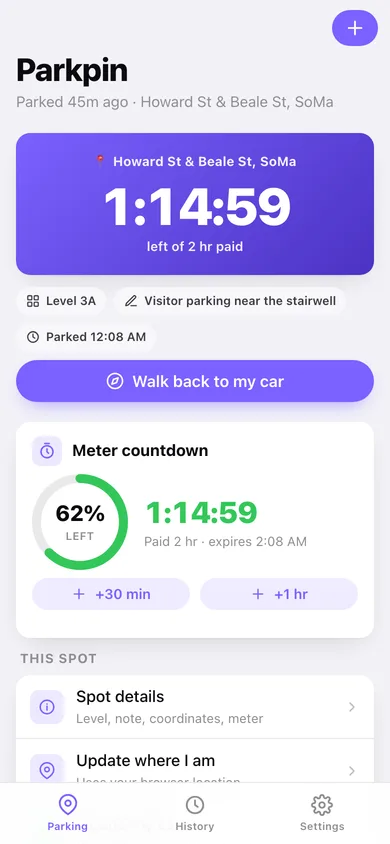
Pick 30 min, 1, 2, 3, 4 or 8 hours — or any 15-minute step up to a day. The home screen goes amber inside the last ten minutes and red when the time is up, and you can top up by 30 minutes or an hour.
Compass walk-back
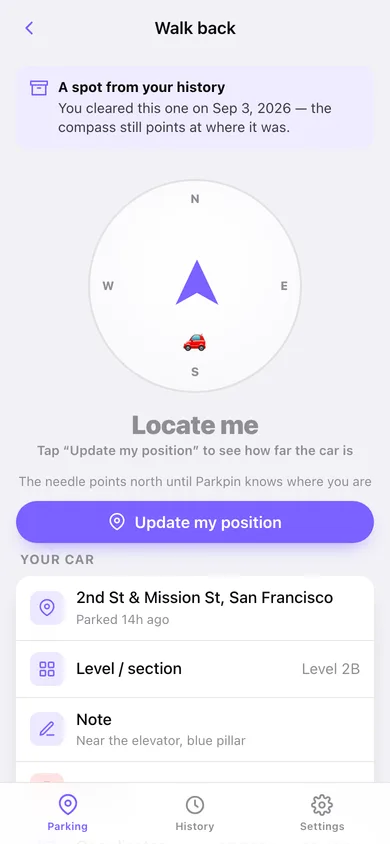
A compass rose with an arrow pointing at the car, the bearing in degrees, and the distance in feet or metres — it rotates with your phone when the browser reports a heading.
Searchable parking history
Every cleared spot is filed by month with its level, note, paid time and how long you actually stayed. Search by address, level or note, and park in a good spot again in one tap.
Did you beat the meter?
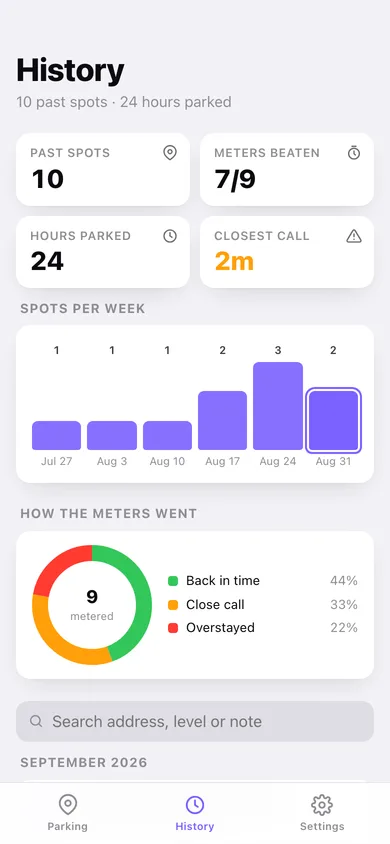
History counts meters beaten, overstays and your closest call in minutes, plus spots per week and a breakdown of back-in-time, close-call and overstayed returns.
Nothing leaves the browser
No account, no background tracking. Export the whole parking log as JSON or CSV whenever you want it elsewhere.
Screens
Every screen, rebuilt for the browser
-
1
Parked
The live meter countdown for the car you are parked in right now, the level and note, and the walk-back button.
-
2
Save spot
Coordinates, street or garage, level, note and the meter presets — the whole park-and-go form.
-
3
Spot detail
Everything about one spot: where it was, how long you stayed, and whether you got back before the meter died.
-
4
Walk back
Compass rose, bearing and distance back to the car, with the level and note you left yourself.
-
5
History
Meters beaten, hours parked, closest call, spots per week and every past spot grouped by month.
-
6
Settings
Warning window, default paid time, feet or metres, and export / sample / erase.
Try it with sample data: Loads ten past San Francisco parking spots from the last five weeks — garages, street meters, an SFO long-term level and two overstays — plus a car parked 45 minutes ago on a two-hour meter. You can start fresh at any time.
Ready? It's free.
No account, no install, no subscription. Everything you do stays in this browser.
Your say
What should Parkpin do? Tell us before we build it.
Tell us what to build next.
Comments need a free Google sign-in, so every one is from a real person.
Sign in with Google to commentNo comments yet — be the first to say what this app should do next.
Questions
Is the web version of Parkpin free?+
Yes. Every screen is free to use: no subscription, no in-app purchases, no account.
Do I need an account?+
No. Open Parkpin and start using it right away. Sign in with Google only if you want to upvote an app, save it to your list, or leave a comment.
Where is my data stored?+
Only in this browser's local storage. Nothing you enter is sent to our servers, so we can't see it, back it up, or restore it. Clearing site data, a private window, or another device starts empty. Export a backup from the in-app menu to keep it.
Is there a Parkpin app for iPhone or Android?+
Not yet. Parkpin is a community proposal: the browser version is complete, and we build the iPhone and Android app once 100 people upvote it. Upvoters get one email when it ships.