
Web app · Travel
Packlist
A packing list per person, per trip — in your browser, with no ads
Start from Beach week, Ski trip, Camping or Business overnight, give every traveler their own checklist, pull from a bundled 222-item catalog, and keep the flight, hotel and allergy notes in the trip dossier. Free, nothing to install.
Stored in your browser only. Nothing you do in the web version is sent to our servers. Clear your browser data and it's gone — so export a backup from the in-app menu if you want to keep it.
This app is a community proposal.
Try the full browser version now. We build the iPhone and Android app once 100 people upvote it.
We'll email you once, when it ships. Unsubscribe anytime.
In your browser
What you can do in Packlist on the web
Per-person checklists inside one trip
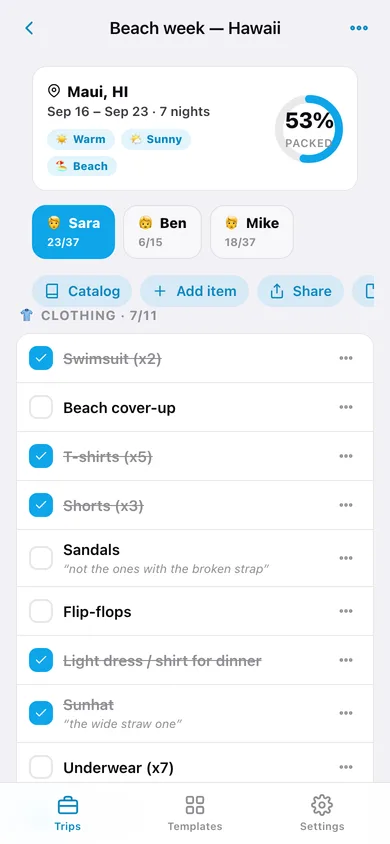
Add Sara, Ben and Mike to the same trip — each gets their own list, their own progress count and their own notes, so nobody forgets the kids' rain jackets.
Six reusable templates + a blank one
Beach week, Ski trip, Weekend city, Business overnight, Camping and Week abroad each seed a full adult list and a separate kid list; Custom starts empty.
Conditions instead of a weather API
Tag the destination cold, mild, warm, rainy, sunny, beach or snow. Templates pre-fill the conditions they imply — no network call, no weather bugs.
The whole 222-item catalog, offline
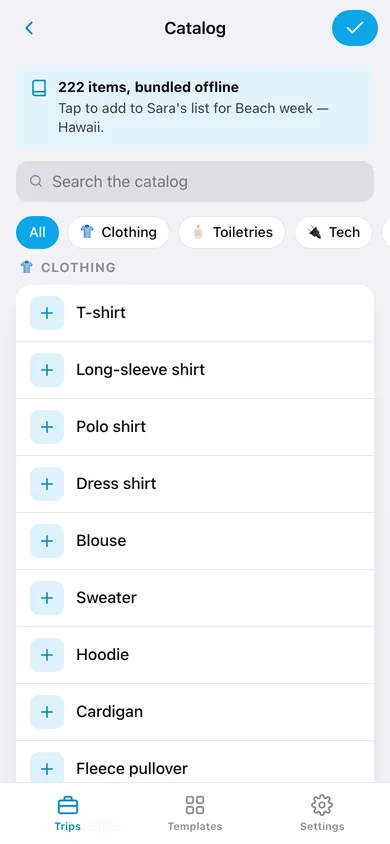
Clothing, Toiletries, Tech, Docs, Gear and Kids — search it, filter by category and tap any item onto the list you are filling.
Trip dossier
Flight numbers, hotel address, passport expiry and dietary or medical notes live with the trip instead of in six different apps.
Share a clean list
Turn any traveler's checklist into plain text with [x] marks and notes, then copy it, send it or download it as a .txt for the person doing the packing.
Screens
Every screen, rebuilt for the browser
-
1
Trips
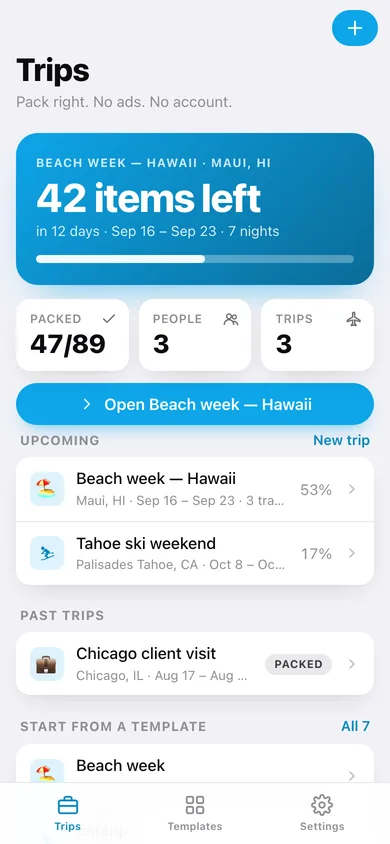
Countdown to the next trip, how many items are still out of the bag, and every upcoming and past trip.
-
2
Trip
Traveler tabs, a packed-progress ring and the checklist grouped by category with notes and swipe-free deletes.
-
3
New trip
Name, destination, dates, condition chips, template picker and the travelers who get a list.
-
4
Catalog
The bundled 222-item catalog with search and category filters, tapping items onto one traveler's list.
-
5
Trip dossier
Flights, hotel, passport expiry and dietary notes for one trip.
-
6
Share list
A plain-text version of one traveler's list to copy, send or download.
-
7
Templates
All seven templates with their adult and kid item counts, implied conditions and a one-tap start.
-
8
Settings
Hide packed items, group by category, default template, export, sample data and erase.
Try it with sample data: Loads three trips — a Hawaii beach week in twelve days with Sara, Ben and Mike part-packed, a Tahoe ski weekend barely started, and a finished Chicago client overnight — plus their dossiers and item notes. You can start fresh at any time.
Ready? It's free.
No account, no install, no subscription. Everything you do stays in this browser.
Your say
What should Packlist do? Tell us before we build it.
Tell us what to build next.
Comments need a free Google sign-in, so every one is from a real person.
Sign in with Google to commentNo comments yet — be the first to say what this app should do next.
Questions
Is the web version of Packlist free?+
Yes. Every screen is free to use: no subscription, no in-app purchases, no account.
Do I need an account?+
No. Open Packlist and start using it right away. Sign in with Google only if you want to upvote an app, save it to your list, or leave a comment.
Where is my data stored?+
Only in this browser's local storage. Nothing you enter is sent to our servers, so we can't see it, back it up, or restore it. Clearing site data, a private window, or another device starts empty. Export a backup from the in-app menu to keep it.
Is there a Packlist app for iPhone or Android?+
Not yet. Packlist is a community proposal: the browser version is complete, and we build the iPhone and Android app once 100 people upvote it. Upvoters get one email when it ships.