
Web app · Utilities
PackCycle
Every battery in your fleet, side by side — the view no charger gives you
Track cycles against each pack's retire threshold, log a whole field day across six packs in one save, watch which LiPos are sitting fully charged, chart internal resistance over time, and get a keep-watch-retire verdict with cost per cycle. Free, no install, no account.
Stored in your browser only. Nothing you do in the web version is sent to our servers. Clear your browser data and it's gone — so export a backup from the in-app menu if you want to keep it.
This app is a community proposal.
Try the full browser version now. We build the iPhone and Android app once 100 people upvote it.
We'll email you once, when it ships. Unsubscribe anytime.
In your browser
What you can do in PackCycle on the web
Fleet board
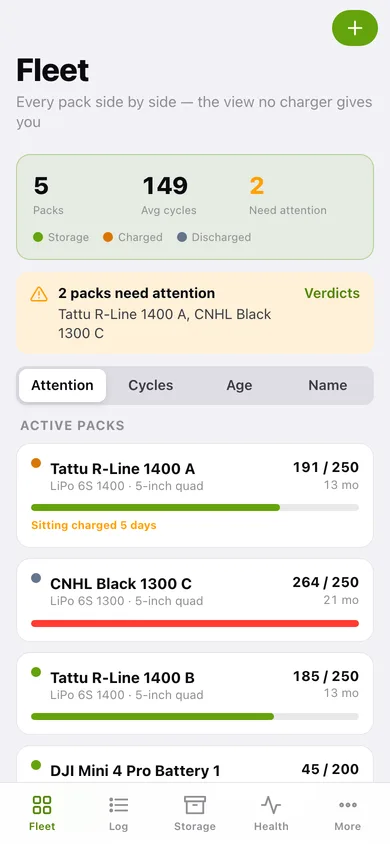
Every pack side by side with its cycle count against its threshold, age in months, chemistry, cell count, capacity and a charge-state dot — sorted by attention, cycles, age or name so the tired and over-charged packs surface first.
Two-tap batch session logging
Pick the packs you flew, set cycles per pack, save once. Every selected pack gets its cycles and its charge state flipped — a whole field day recorded in one go, the way the notebook never worked.
Storage watch
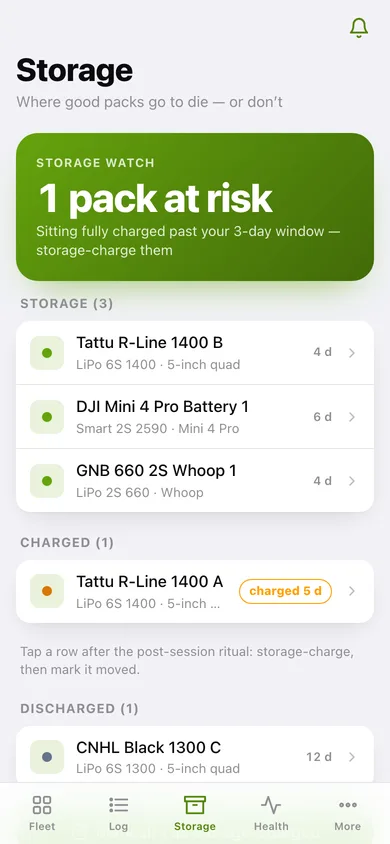
Packs grouped by charged, storage and discharged with days-in-state badges. Anything sitting fully charged past your grace window turns amber, and one button storage-charges the lot.
Internal-resistance trends
A home for the mΩ-per-cell numbers your charger shows and forgets: log readings per pack with the device that read them, see the trend line, and compare the latest IR across the fleet worst-first.
Retire-or-keep verdict
Every active pack scored Keep, Watch or Retire from cycles, age past 24 months and IR drift over 50%, with the reasons spelled out in your own numbers.
Cost per cycle and the 12-month bill
What each pack has cost per cycle to date, your fleet's cycles-per-month rate from the last 90 days, which packs cross their threshold within a year, and what replacing them will run.
Screens
Every screen, rebuilt for the browser
-
1
Fleet board
Packs, average cycles and how many need attention, then every pack with its cycle bar, age and charge-state dot.
-
2
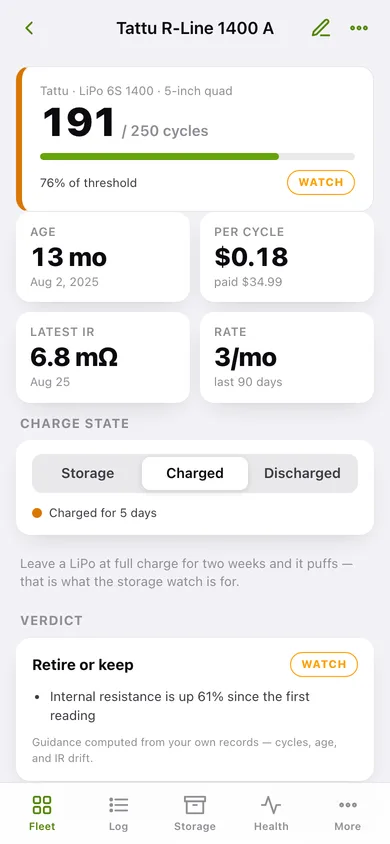
Pack detail
Cycles against threshold, age, cost per cycle and latest IR, charge-state control, the verdict with its reasons, the IR trend and the cycle history.
-
3
Add or edit a pack
Label, brand, model, chemistry, cells, capacity, purchase date and price, retire threshold, starting cycles and fleet group.
-
4
Sessions
Cycles in the last 30 days and every logged session grouped by day, with the packs it covered.
-
5
Log a session
Date, flight / charge / bench, multi-select pack chips with Select all, cycles per pack and a note — one save covers the whole fleet.
-
6
Storage watch
How many packs are sitting fully charged past your grace window, then every pack grouped by charge state with days-in-state badges.
-
7
Health trends
The highest IR in the fleet, a per-pack trend line with drift since the first reading, that pack's readings, and a worst-first fleet comparison.
-
8
Log an IR reading
Pack, date, mΩ per cell and which charger read it.
-
9
Retire or keep
Keep, Watch and Retire counts, then every active pack scored with its cycle bar and the reasons behind the verdict.
-
10
Cost & forecast
Fleet cost per cycle, cost per cycle per pack, and the packs crossing their threshold within 12 months at your current flying rate.
-
11
More
Retire math and cost shortcuts, default retire threshold, storage grace window, fleet groups, three CSV exports, sample data and erase.
Try it with sample data: Loads a five-pack mixed fleet — two Tattu R-Line 6S, a CNHL Black already past its threshold, a DJI Mini 4 Pro smart battery and a GNB whoop pack — with eight batch sessions over the last month and eight internal-resistance readings so the trends, verdicts and cost forecast all have something to say. You can start fresh at any time.
Ready? It's free.
No account, no install, no subscription. Everything you do stays in this browser.
Your say
What should PackCycle do? Tell us before we build it.
Tell us what to build next.
Comments need a free Google sign-in, so every one is from a real person.
Sign in with Google to commentNo comments yet — be the first to say what this app should do next.
Questions
Is the web version of PackCycle free?+
Yes. Every screen is free to use: no subscription, no in-app purchases, no account.
Do I need an account?+
No. Open PackCycle and start using it right away. Sign in with Google only if you want to upvote an app, save it to your list, or leave a comment.
Where is my data stored?+
Only in this browser's local storage. Nothing you enter is sent to our servers, so we can't see it, back it up, or restore it. Clearing site data, a private window, or another device starts empty. Export a backup from the in-app menu to keep it.
Is there a PackCycle app for iPhone or Android?+
Not yet. PackCycle is a community proposal: the browser version is complete, and we build the iPhone and Android app once 100 people upvote it. Upvoters get one email when it ships.