
Web app · Music
Overtone: Harmonic Singing
Watch the overtone you are singing climb the harmonic ladder
A live spectral waterfall names the exact partial you are isolating over a bundled drone, with hold-a-partial drills, a melody game on overtones 4–10, and saved takes you can export as an image. Free, and your voice never leaves the browser.
Stored in your browser only. Nothing you do in the web version is sent to our servers. Clear your browser data and it's gone — so export a backup from the in-app menu if you want to keep it.
This app is a community proposal.
Try the full browser version now. We build the iPhone and Android app once 100 people upvote it.
We'll email you once, when it ships. Unsubscribe anytime.
In your browser
What you can do in Overtone: Harmonic Singing on the web
Live harmonic waterfall
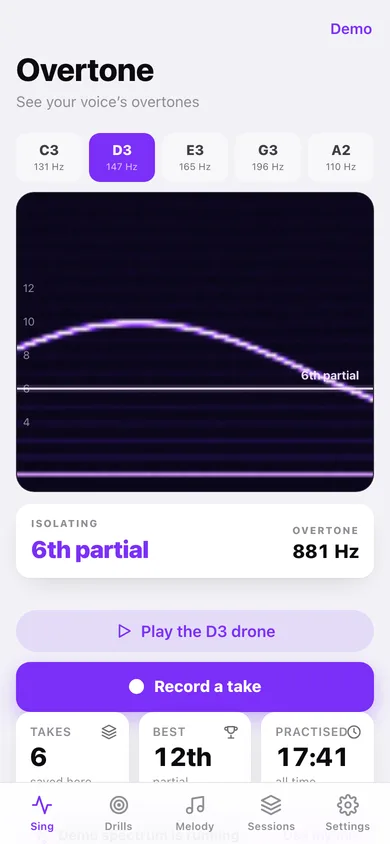
Time runs left to right, frequency bottom to top, and the partial you are isolating glows with a labelled crest line — the same violet colormap and 80-bin spectrum the iPhone app draws.
Live mic or bundled demo
Grant the microphone and every column is a real FFT of your voice computed in this tab; leave it off and a bundled sample spectrum sweeps partials 4→10 so you can learn to read the display in a silent room. A badge always says which.
Drone and hold drills
Play a C3, D3, E3, G3 or A2 drone from the browser's own oscillators and hold partials 4, 5, 6, 8, 10 or 12 until the meter fills — then it advances you to the next one.
Partial melody game
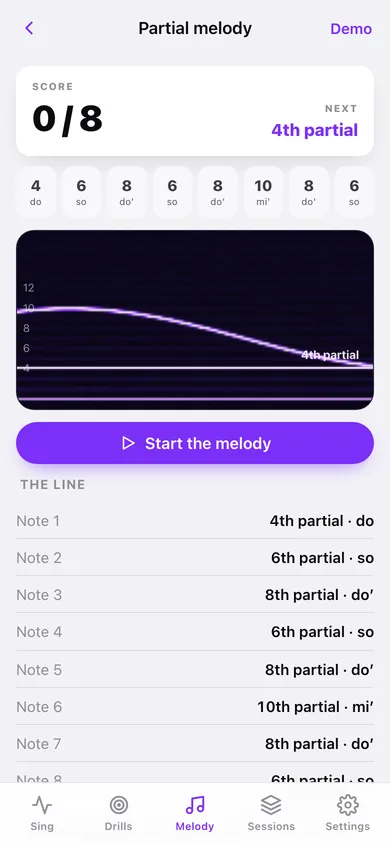
Hop your isolated overtone across 4–6–8–6–8–10–8–6 to play a tune on the harmonic series, scored note by note with solfège labels.
Sessions with real waterfalls
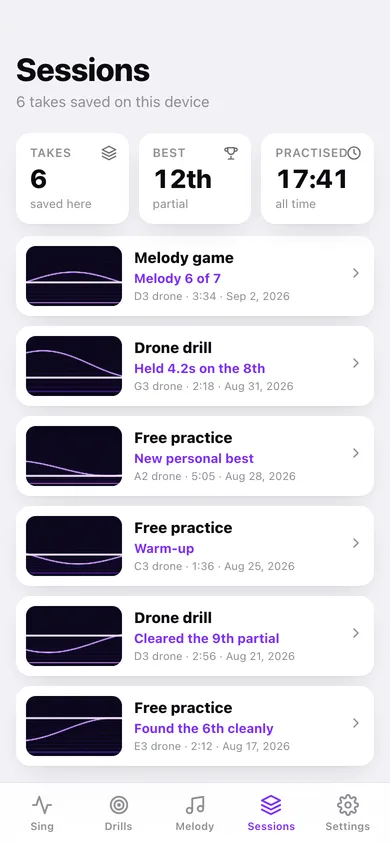
Every take, drill pass and finished melody saves with its drone, best partial, length and a redrawn waterfall thumbnail — plus a chart of your best partial over time.
Export the image
Save any session's waterfall as a PNG, or a CSV of every take. Nothing is uploaded; there is no account and no server.
Screens
Every screen, rebuilt for the browser
-
1
Sing
The drone picker, the live waterfall with the isolated partial labelled, the Hz readout and the record button.
-
2
Drone drills
Drone playback, the six target partials, the hold meter and a mini waterfall locked to the target.
-
3
Partial melody
Score, the eight-note line with solfège labels, and the waterfall highlighting the note you need next.
-
4
Sessions
Every saved take with its waterfall thumbnail, plus best partial over time.
-
5
Session
The full waterfall, the take's details, the harmonic ladder up to your best partial, and image export.
-
6
Settings
Base drone, microphone, drone playback, CSV export, sample sessions and erase.
Try it with sample data: Adds six practice takes from the last three weeks — a melody game, two drone drills and three free sessions across the C3, D3, E3, G3 and A2 drones — each with its own redrawn waterfall. You can start fresh at any time.
Ready? It's free.
No account, no install, no subscription. Everything you do stays in this browser.
Your say
What should Overtone: Harmonic Singing do? Tell us before we build it.
Tell us what to build next.
Comments need a free Google sign-in, so every one is from a real person.
Sign in with Google to commentNo comments yet — be the first to say what this app should do next.
Questions
Is the web version of Overtone: Harmonic Singing free?+
Yes. Every screen is free to use: no subscription, no in-app purchases, no account.
Do I need an account?+
No. Open Overtone: Harmonic Singing and start using it right away. Sign in with Google only if you want to upvote an app, save it to your list, or leave a comment.
Where is my data stored?+
Only in this browser's local storage. Nothing you enter is sent to our servers, so we can't see it, back it up, or restore it. Clearing site data, a private window, or another device starts empty. Export a backup from the in-app menu to keep it.
Is there a Overtone: Harmonic Singing app for iPhone or Android?+
Not yet. Overtone: Harmonic Singing is a community proposal: the browser version is complete, and we build the iPhone and Android app once 100 people upvote it. Upvoters get one email when it ships.