
Web app · Productivity
OnLoan Tracker
Remember who has your drill, your book and your casserole dish
Log a loan in seconds — item, borrower, category, an optional due date — and OnLoan pins the overdue ones to the top, writes the polite nudge for you, and keeps a history of everything that made it home. Free, no account, nothing leaves your browser.
Stored in your browser only. Nothing you do in the web version is sent to our servers. Clear your browser data and it's gone — so export a backup from the in-app menu if you want to keep it.
This app is a community proposal.
Try the full browser version now. We build the iPhone and Android app once 100 people upvote it.
We'll email you once, when it ships. Unsubscribe anytime.
In your browser
What you can do in OnLoan Tracker on the web
Overdue pinned to the top
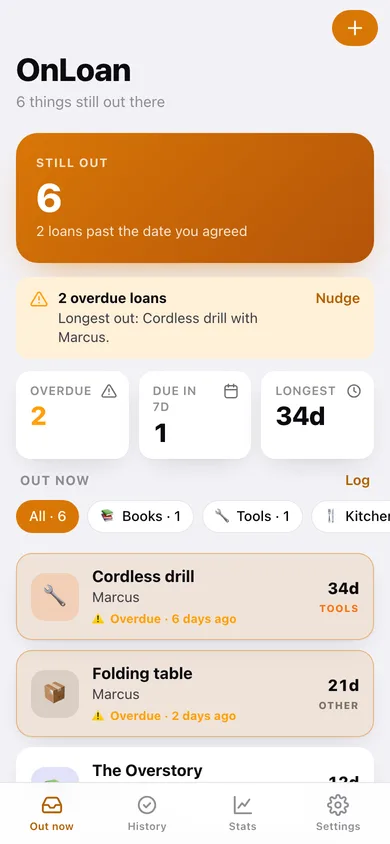
Active loans sort exactly the way the iPhone app does: anything past its date first in amber, then by due date, open-ended loans last.
The nudge, already written
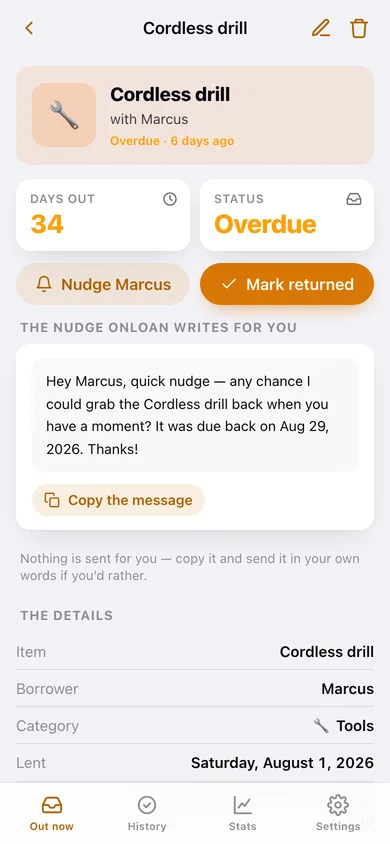
Every loan comes with a ready-made message that names the borrower, the item and the date it was due — copy it and send it in your own thread.
Seven categories with filters
Books, Tools, Kitchen, Tech, Money, Clothes and Other, each with its own badge, filterable from the out list and charted in Stats.
Lending history
Mark a loan returned and it moves to a searchable history grouped by month, with the number of days it was actually out.
Borrower stats
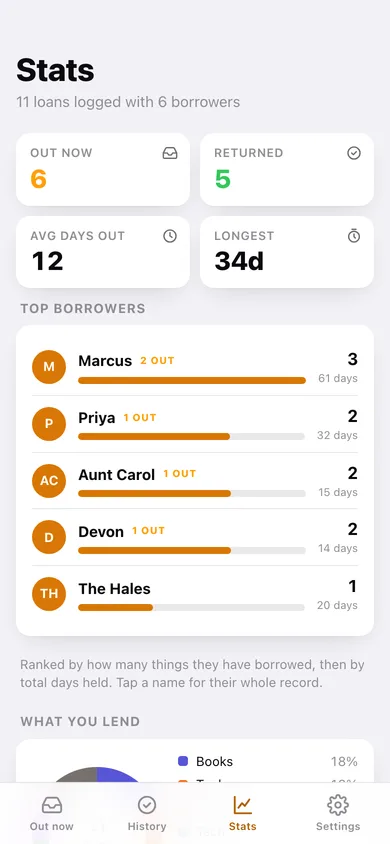
Top borrowers ranked by loans and total days held, average days held, the longest loan still out, and a per-person record you can open.
CSV and JSON export
Take the whole lending ledger with you — every loan with its dates, days held and status.
Screens
Every screen, rebuilt for the browser
-
1
Out now
How many things are out, what is overdue, and every active loan as a card.
-
2
Loan detail
Days held, the pre-written nudge, mark returned, and everything else this borrower has.
-
3
Log a loan
Item, borrower, category, lent date, optional due date and notes, with one-tap due-date shortcuts.
-
4
History
Everything returned, grouped by month and searchable by item or borrower.
-
5
Stats
Out now, returned, average days held, top borrowers and what you lend most.
-
6
Borrower
One person's whole record — what they still have and everything they have given back.
-
7
Settings
Default loan length, due-date suggestions, re-nudge interval, export, sample data and erase.
Try it with sample data: Loads eleven loans — an overdue cordless drill, a book due in three days, forty dollars, a folding table and six things already returned across the last three months. You can start fresh at any time.
Ready? It's free.
No account, no install, no subscription. Everything you do stays in this browser.
Your say
What should OnLoan Tracker do? Tell us before we build it.
Tell us what to build next.
Comments need a free Google sign-in, so every one is from a real person.
Sign in with Google to commentNo comments yet — be the first to say what this app should do next.
Questions
Is the web version of OnLoan Tracker free?+
Yes. Every screen is free to use: no subscription, no in-app purchases, no account.
Do I need an account?+
No. Open OnLoan Tracker and start using it right away. Sign in with Google only if you want to upvote an app, save it to your list, or leave a comment.
Where is my data stored?+
Only in this browser's local storage. Nothing you enter is sent to our servers, so we can't see it, back it up, or restore it. Clearing site data, a private window, or another device starts empty. Export a backup from the in-app menu to keep it.
Is there a OnLoan Tracker app for iPhone or Android?+
Not yet. OnLoan Tracker is a community proposal: the browser version is complete, and we build the iPhone and Android app once 100 people upvote it. Upvoters get one email when it ships.