
Web app · Health And Fitness
OffShot
Week 14 off, still held — the maintenance log for after your last shot
Anchor your last GLP-1 dose, set a hold band around the weight you're defending, and log a two-minute weekly check-in: weigh-in, 0-10 hunger, 0-10 food noise, habit ticks. The band chart turns maintenance into a streak, and restarts become chapters. Free, offline, no account.
Stored in your browser only. Nothing you do in the web version is sent to our servers. Clear your browser data and it's gone — so export a backup from the in-app menu if you want to keep it.
This app is a community proposal.
Try the full browser version now. We build the iPhone and Android app once 100 people upvote it.
We'll email you once, when it ships. Unsubscribe anytime.
In your browser
What you can do in OffShot on the web
Last-dose anchor and off-clock
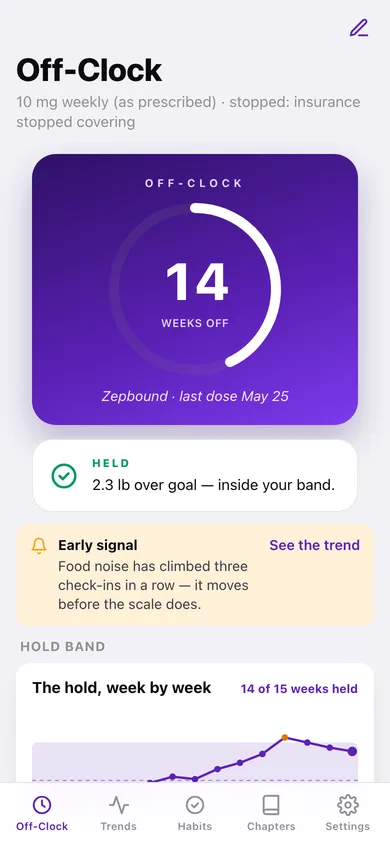
Record the medication, the final dose exactly as your prescriber wrote it and the date of that last shot. The home screen becomes a weeks-off clock with a ring that fills through the current week.
The hold band
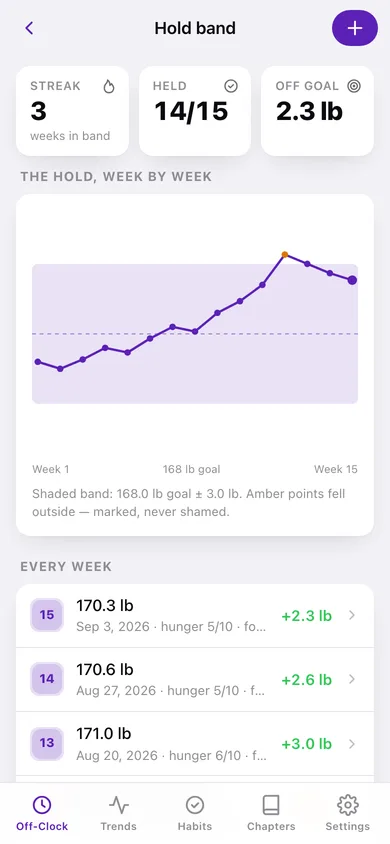
Pick a goal weight and a margin (± 1, 2, 3 or 5 lb). Every weigh-in inside goal ± margin counts as held; the band chart shades the zone, draws your line through it and marks the weeks that fell outside in amber — marked, never shamed.
Two-minute weekly check-in
Weigh-in with a live held/outside verdict, hunger and food noise on 0-10 sliders, a tick for each maintenance habit and an optional note about how the week felt.
Early warning before the scale moves
When hunger or food noise climbs for three check-ins in a row, a calm signal appears on the home screen and the trends tab — the same rule as the iPhone app, four ascending points.
Habit protocol with consistency
Protein 100g/day, strength 3x/week, weigh in every check-in, 7h+ sleep — each with the reason research links it to keeping the loss, and a per-habit percentage of weeks kept. Add your own.
Restart chapters and a report
Closing an off phase and opening a restart keeps every attempt's weights, scores and duration in a dated timeline, and the maintenance report exports every check-in as one file for your prescriber.
Screens
Every screen, rebuilt for the browser
-
1
Off-Clock
Weeks off, the held status, the early signal, the band chart and this week's check-in nudge.
-
2
Weekly check-in
Weigh-in with a live band verdict, the two 0-10 sliders, habit ticks and a note.
-
3
Hold band
The full band chart, current streak, weeks held, and every week you have logged.
-
4
Trends
Food-noise and hunger lines with the early-warning banner, and the same weeks against the band.
-
5
Habits
The maintenance protocol with per-habit consistency bars and weeks kept.
-
6
Held card
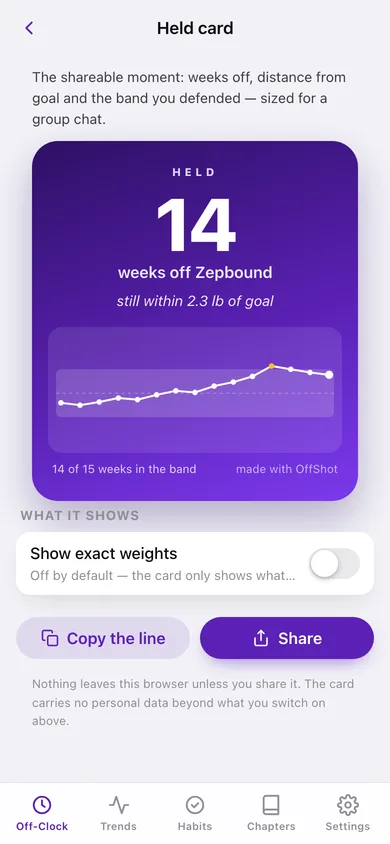
The shareable card: weeks off, distance from goal, weeks in the band.
-
7
Chapters
Every attempt as a dated chapter, with the transition into a restart or a new off phase.
-
8
One chapter
A chapter's weights, score ranges, habits kept and every check-in inside it.
-
9
Anchor
Medication, final dose as prescribed, last-dose date, why you stopped, units, goal and band margin.
-
10
Settings
Setup shortcuts, sharing privacy, maintenance report, JSON backup, sample data and erase.
Try it with sample data: Loads a Zepbound story anchored 14 weeks back — a closed on-drug chapter (214 lb → 166.8 lb), the current off phase, four habits, and 15 weekly check-ins where week 12 breaks the band and food noise ends on a three-week rise. You can start fresh at any time.
Ready? It's free.
No account, no install, no subscription. Everything you do stays in this browser.
Your say
What should OffShot do? Tell us before we build it.
Tell us what to build next.
Comments need a free Google sign-in, so every one is from a real person.
Sign in with Google to commentNo comments yet — be the first to say what this app should do next.
Questions
Is the web version of OffShot free?+
Yes. Every screen is free to use: no subscription, no in-app purchases, no account.
Do I need an account?+
No. Open OffShot and start using it right away. Sign in with Google only if you want to upvote an app, save it to your list, or leave a comment.
Where is my data stored?+
Only in this browser's local storage. Nothing you enter is sent to our servers, so we can't see it, back it up, or restore it. Clearing site data, a private window, or another device starts empty. Export a backup from the in-app menu to keep it.
Is there a OffShot app for iPhone or Android?+
Not yet. OffShot is a community proposal: the browser version is complete, and we build the iPhone and Android app once 100 people upvote it. Upvoters get one email when it ships.