
Web app · Productivity
Offergrade
Score the job offer, run the counter, and know your walk-line — in the browser
Enter base, bonus, sign-on and RSUs for every offer on the table. Offergrade normalizes them to four-year total comp, scores each against the 2026-Q1 public p25/p50/p75 bands, and writes three counter scripts you can copy. Free, nothing installed, nothing sent to your recruiter.
Stored in your browser only. Nothing you do in the web version is sent to our servers. Clear your browser data and it's gone — so export a backup from the in-app menu if you want to keep it.
This app is a community proposal.
Try the full browser version now. We build the iPhone and Android app once 100 people upvote it.
We'll email you once, when it ships. Unsubscribe anytime.
In your browser
What you can do in Offergrade on the web
Compare offers on one number
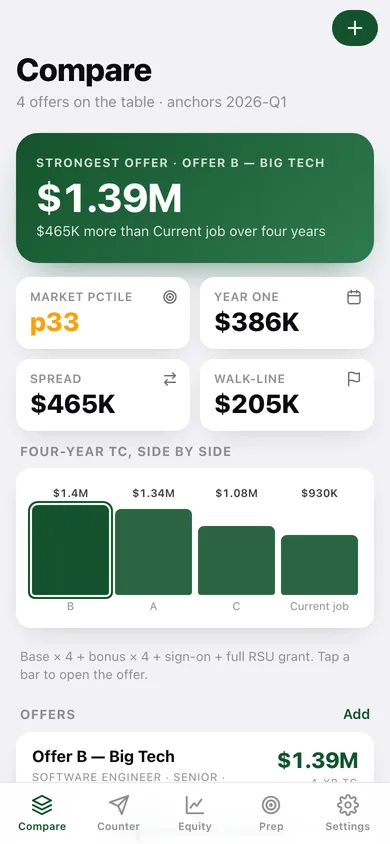
Every offer is normalized to four-year total comp — base × 4 + bonus × 4 + sign-on + the full RSU grant — and charted side by side against the offer you flag as your baseline.
Market band scoring
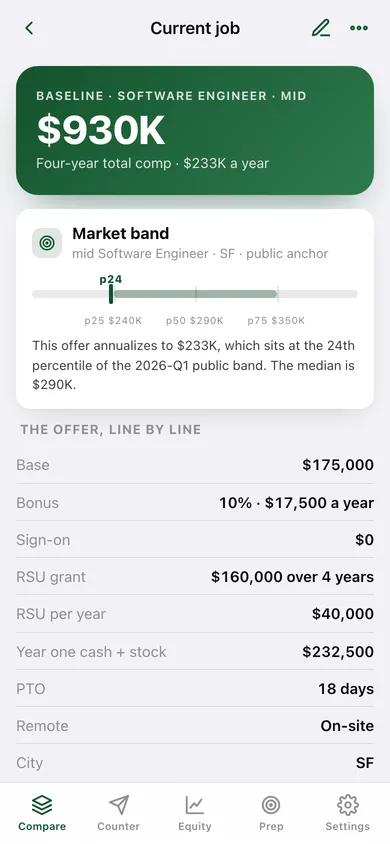
18 public 2026-Q1 total-comp bands across Software Engineer, PM, Designer, Data Scientist, ML Engineer and Engineering Manager in SF, NYC, Seattle, Austin, Remote-US and London, with your offer plotted on the p25–p75 band.
Three counter scripts
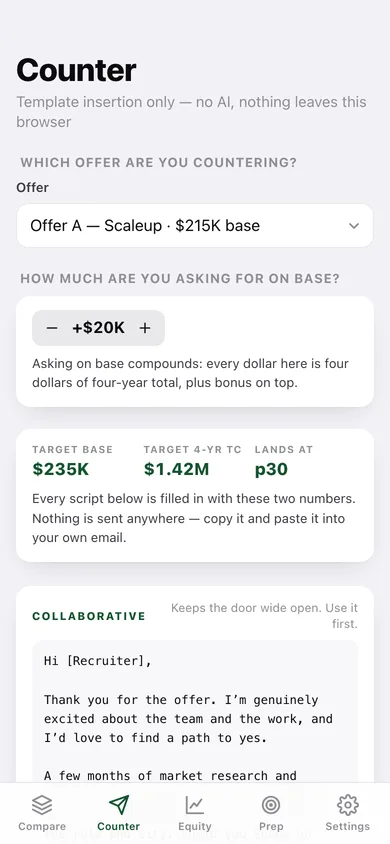
Collaborative, Firm and Walk-away drafts fill themselves in from your target base and four-year total. Template insertion only — no AI, and copy is the only thing that leaves the page.
Walk-away math
Set a walk-line base and a monthly burn: every offer then tells you what they still have to add, and how many months of runway the move actually buys over your baseline.
Equity quick-math
Grant shares at preferred versus common/409A price, dilution to exit, the cliff slice and a cumulative vesting ladder — so the headline equity number gets a floor.
The five-card prep sheet
BATNA, anchor, range, leverage and walk-line, written down before the call rather than improvised during it.
Screens
Every screen, rebuilt for the browser
-
1
Compare
Strongest offer, market percentile, spread and a four-year TC bar chart over every offer card.
-
2
Offer detail
The market band, the offer line by line, and the walk-away math versus your baseline.
-
3
Add or edit an offer
Label, role, level, city, base, bonus %, sign-on, RSU grant, vesting, PTO, remote and baseline flag.
-
4
Counter
Pick the offer, set the ask on base, and read the three scripts with a copy button on each.
-
5
Equity
Preferred versus common value, dilution, cliff shares and the cumulative vesting ladder.
-
6
Prep
The five negotiation cards — BATNA, anchor, range, leverage, walk-line — with your answers saved.
-
7
Market anchors
The full public band table by role, level and city, with the sources worth re-checking.
-
8
Settings
Walk-line base, monthly burn, estimated bands, CSV and JSON export, sample data and erase.
Try it with sample data: Loads four worked offers — a current job used as the baseline plus a scaleup, a big-tech and a remote startup offer — with a filled prep sheet and an equity grant to play with. You can start fresh at any time.
Ready? It's free.
No account, no install, no subscription. Everything you do stays in this browser.
Your say
What should Offergrade do? Tell us before we build it.
Tell us what to build next.
Comments need a free Google sign-in, so every one is from a real person.
Sign in with Google to commentNo comments yet — be the first to say what this app should do next.
Questions
Is the web version of Offergrade free?+
Yes. Every screen is free to use: no subscription, no in-app purchases, no account.
Do I need an account?+
No. Open Offergrade and start using it right away. Sign in with Google only if you want to upvote an app, save it to your list, or leave a comment.
Where is my data stored?+
Only in this browser's local storage. Nothing you enter is sent to our servers, so we can't see it, back it up, or restore it. Clearing site data, a private window, or another device starts empty. Export a backup from the in-app menu to keep it.
Is there a Offergrade app for iPhone or Android?+
Not yet. Offergrade is a community proposal: the browser version is complete, and we build the iPhone and Android app once 100 people upvote it. Upvoters get one email when it ships.