
Web app · Productivity
OathDay
Count every day to citizenship — presence, the 180-day line, your filing date
Log each trip outside the US once and OathDay does the naturalization day math: days physically present against 913 (or 548), your longest trip against the 180-day line, your earliest filing date, a simulator for a trip you haven't booked, and the travel-history table ready to transcribe. Free, private, no account.
Stored in your browser only. Nothing you do in the web version is sent to our servers. Clear your browser data and it's gone — so export a backup from the in-app menu if you want to keep it.
This app is a community proposal.
Try the full browser version now. We build the iPhone and Android app once 100 people upvote it.
We'll email you once, when it ships. Unsubscribe anytime.
In your browser
What you can do in OathDay on the web
The day math, done the way the rules count
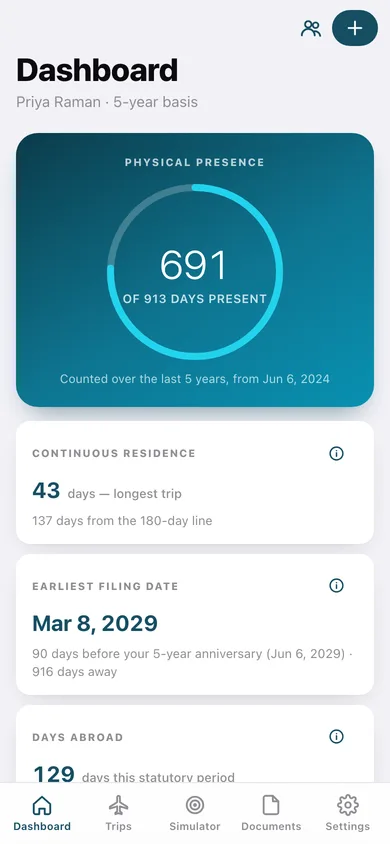
913 days of physical presence in five years, or 548 in three on the marriage basis, over a window clipped so it never starts before your resident-since date.
The 180-day line, watched
Every trip is measured against the continuous-residence line — amber from 150 days, red at 180 — on the dashboard, in the log and in the editor as you type the dates.
Earliest filing date, live
Ninety days before your green-card anniversary, recomputed from the basis you file on and shown with the days still to wait.
Trip simulator
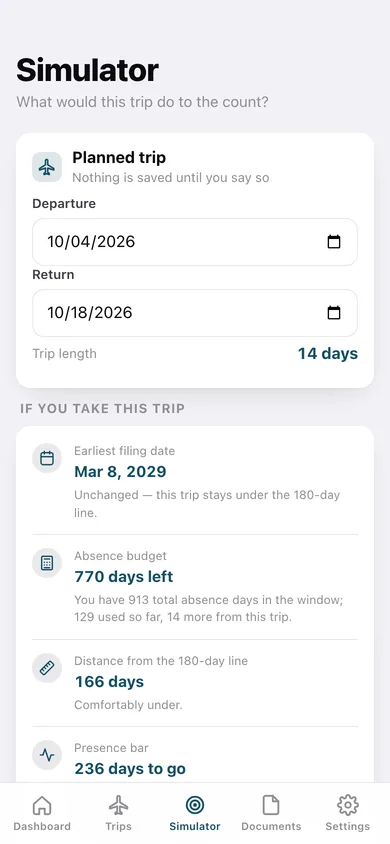
Enter a trip you haven't booked and see what it does to your absence budget, your presence count and — if it crosses 180 days — your filing date.
Travel-history table
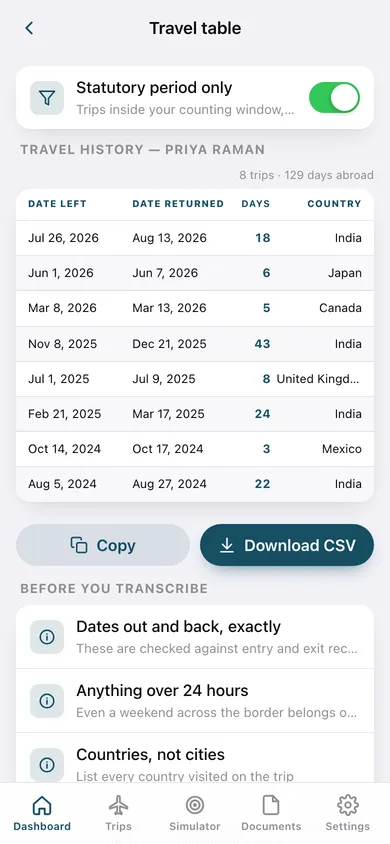
Date left, date returned, days out, country: the rows the application asks for, scoped to the statutory period, copyable into a spreadsheet or downloadable as CSV.
Expiry clocks and family profiles
Green card, passport and re-entry permit countdowns with renew-by dates, and one browser tracking every green-card holder in the household.
Screens
Every screen, rebuilt for the browser
-
1
Dashboard
The presence ring, longest-trip status against the 180-day line, earliest filing date, days abroad and the absence budget left.
-
2
Simulator
A trip you haven't taken, scored live: filing date, absence budget, distance from the 180-day line and presence after it.
-
3
Travel table
The formatted travel-history rows for the statutory period, with copy and CSV download.
-
4
Trip log
Every trip by year with days abroad, filtered to the window, the planned ones, or the ones near the line.
-
5
Trip
One trip: days abroad, whether it counts, your presence with and without it, and how close it came to 180 days.
-
6
Log a trip
Dates out and back, country from the bundled list, purpose, planned or taken, and a live day count with the line warnings.
-
7
Edit trip
Correct the dates, country or purpose — every count on the dashboard moves with it.
-
8
Documents
Green card, passport and re-entry permit clocks with days left, renew-by dates and elapsed bars.
-
9
How the days count
Physical presence, continuous residence, listing every trip and the 90-day window, plus the exact numbers OathDay uses.
-
10
Profiles
Every green-card holder in the household with their own basis, trips, documents and filing date.
-
11
Settings
Active profile summary, reading, CSV and JSON export, sample data and erase.
Try it with sample data: Loads two household profiles — one on the 5-year basis and one on the 3-year marriage basis — with thirteen trips over the last two years, a 43-day emergency trip, a planned December trip and five expiry clocks. You can start fresh at any time.
Ready? It's free.
No account, no install, no subscription. Everything you do stays in this browser.
Your say
What should OathDay do? Tell us before we build it.
Tell us what to build next.
Comments need a free Google sign-in, so every one is from a real person.
Sign in with Google to commentNo comments yet — be the first to say what this app should do next.
Questions
Is the web version of OathDay free?+
Yes. Every screen is free to use: no subscription, no in-app purchases, no account.
Do I need an account?+
No. Open OathDay and start using it right away. Sign in with Google only if you want to upvote an app, save it to your list, or leave a comment.
Where is my data stored?+
Only in this browser's local storage. Nothing you enter is sent to our servers, so we can't see it, back it up, or restore it. Clearing site data, a private window, or another device starts empty. Export a backup from the in-app menu to keep it.
Is there a OathDay app for iPhone or Android?+
Not yet. OathDay is a community proposal: the browser version is complete, and we build the iPhone and Android app once 100 people upvote it. Upvoters get one email when it ships.