
Web app · Health And Fitness
Nocta
Your anchor sleep window, coffee cutoff and light timing — for every shift
Put your shifts on the roster (or apply a nurse, firefighter, oil-rig, pilot or EMT rotation in one tap) and Nocta computes the day's circadian plan from published rules — a 4h anchor sleep block, an 8h caffeine cutoff, a bright-light window and optional melatonin. Free, offline, no account.
Stored in your browser only. Nothing you do in the web version is sent to our servers. Clear your browser data and it's gone — so export a backup from the in-app menu if you want to keep it.
This app is a community proposal.
Try the full browser version now. We build the iPhone and Android app once 100 people upvote it.
We'll email you once, when it ships. Unsubscribe anytime.
In your browser
What you can do in Nocta on the web
The deterministic circadian plan
Anchor sleep is a 4-hour core block ending 2h30 before a night shift; caffeine stops 8 hours before sleep starts; bright light runs 30 minutes after wake; melatonin, if you take it, lands 90 minutes before sleep. Same input, same output, every time — no AI.
Five rotation templates
Nurse 3-on / 4-off nights, the firefighter Kelly schedule, the oil-rig rotating fortnight, pilot duty days and EMT 4-on / 3-off. Pick a start date, repeat the cycle up to twelve times, then edit any day.
Tonight, at a glance
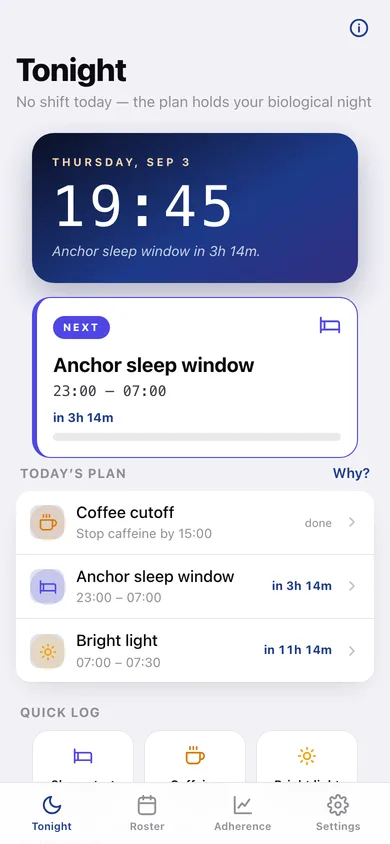
A live clock, the next milestone with a countdown ('Coffee cutoff in 4h'), the whole day's plan in order, and a week strip colour-coded by shift kind.
Why each window exists
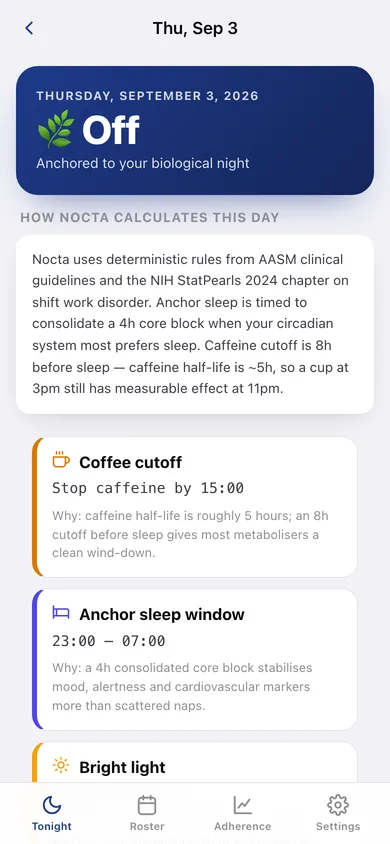
The day-detail screen shows every milestone with the reasoning behind it — caffeine's ~5h half-life, why a consolidated 4h block beats scattered naps, why 0.3–0.5 mg of melatonin is the dose that matters.
Adherence log
One tap records when you actually slept, when you had your last coffee, and when you got bright light. A weekly trend bar chart and a per-category breakdown show whether the plan is surviving contact with real life.
Your own rules
Change the caffeine cutoff (4–12 hours), the bright-light duration (10–60 minutes) or the melatonin lead (30–180 minutes) and every day in the roster recalculates instantly.
Screens
Every screen, rebuilt for the browser
-
1
Tonight
The clock, the next milestone with its countdown, today's full plan, quick log and the week strip.
-
2
Roster
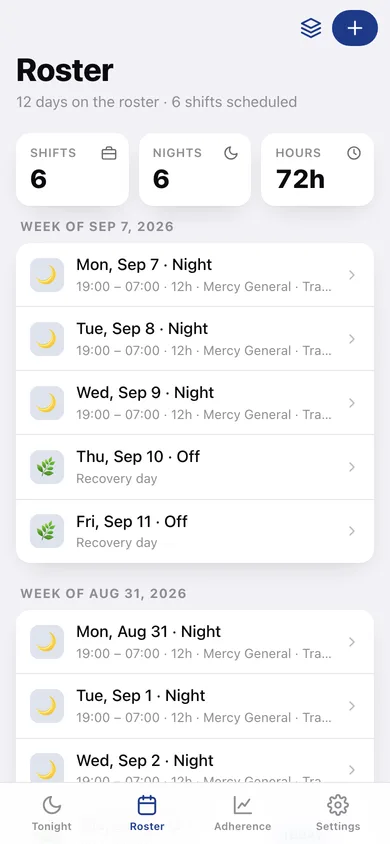
Every scheduled day grouped by week, with shift hours, duration and notes.
-
3
One shift
Edit a shift's date, kind, clock-in and clock-out, and see the circadian plan that day produces.
-
4
Rotation templates
Five published rotations with their patterns drawn out, a start date and a repeat count.
-
5
Day detail
How Nocta calculates the day — each window with its published rationale, plus the rules currently in force.
-
6
Adherence
Seven-day counts per category, a weekly trend chart and every log you have kept.
-
7
Settings
Circadian rule numbers, weekly CSV export for your partner, JSON backup, sample data and erase.
Try it with sample data: Loads a nurse 3-on / 4-off fortnight around today — three 19:00–07:00 nights at Mercy General, four recovery days, three more nights — plus ten adherence logs from the last four days. You can start fresh at any time.
Ready? It's free.
No account, no install, no subscription. Everything you do stays in this browser.
Your say
What should Nocta do? Tell us before we build it.
Tell us what to build next.
Comments need a free Google sign-in, so every one is from a real person.
Sign in with Google to commentNo comments yet — be the first to say what this app should do next.
Questions
Is the web version of Nocta free?+
Yes. Every screen is free to use: no subscription, no in-app purchases, no account.
Do I need an account?+
No. Open Nocta and start using it right away. Sign in with Google only if you want to upvote an app, save it to your list, or leave a comment.
Where is my data stored?+
Only in this browser's local storage. Nothing you enter is sent to our servers, so we can't see it, back it up, or restore it. Clearing site data, a private window, or another device starts empty. Export a backup from the in-app menu to keep it.
Is there a Nocta app for iPhone or Android?+
Not yet. Nocta is a community proposal: the browser version is complete, and we build the iPhone and Android app once 100 people upvote it. Upvoters get one email when it ships.