
Web app · Travel
Ninety
Know exactly how many Schengen days you have left — today and on any future date
Log every entry and exit and Ninety runs the rolling 90/180 maths for you: days used, days left, the date you must leave by, and a planner that tests a trip's dates before you book. Free in your browser, no account, nothing uploaded.
Stored in your browser only. Nothing you do in the web version is sent to our servers. Clear your browser data and it's gone — so export a backup from the in-app menu if you want to keep it.
This app is a community proposal.
Try the full browser version now. We build the iPhone and Android app once 100 people upvote it.
We'll email you once, when it ships. Unsubscribe anytime.
In your browser
What you can do in Ninety on the web
The rolling 180-day counter
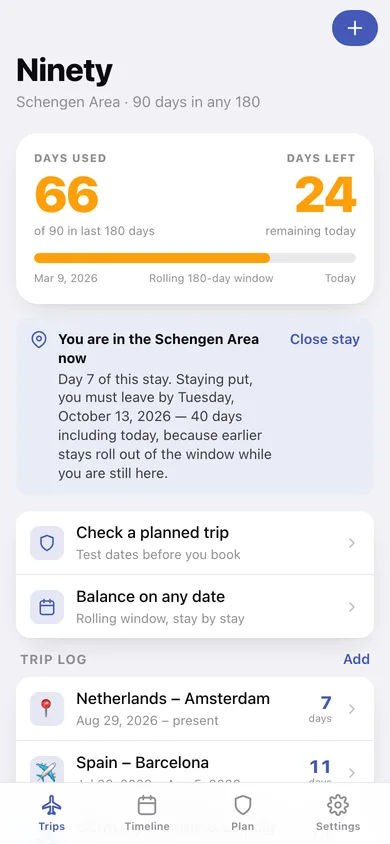
Days used and days left against the 90-day allowance, with the exact window dates and a bar that turns amber past 60 and red past 80.
Entry / exit stay log
Log each stay with entry, exit and a note like “Spain – Barcelona”; leave the exit open while you are still inside and Ninety counts up to today.
Must-leave-by date
While a stay is open, Ninety names the last day you can stay without breaking the limit — and, if you are at zero, the date your balance goes positive again.
Plan a trip before you book
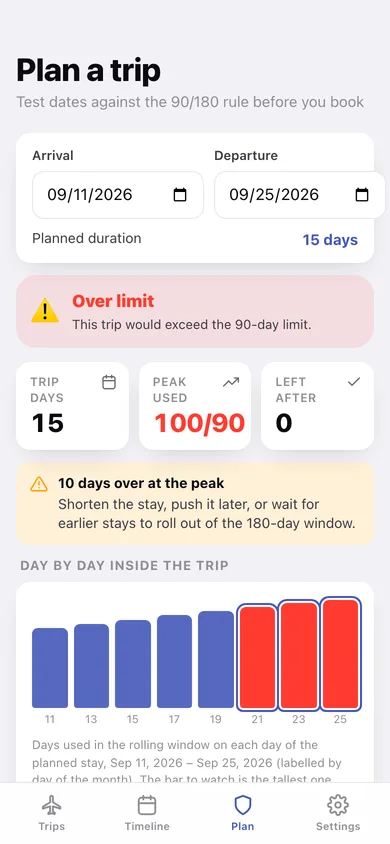
Enter arrival and departure and see the verdict, the peak days used across the whole stay, and a day-by-day bar chart against the 90-day ceiling.
Balance on any date
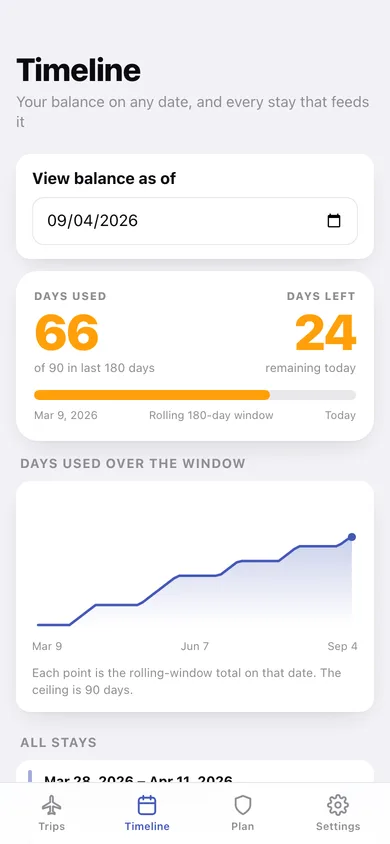
Move the timeline's reference date to any past or future day and watch the window recompute, with a line chart of the total across the whole 180 days.
Other visa day-limits too
Add zones with their own allowance and window (e.g. 180 days in 365) and log stays against each one.
Export your travel log
A CSV with one row per stay and its counted days, or a full JSON backup — all generated in your browser.
Screens
Every screen, rebuilt for the browser
-
1
Trips
Days used and days left in the rolling window, your must-leave-by date, and the full stay log.
-
2
Plan a trip
Arrival and departure dates checked against the limit, with the peak reading and a day-by-day chart.
-
3
Timeline
Balance as of any date you choose, the 180-day curve, and every stay drawn as a bar.
-
4
Stay detail
Counted days, the window reading on the entry and exit days, and the date those days roll out.
-
5
Log a stay
Entry, exit (or still-inside), notes and a live preview of what the stay costs your balance.
-
6
Zones
Schengen 90/180 plus any other visa allowance and window you need to track.
-
7
Settings
Active zone, CSV and JSON export, sample data, erase, and how the rolling rule actually works.
Try it with sample data: Adds five European stays across the last six months — Portugal, Italy + France, Germany, Spain, and an Amsterdam stay that is still open — so the counter, the timeline curve and the planner all have real history to work against. You can start fresh at any time.
Ready? It's free.
No account, no install, no subscription. Everything you do stays in this browser.
Your say
What should Ninety do? Tell us before we build it.
Tell us what to build next.
Comments need a free Google sign-in, so every one is from a real person.
Sign in with Google to commentNo comments yet — be the first to say what this app should do next.
Questions
Is the web version of Ninety free?+
Yes. Every screen is free to use: no subscription, no in-app purchases, no account.
Do I need an account?+
No. Open Ninety and start using it right away. Sign in with Google only if you want to upvote an app, save it to your list, or leave a comment.
Where is my data stored?+
Only in this browser's local storage. Nothing you enter is sent to our servers, so we can't see it, back it up, or restore it. Clearing site data, a private window, or another device starts empty. Export a backup from the in-app menu to keep it.
Is there a Ninety app for iPhone or Android?+
Not yet. Ninety is a community proposal: the browser version is complete, and we build the iPhone and Android app once 100 people upvote it. Upvoters get one email when it ships.