
Web app · Medical
Nightshift
The clipboard you never have time to write — for the shift you’re working tonight
A pocket companion for CNAs, PCTs and aides: tonight’s rooms with their flags, tap-to-confirm rounds against your own interval, the vitals quick-card, an SBAR handoff builder, a break timer that warns you at five minutes left, and a thirty-second wind-down. Free, no account, initials only.
Stored in your browser only. Nothing you do in the web version is sent to our servers. Clear your browser data and it's gone — so export a backup from the in-app menu if you want to keep it.
This app is a community proposal.
Try the full browser version now. We build the iPhone and Android app once 100 people upvote it.
We'll email you once, when it ships. Unsubscribe anytime.
In your browser
What you can do in Nightshift on the web
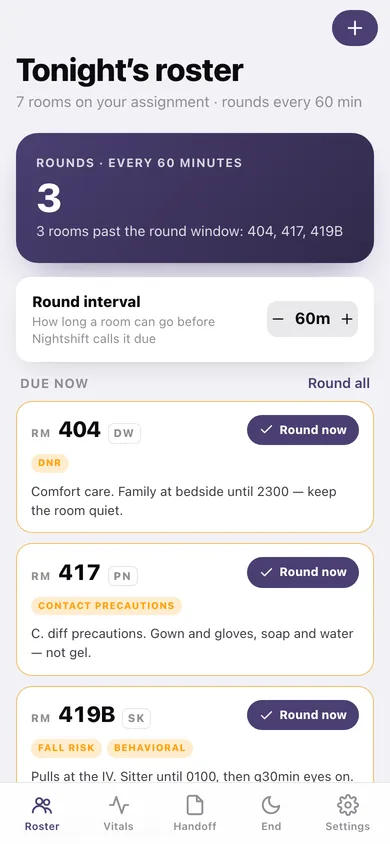
Tonight’s roster, flags first
Room number, initials only, and the flags that change how you walk in — DNR, fall risk, fluid restriction, contact precautions, behavioral, hard of hearing — plus the one line you’d otherwise write on your hand.
Rounds against your own interval
Set 30 to 120 minutes and the home screen tells you exactly how many rooms are past the window and which ones. Tap Round on a card, or mark them all at once.
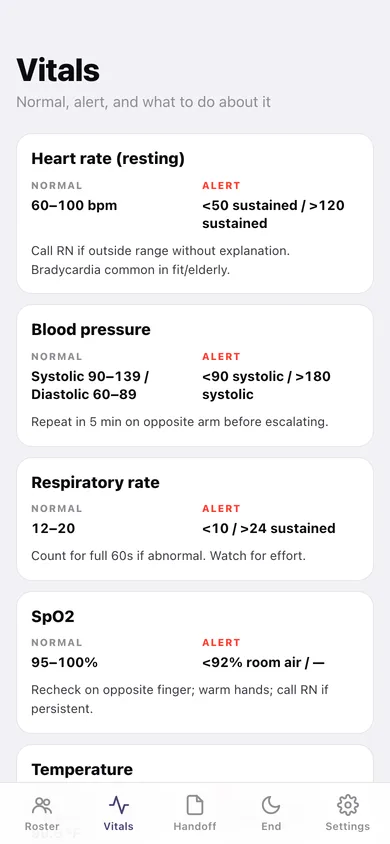
Vitals quick-card
Adult heart rate, blood pressure, respiratory rate, SpO2 and temperature with the normal band, the alert values, and the one-line decision support — plus heart and respiratory rates by age band from newborn to adult.
SBAR handoff builder
Situation, Background, Assessment, Recommendation on one screen, tied to a room, saved as a draft and copyable as a single message you can text yourself.
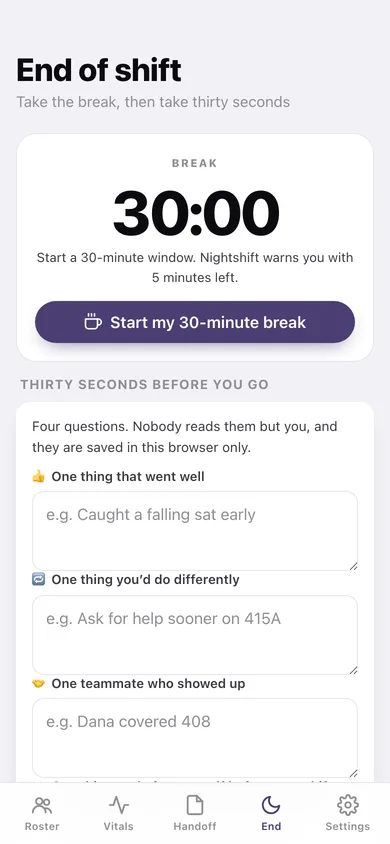
A break timer that actually runs
Start a 30-minute window (or your own length), watch it count down in the tab, get a warning with five minutes left, and add five if you need them.
Thirty-second wind-down
Four questions at the end of the shift — what went well, what you’d do differently, who showed up, what you’ll do for yourself — kept as a history of your shifts.
Screens
Every screen, rebuilt for the browser
-
1
Tonight’s roster
How many rooms are past the round window, the interval control, and every room on the board with its flags and last round.
-
2
Room
One room: minutes since the last round, its flags spelled out, the one line, and every round logged on it.
-
3
Add or edit a room
Room number, initials only, the six flags, and the line to remember.
-
4
Rounds log
Rounds per hour across the last twelve hours, last-rounded by room, and every round you logged.
-
5
Vitals
Normal ranges, alert values and what to do about them, plus heart and respiratory rate by age band.
-
6
Handoff
The SBAR builder and your saved drafts, copyable as one message.
-
7
End of shift
The live break countdown and the four-question wind-down, with every shift you’ve logged.
-
8
Settings
Round interval, break length, sounds, CSV and JSON export, clear the board, erase everything.
Try it with sample data: Loads a seven-room assignment mid-shift — 401 through 419B with real flags and one-liners — sixteen rounds logged across the last three hours so some rooms read as due, a saved SBAR draft for 408, and five prior end-of-shift reflections. You can start fresh at any time.
Ready? It's free.
No account, no install, no subscription. Everything you do stays in this browser.
Your say
What should Nightshift do? Tell us before we build it.
Tell us what to build next.
Comments need a free Google sign-in, so every one is from a real person.
Sign in with Google to commentNo comments yet — be the first to say what this app should do next.
Questions
Is the web version of Nightshift free?+
Yes. Every screen is free to use: no subscription, no in-app purchases, no account.
Do I need an account?+
No. Open Nightshift and start using it right away. Sign in with Google only if you want to upvote an app, save it to your list, or leave a comment.
Where is my data stored?+
Only in this browser's local storage. Nothing you enter is sent to our servers, so we can't see it, back it up, or restore it. Clearing site data, a private window, or another device starts empty. Export a backup from the in-app menu to keep it.
Is there a Nightshift app for iPhone or Android?+
Not yet. Nightshift is a community proposal: the browser version is complete, and we build the iPhone and Android app once 100 people upvote it. Upvoters get one email when it ships.