
Web app · Lifestyle
Nestling
Feeds, diapers and sleep — logged in one tap, at 4 a.m., in your browser
The calm daily care log for new parents: a live left/right breast timer, bottle ounces, one-tap diapers, sleep sessions, a today timeline, and the feeds-per-day and wet-diaper numbers your pediatrician asks for. Free, no account, nothing leaves this browser.
Stored in your browser only. Nothing you do in the web version is sent to our servers. Clear your browser data and it's gone — so export a backup from the in-app menu if you want to keep it.
This app is a community proposal.
Try the full browser version now. We build the iPhone and Android app once 100 people upvote it.
We'll email you once, when it ships. Unsubscribe anytime.
In your browser
What you can do in Nestling on the web
Last feed, last diaper, last sleep
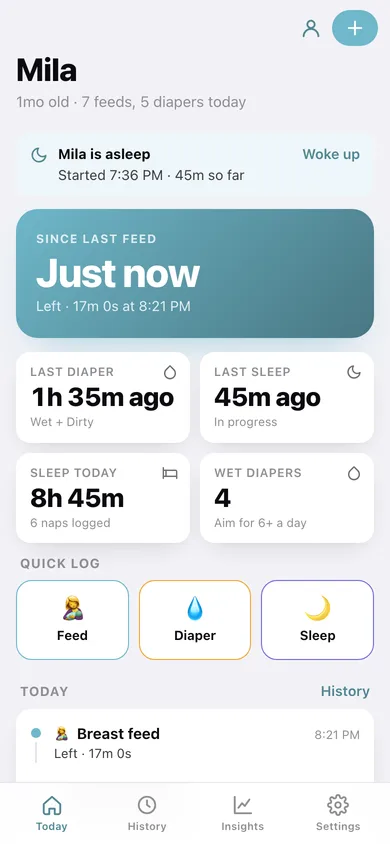
The three numbers you are always asked sit on the home screen as time-since counters, next to sleep today and today's wet-diaper count.
Live breast timer with left / right
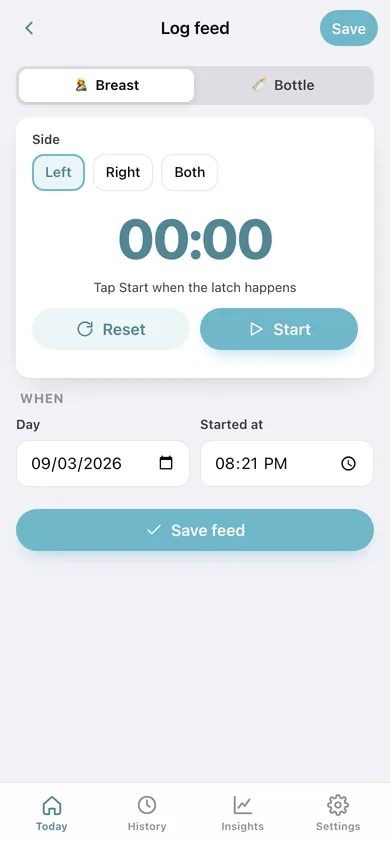
Pick a side, hit Start, switch mid-session — the elapsed clock saves as the feed's duration, exactly like the iPhone timer.
Bottles in ounces (or millilitres)
Drag the slider from 0.5 to 8 oz or tap a common amount — 1.5, 2, 2.5, 3, 3.5, 4 — and the feed lands on the timeline.
One-tap diapers and sleep sessions
Wet, dirty or wet + dirty with a note and time; naps log as started-now (with a running clock and a Woke up button on Home) or already-done with a start and end.
Day-grouped history you can filter
Every event by day with per-day totals — feeds, diapers, hours of sleep — filterable to just feeds, just diapers or just sleep, and editable or deletable from any row.
Insights for the well-baby visit
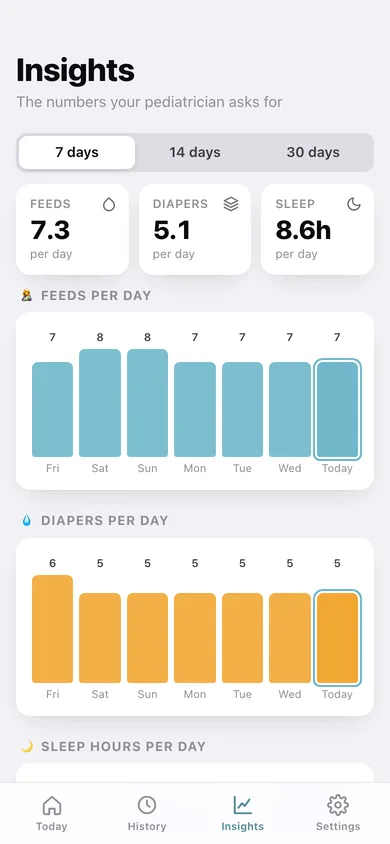
Feeds-per-day and diapers-per-day bars, a sleep-hours line, breast-vs-bottle split, 7/14/30-day averages, longest sleep stretch, and a CSV export to take along.
One log per baby
Twins and siblings each get their own profile with age, totals and a switcher — all of it unlocked, none of it behind a subscription.
Screens
Every screen, rebuilt for the browser
-
1
Today
Time since the last feed, at-a-glance diaper and sleep cards, quick-log buttons and today's chronological timeline.
-
2
Log feed
Breast with a live left/right timer, or bottle with an ounce slider and common amounts.
-
3
Log diaper
Wet, dirty or wet + dirty, with time and an optional note.
-
4
Log sleep
Start a nap now with a running clock, or enter a nap that already finished.
-
5
History
Every feed, diaper and sleep grouped by day with per-day totals and a category filter.
-
6
Insights
Feeds and diapers per day, sleep hours, breast vs bottle, and the averages a pediatrician asks about.
-
7
Baby profile
Name, birthday, age and lifetime totals for one baby; add siblings or switch who you are logging.
-
8
Settings
Ounces or millilitres, insights window, backup, CSV export, sample data and erase.
Try it with sample data: Loads Mila, eight weeks old, with two weeks of feeds, diapers and naps — about 250 events — plus a nap that is still running right now. You can start fresh at any time.
Ready? It's free.
No account, no install, no subscription. Everything you do stays in this browser.
Your say
What should Nestling do? Tell us before we build it.
Tell us what to build next.
Comments need a free Google sign-in, so every one is from a real person.
Sign in with Google to commentNo comments yet — be the first to say what this app should do next.
Questions
Is the web version of Nestling free?+
Yes. Every screen is free to use: no subscription, no in-app purchases, no account.
Do I need an account?+
No. Open Nestling and start using it right away. Sign in with Google only if you want to upvote an app, save it to your list, or leave a comment.
Where is my data stored?+
Only in this browser's local storage. Nothing you enter is sent to our servers, so we can't see it, back it up, or restore it. Clearing site data, a private window, or another device starts empty. Export a backup from the in-app menu to keep it.
Is there a Nestling app for iPhone or Android?+
Not yet. Nestling is a community proposal: the browser version is complete, and we build the iPhone and Android app once 100 people upvote it. Upvoters get one email when it ships.