
Web app · Productivity
Neowner
The household journal for your humanoid: queue, charge log, no-go zones
Neowner is the owner's side of living with an 1X NEO. Queue the chores you want done, tick them off, log charge cycles so the app can estimate what's left in the battery, map which rooms are off limits, and set what each person may ask the robot for. Free, offline, no account.
Stored in your browser only. Nothing you do in the web version is sent to our servers. Clear your browser data and it's gone — so export a backup from the in-app menu if you want to keep it.
This app is a community proposal.
Try the full browser version now. We build the iPhone and Android app once 100 people upvote it.
We'll email you once, when it ships. Unsubscribe anytime.
In your browser
What you can do in Neowner on the web
A calm task queue
Chores with a day, a time, a rough length, the room they happen in and who asked — grouped by day, ticked off in one tap.
A charge estimate from your own logs
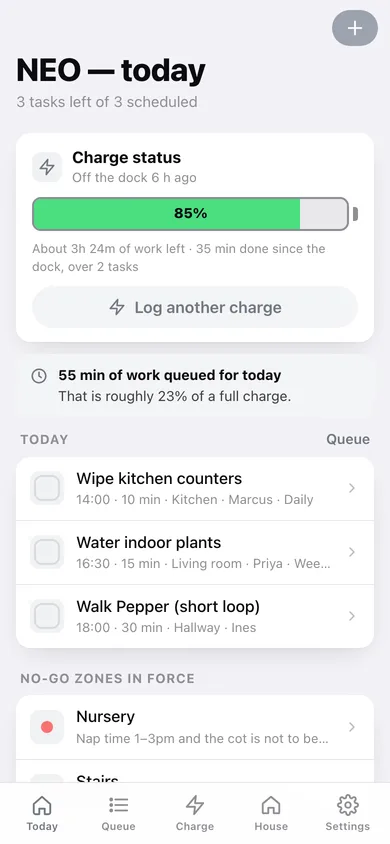
Log when it docks and undocks; the Today screen subtracts the work you've ticked off from the level it left at, and tells you how much working time is left.
House map with no-go zones
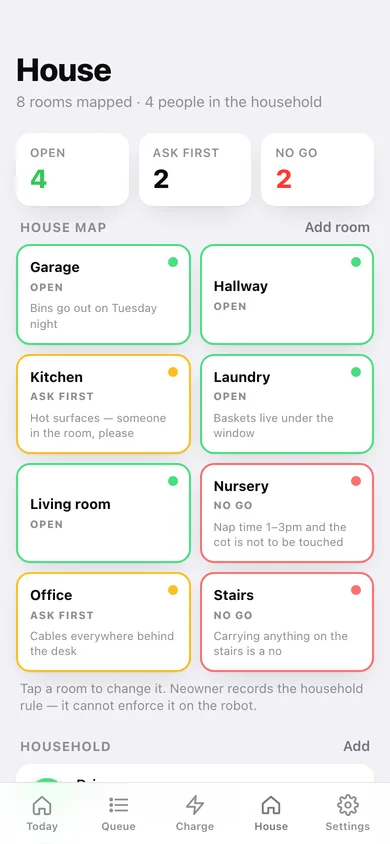
Sixteen rooms you can mark Open, Ask first or No go, each with the reason — so everyone in the house sees the same rules.
Household permissions
Add the people in your home, give each a role, and choose which of thirteen chores they may ask for. Four are house rules nobody can grant.
Charge history worth reading
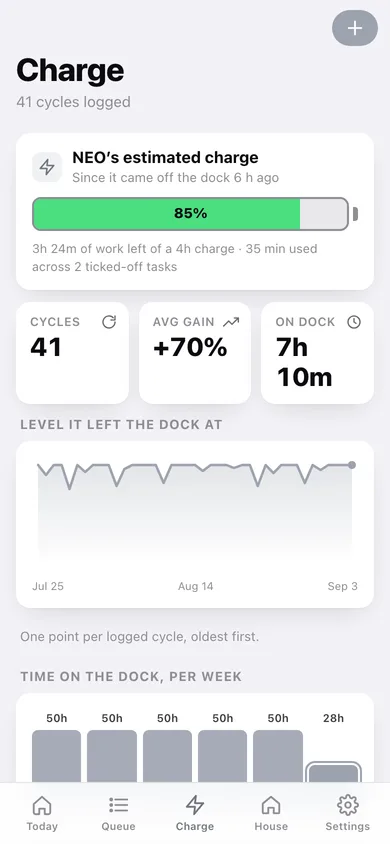
Cycles logged with the level gained, a line of how full it left the dock each time, and hours on the dock per week.
Yours, and only yours
Nothing is sent anywhere and no account is needed. Export the task log as CSV or take a full JSON backup.
Screens
Every screen, rebuilt for the browser
-
1
Today
Charge gauge, today's queued work against what's left in the battery, today's tasks and the no-go zones in force.
-
2
Charge
Battery estimate, cycle stats, the level it left the dock at over time, hours on the dock per week and the full cycle log.
-
3
House
The room map colour-coded Open / Ask first / No go, the household with their permissions, and the fixed house rules.
-
4
Queue
Every task by day — today, upcoming, done or all — with the hours of work each day holds.
-
5
Task
One chore: notes for the robot, room, who asked, share of a charge it costs, and a warning if its room is off limits.
-
6
Queue a task
Name the chore, pick the day, time, length, room, who asked and whether it repeats.
-
7
Edit task
Change any part of a queued chore, including moving it to another day or room.
-
8
Settings
Name your robot, set full-charge runtime, see journal totals, export CSV or JSON, load sample data or erase.
Try it with sample data: Loads a fortnight of a real household: 23 chores across eight rooms and four people, six weeks of charge cycles, and a nursery and staircase marked no-go. You can start fresh at any time.
Ready? It's free.
No account, no install, no subscription. Everything you do stays in this browser.
Your say
What should Neowner do? Tell us before we build it.
Tell us what to build next.
Comments need a free Google sign-in, so every one is from a real person.
Sign in with Google to commentNo comments yet — be the first to say what this app should do next.
Questions
Is the web version of Neowner free?+
Yes. Every screen is free to use: no subscription, no in-app purchases, no account.
Do I need an account?+
No. Open Neowner and start using it right away. Sign in with Google only if you want to upvote an app, save it to your list, or leave a comment.
Where is my data stored?+
Only in this browser's local storage. Nothing you enter is sent to our servers, so we can't see it, back it up, or restore it. Clearing site data, a private window, or another device starts empty. Export a backup from the in-app menu to keep it.
Is there a Neowner app for iPhone or Android?+
Not yet. Neowner is a community proposal: the browser version is complete, and we build the iPhone and Android app once 100 people upvote it. Upvoters get one email when it ships.