
Web app · Lifestyle
Namesake
Swipe baby names, rank the shortlist, send it to the other parent
A curated catalogue with the meaning, origin, pronunciation, a historical note and a sibling-fit line for every name. Swipe right to love, up for maybe, left to skip; rank what survives and share a clean list. Free, no account, and it all stays in your browser.
Stored in your browser only. Nothing you do in the web version is sent to our servers. Clear your browser data and it's gone — so export a backup from the in-app menu if you want to keep it.
This app is a community proposal.
Try the full browser version now. We build the iPhone and Android app once 100 people upvote it.
We'll email you once, when it ships. Unsubscribe anytime.
In your browser
What you can do in Namesake on the web
A real swipe deck
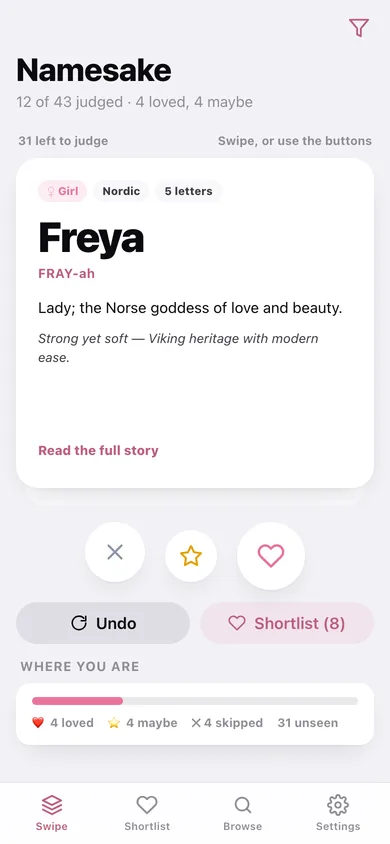
Drag the card right to love, up for maybe or left to skip — or use the three buttons. Undo the last verdict whenever one slips through.
Names with a story
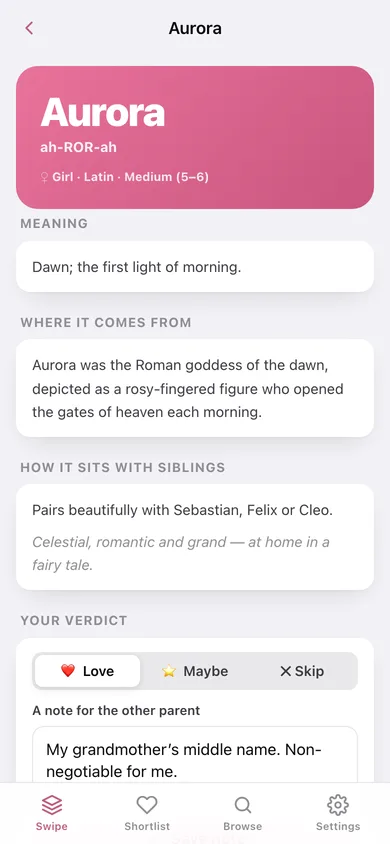
Every name carries its meaning, language of origin, how to say it, a historical note and a line on which siblings it sits beside.
Ranked shortlist
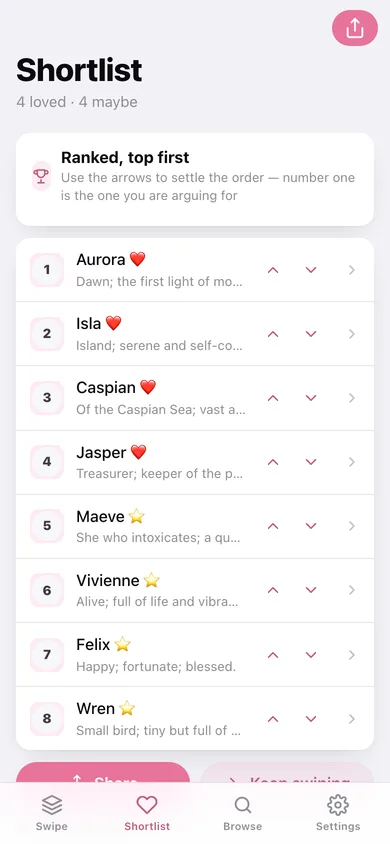
Loves and maybes land on one list you reorder with the arrows — number one is the name you are arguing for.
Filters that stick
Narrow the deck by gender, origin family and name length (short ≤4, medium 5–6, long 7+), with a live count of what still matches.
A shortlist worth sending
A clean ranked card you can copy, share or download as text — with the note you wrote beside each name.
Add your own
Anything the catalogue is missing — grandma's suggestion included — goes straight into the deck with its own meaning and pronunciation.
Screens
Every screen, rebuilt for the browser
-
1
Swipe deck
The card stack with love / maybe / skip, how far through you are and what is left.
-
2
Name detail
One name in full: meaning, where it comes from, sibling fit, your verdict and your note.
-
3
Shortlist
Loves and maybes, ranked, with arrows to settle the order.
-
4
Browse
The whole catalogue, searchable and filtered by verdict — the place to change your mind.
-
5
Filters
Gender, origin and length, with a live count of the names still to judge.
-
6
Share
The ranked shortlist card, ready to copy, share or download.
-
7
Settings
Filters, adding a name, resetting every verdict, backup and erase.
Try it with sample data: Judges twelve names for you — four loves led by Aurora, four maybes, four skips and a couple of notes to the other parent — leaving the rest of the catalogue to swipe. You can start fresh at any time.
Ready? It's free.
No account, no install, no subscription. Everything you do stays in this browser.
Your say
What should Namesake do? Tell us before we build it.
Tell us what to build next.
Comments need a free Google sign-in, so every one is from a real person.
Sign in with Google to commentNo comments yet — be the first to say what this app should do next.
Questions
Is the web version of Namesake free?+
Yes. Every screen is free to use: no subscription, no in-app purchases, no account.
Do I need an account?+
No. Open Namesake and start using it right away. Sign in with Google only if you want to upvote an app, save it to your list, or leave a comment.
Where is my data stored?+
Only in this browser's local storage. Nothing you enter is sent to our servers, so we can't see it, back it up, or restore it. Clearing site data, a private window, or another device starts empty. Export a backup from the in-app menu to keep it.
Is there a Namesake app for iPhone or Android?+
Not yet. Namesake is a community proposal: the browser version is complete, and we build the iPhone and Android app once 100 people upvote it. Upvoters get one email when it ships.