
Web app · Medical
My Supporters
Build a Supported Decision-Making Agreement without giving your data to anyone
Name your supporters, initial exactly which of the ten statutory life areas each one may help with, switch the HIPAA / FERPA / state-confidentiality releases on or off, set your dates and signing method, then print the agreement and the wallet cards. Free, no account, nothing uploaded.
Stored in your browser only. Nothing you do in the web version is sent to our servers. Clear your browser data and it's gone — so export a backup from the in-app menu if you want to keep it.
This app is a community proposal.
Try the full browser version now. We build the iPhone and Android app once 100 people upvote it.
We'll email you once, when it ships. Unsubscribe anytime.
In your browser
What you can do in My Supporters on the web
Supporter builder
Add each person you trust with their relationship, address, phone and email — the fields the statutory form asks for — and edit or remove them any time.
The ten statutory decision areas
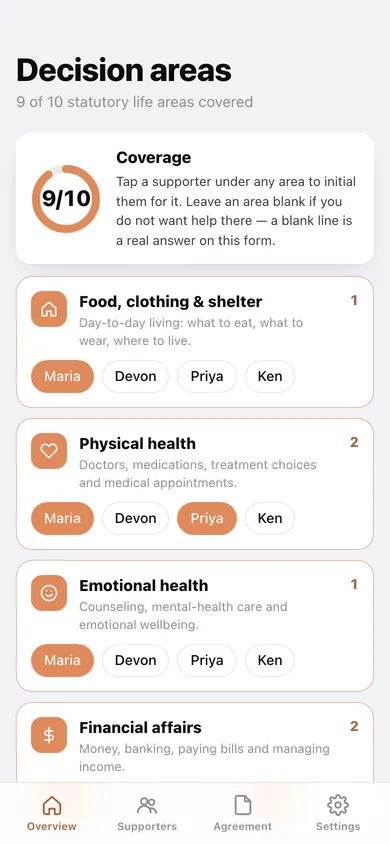
Food/clothing/shelter, physical health, emotional health, financial affairs, public benefits, finding work, residential services, school, self-advocacy and other — the same list as the Texas, Illinois and ACLU model forms. Tap a supporter under any area to initial them for it.
HIPAA, FERPA and state releases
Each release has a plain-language explanation of what it actually permits, and the exact legal wording it prints into the agreement when you switch it on.
Witnesses or notary, step by step
Choose how you will execute the agreement and get the matching six-step checklist — the signature block in the printed document changes to match, with witness lines or a notarial block.
The print-and-sign agreement
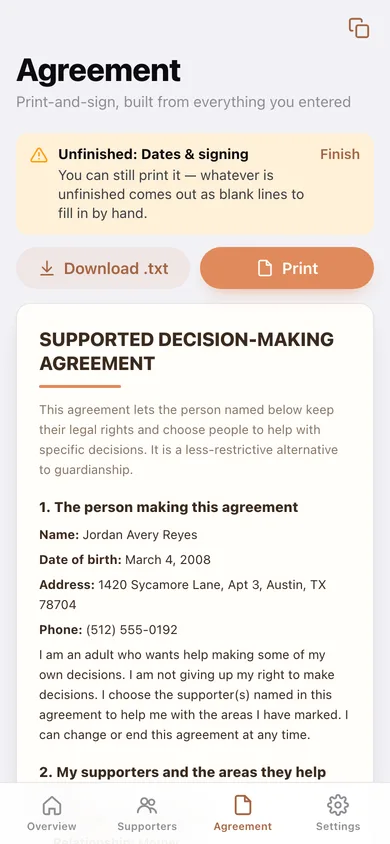
A five-section Supported Decision-Making Agreement assembled from your entries, with an initials line under every area and a signature line for you and each supporter. Copy it, download it or print it.
Wallet cards
One pocket card per supporter listing who they are and the exact areas they support — for appointments, IEP meetings and benefits offices.
Screens
Every screen, rebuilt for the browser
-
1
Overview
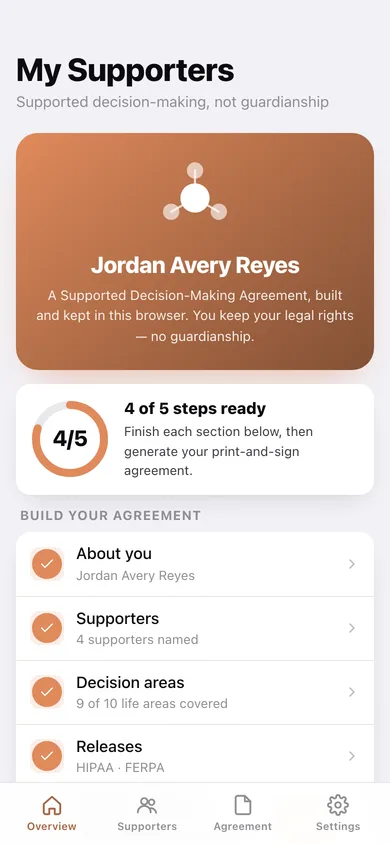
How many of the five steps are ready, and the way into each section of the agreement.
-
2
About you
The adult making the agreement: name, date of birth, address and phone.
-
3
Supporters
Everyone named in the agreement, how many areas each covers, and which life areas nobody covers yet.
-
4
Supporter
One supporter's contact details, the areas they are initialed for, and their wallet card.
-
5
Add or edit a supporter
Name, relationship, address, phone, email and the decision areas they help with.
-
6
Decision areas
The coverage grid: all ten statutory areas with a tap-to-initial chip for each supporter.
-
7
Releases
HIPAA, FERPA and state-confidentiality releases with plain-language explanations and the legal wording each one prints.
-
8
Dates & signing
Effective and end dates, witnesses versus notary, and the six-step signing checklist.
-
9
Agreement
The assembled five-section print-and-sign agreement, with initials lines, signature lines and the right execution block.
-
10
Wallet cards
A pocket card for each supporter showing who they are and what they support you with.
-
11
Settings
Download the agreement and cards, export a backup, load the sample, clear the checklist, erase everything.
Try it with sample data: Loads a filled-in example agreement for a fictional 18-year-old in Austin with four supporters — mother, transition coach, older sister and benefits counselor — covering nine of the ten life areas, HIPAA and FERPA on, and three of the six signing steps already ticked. You can start fresh at any time.
Ready? It's free.
No account, no install, no subscription. Everything you do stays in this browser.
Your say
What should My Supporters do? Tell us before we build it.
Tell us what to build next.
Comments need a free Google sign-in, so every one is from a real person.
Sign in with Google to commentNo comments yet — be the first to say what this app should do next.
Questions
Is the web version of My Supporters free?+
Yes. Every screen is free to use: no subscription, no in-app purchases, no account.
Do I need an account?+
No. Open My Supporters and start using it right away. Sign in with Google only if you want to upvote an app, save it to your list, or leave a comment.
Where is my data stored?+
Only in this browser's local storage. Nothing you enter is sent to our servers, so we can't see it, back it up, or restore it. Clearing site data, a private window, or another device starts empty. Export a backup from the in-app menu to keep it.
Is there a My Supporters app for iPhone or Android?+
Not yet. My Supporters is a community proposal: the browser version is complete, and we build the iPhone and Android app once 100 people upvote it. Upvoters get one email when it ships.