
Web app · Productivity
Modelpicker
Keep score on the models you actually use — a private benchmark journal
Run the same prompt across GPT-5, Claude, Gemini, Llama or anything else, log which one won and why, and watch a leaderboard build from your own work: win rates, head-to-head records, and which model to reach for per kind of task. Free, local, no API key.
Stored in your browser only. Nothing you do in the web version is sent to our servers. Clear your browser data and it's gone — so export a backup from the in-app menu if you want to keep it.
This app is a community proposal.
Try the full browser version now. We build the iPhone and Android app once 100 people upvote it.
We'll email you once, when it ships. Unsubscribe anytime.
In your browser
What you can do in Modelpicker on the web
Log a comparison in seconds
Task, the models you ran it across, the winner, how clear the win was, who answered fastest, and the note that explains it.
Win rate that means something
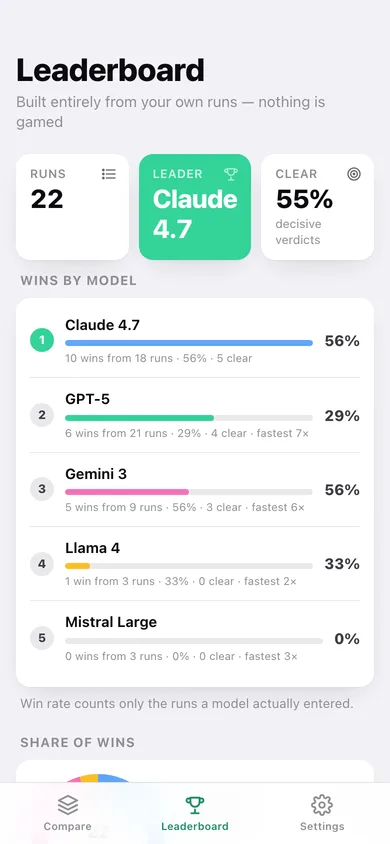
A model is only judged on the runs it actually entered, so adding a new contender never dilutes anyone's record.
Head-to-head records
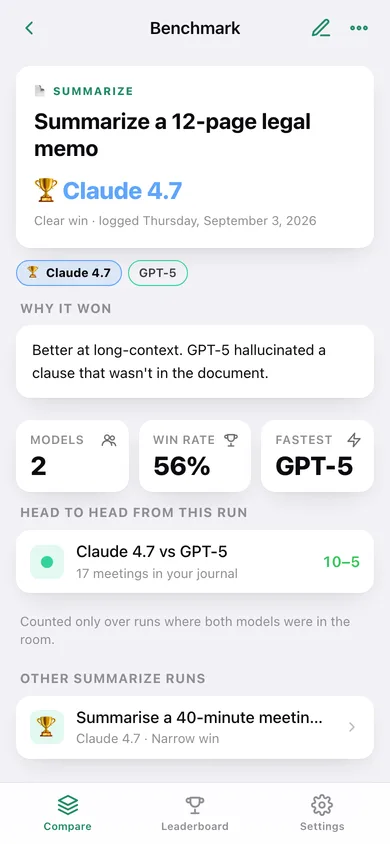
Every pairing you have tested at least twice, scored only over the runs where both models were in the room.
Who to reach for
Twelve kinds of work — coding, summarizing, translation, reasoning, extraction, agentic and more — each with the model that wins them for you.
Your own roster
Start from the six models the iPhone app ships with, then add whatever you really test and drop what you never do.
Yours to take away
Export every run as CSV or a JSON backup. Nothing is ever sent to a model or a server.
Screens
Every screen, rebuilt for the browser
-
1
Compare
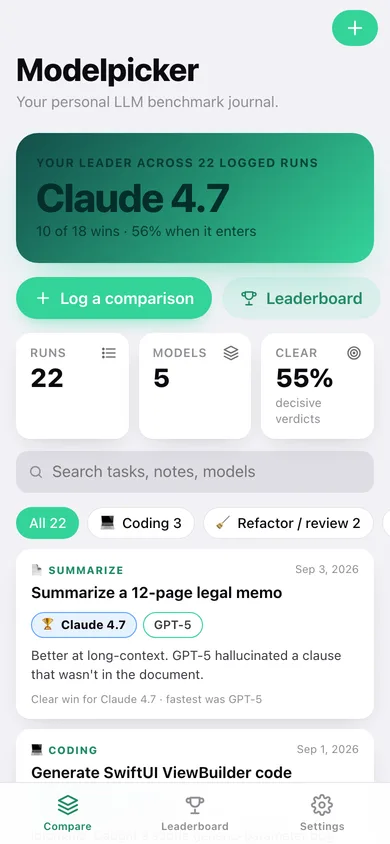
Your current leader, clear-win share, task filters and every logged run with its contenders and verdict.
-
2
Leaderboard
Wins by model with rate bars, share-of-wins donut, per-task leaders, head-to-head records and logging pace.
-
3
Benchmark
One comparison: winner, margin, contenders, your note and the head-to-head record it feeds.
-
4
New comparison
Pick the kind of work, tap the contenders, crown the winner, say how clear it was and why.
-
5
Edit benchmark
Change the winner, the contenders or the note — the leaderboard rebuilds itself.
-
6
Settings
Manage your model roster, see journal totals, export CSV or JSON, load sample data or erase.
Try it with sample data: Loads 22 comparisons from the last seven weeks across five models and eleven kinds of work, with the notes that explain each verdict. You can start fresh at any time.
Ready? It's free.
No account, no install, no subscription. Everything you do stays in this browser.
Your say
What should Modelpicker do? Tell us before we build it.
Tell us what to build next.
Comments need a free Google sign-in, so every one is from a real person.
Sign in with Google to commentNo comments yet — be the first to say what this app should do next.
Questions
Is the web version of Modelpicker free?+
Yes. Every screen is free to use: no subscription, no in-app purchases, no account.
Do I need an account?+
No. Open Modelpicker and start using it right away. Sign in with Google only if you want to upvote an app, save it to your list, or leave a comment.
Where is my data stored?+
Only in this browser's local storage. Nothing you enter is sent to our servers, so we can't see it, back it up, or restore it. Clearing site data, a private window, or another device starts empty. Export a backup from the in-app menu to keep it.
Is there a Modelpicker app for iPhone or Android?+
Not yet. Modelpicker is a community proposal: the browser version is complete, and we build the iPhone and Android app once 100 people upvote it. Upvoters get one email when it ships.