
Web app · Productivity
Memoirly
Write the facts about you once, then paste them into any AI
Memoirly is your portable memory layer: standing facts filed under personal, work, health, family, preferences, skills and goals, assembled into a context block you copy into a new ChatGPT, Claude or Gemini conversation. Free, local, no account.
Stored in your browser only. Nothing you do in the web version is sent to our servers. Clear your browser data and it's gone — so export a backup from the in-app menu if you want to keep it.
This app is a community proposal.
Try the full browser version now. We build the iPhone and Android app once 100 people upvote it.
We'll email you once, when it ships. Unsubscribe anytime.
In your browser
What you can do in Memoirly on the web
Facts, not chat logs
One standing sentence per entry, filed under the same seven categories as the iPhone app, pinned if it should lead the block.
A context block in four shapes
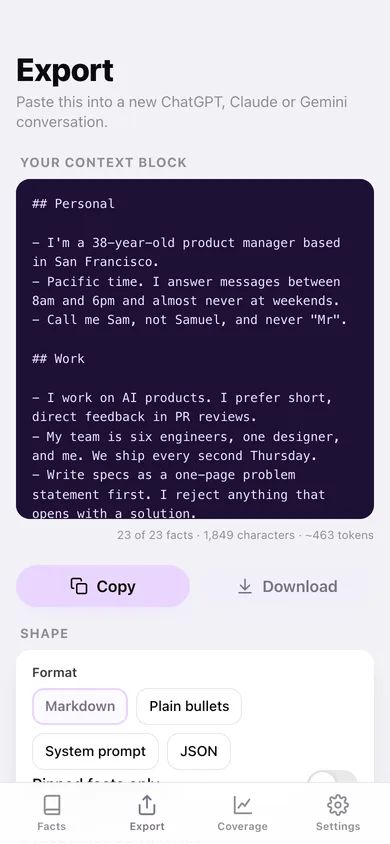
Markdown headings, plain bullets, a ready-made system prompt, or JSON — with a live token estimate so you know what it costs you in a prompt.
Coverage score
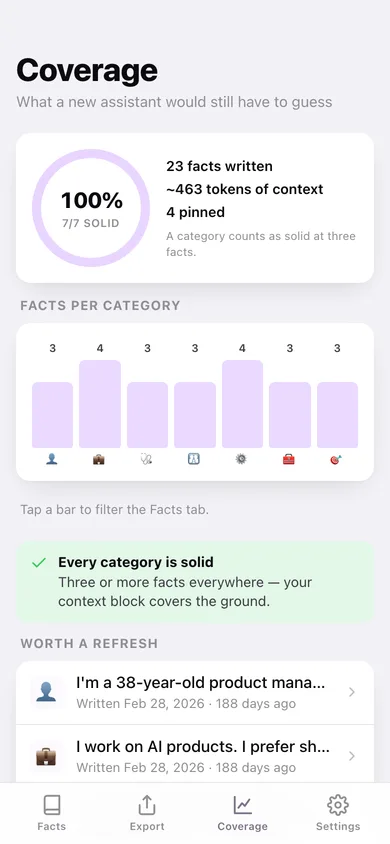
See which of the seven categories are still thin, with starter prompts for each, so a new assistant has less to guess about.
Staleness check
Facts older than four months are flagged for review — jobs change, kids get older, goals get met.
Choose what leaves
Toggle whole categories out of the export, or copy only your pinned facts, before anything reaches a chat window.
Portable by design
Copy, download as Markdown, TXT or JSON, or take the whole library out as CSV. Nothing is ever sent anywhere by the app.
Screens
Every screen, rebuilt for the browser
-
1
Facts
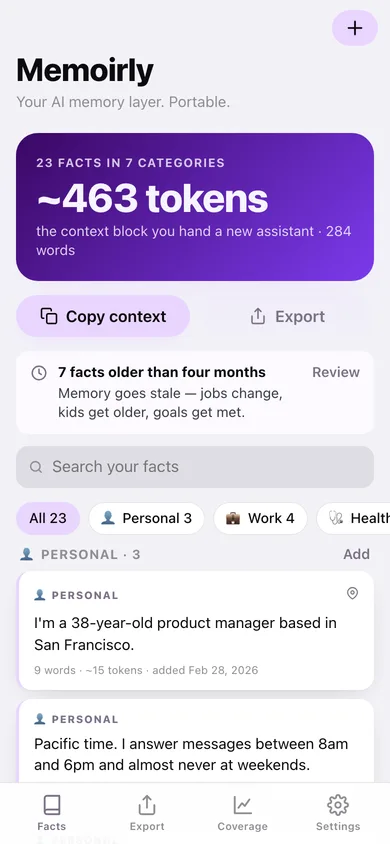
Token-count hero, coverage warnings, search, category chips and every fact grouped by category.
-
2
Export
Format and category picker over a live monospace preview of the context block, with copy, download and where-to-paste links.
-
3
Coverage
Coverage ring, facts-per-category chart, thin categories with starter prompts and facts due a refresh.
-
4
Fact
One fact with its word and token cost, category guidance, siblings, pin, edit and delete.
-
5
New fact
Pick a category, write one sentence, pin it — with five starter prompts for that category.
-
6
Edit fact
Rewrite a fact, move it to another category, or change whether it is pinned.
-
7
Settings
Default export format, profile counts, JSON backup, sample data and erase.
Try it with sample data: Loads a worked profile of 23 facts across all seven categories — the oldest written six months ago, four of them pinned. You can start fresh at any time.
Ready? It's free.
No account, no install, no subscription. Everything you do stays in this browser.
Your say
What should Memoirly do? Tell us before we build it.
Tell us what to build next.
Comments need a free Google sign-in, so every one is from a real person.
Sign in with Google to commentNo comments yet — be the first to say what this app should do next.
Questions
Is the web version of Memoirly free?+
Yes. Every screen is free to use: no subscription, no in-app purchases, no account.
Do I need an account?+
No. Open Memoirly and start using it right away. Sign in with Google only if you want to upvote an app, save it to your list, or leave a comment.
Where is my data stored?+
Only in this browser's local storage. Nothing you enter is sent to our servers, so we can't see it, back it up, or restore it. Clearing site data, a private window, or another device starts empty. Export a backup from the in-app menu to keep it.
Is there a Memoirly app for iPhone or Android?+
Not yet. Memoirly is a community proposal: the browser version is complete, and we build the iPhone and Android app once 100 people upvote it. Upvoters get one email when it ships.