
Web app · Sports
MeetDay
Six hours, three kids, one heat sheet — meet day on one calm screen
Type each swimmer's events off the paper heat sheet and MeetDay gives you the merged family schedule, an Up Next view that knows how many heats away you are, the Sharpie arm card, a hand-timing stopwatch and a permanent best-times book with the motivational cuts. Free, no install.
Stored in your browser only. Nothing you do in the web version is sent to our servers. Clear your browser data and it's gone — so export a backup from the in-app menu if you want to keep it.
This app is a community proposal.
Try the full browser version now. We build the iPhone and Android app once 100 people upvote it.
We'll email you once, when it ships. Unsubscribe anytime.
In your browser
What you can do in MeetDay on the web
Merged meet-day schedule
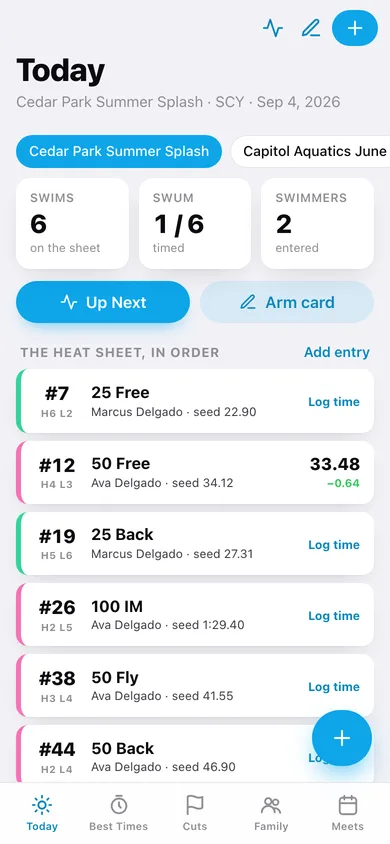
Every swimmer's events in event/heat/lane order on one list, with seed times, what has already been swum and the drop against seed on each result.
Up Next
Tell it what event and heat the pool is on and MeetDay says how many events until your kid swims — or 'behind the blocks NOW' — with the event, heat and lane in huge type.
Arm card
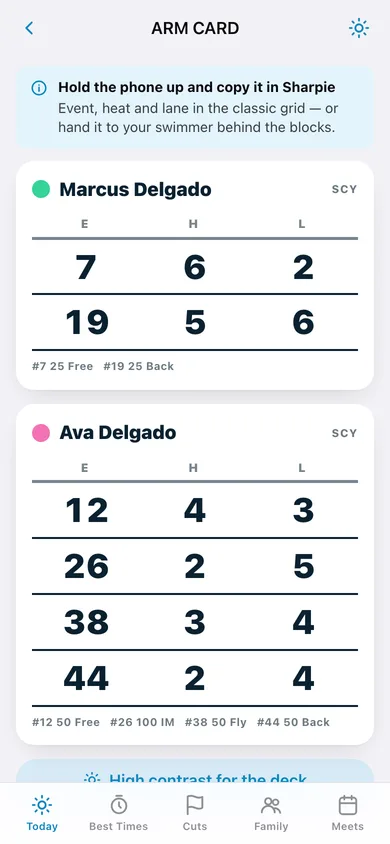
The classic E / H / L grid per swimmer in Sharpie-sized numbers, with a high-contrast mode for bright pool decks. Hold the phone up and copy it, or hand it to your swimmer.
Race timer with splits
A full-screen stopwatch for hand-timing from the stands: lap at each wall, then save the time straight onto the entry — or type the official time once it posts on the wall.
Best-times book
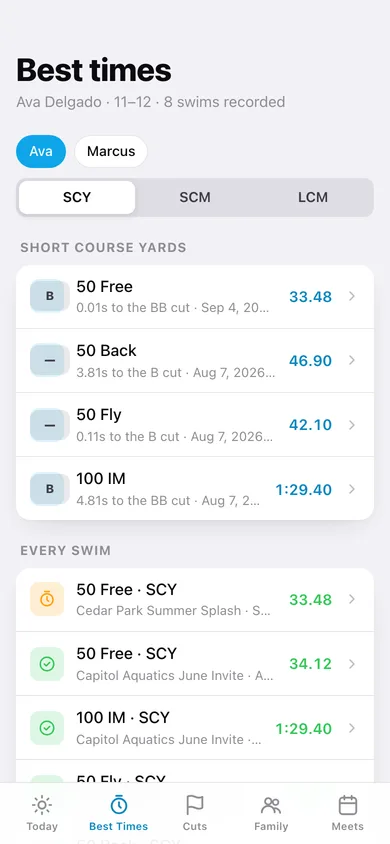
A permanent per-swimmer record book: fastest time in every event, short course and long course kept separate exactly like the real books, with a season-arc chart per event.
Motivational time standards
Bundled B → AAAA ladders for 12 & under in SCY and LCM. Every best time shows the standard it achieved and the exact seconds to the next cut.
Screens
Every screen, rebuilt for the browser
-
1
Today
The active meet's merged schedule in event order, with seed times, results and drops.
-
2
Up Next
Where the pool is now, who is up next, and event/heat/lane in huge type.
-
3
Arm card
The E/H/L Sharpie grid for every swimmer at this meet, with a high-contrast deck mode.
-
4
Race timer
Full-screen stopwatch with lap splits and save-as-hand-time.
-
5
Result
Log the official wall time with place and splits, and see the drop vs seed, vs best and the standard achieved.
-
6
New entry
Straight off the heat sheet: event number, distance, stroke, heat, lane and seed time.
-
7
Best times
Fastest time in every event per course, with the achieved standard and seconds to the next cut.
-
8
Event history
One event's season arc: every swim oldest to newest with the season drop.
-
9
Cuts
Standards progress event by event with a bar to the next cut.
-
10
Standards ladder
One event's full B → AAAA ladder with the seconds still to go on each cut.
-
11
Family
The roster with age group, swims recorded and bests per swimmer.
-
12
Swimmer
Name, birth year, standards chart and cap colour, plus links into that swimmer's record book.
-
13
Meets
The season's meets with pool, course and swim count; pick the one that is on today.
-
14
Meet
Name, date, pool, course and notes, plus every swim entered at that meet.
-
15
Settings
Default course, high-contrast arm card, record-book CSV, backup, sample data and erase.
Try it with sample data: Loads two swimmers, three meets across a season — a long-course kickoff, a short-course invite and today's Summer Splash in progress — with seventeen entries, twelve logged times and one hand-timed swim with splits. You can start fresh at any time.
Ready? It's free.
No account, no install, no subscription. Everything you do stays in this browser.
Your say
What should MeetDay do? Tell us before we build it.
Tell us what to build next.
Comments need a free Google sign-in, so every one is from a real person.
Sign in with Google to commentNo comments yet — be the first to say what this app should do next.
Questions
Is the web version of MeetDay free?+
Yes. Every screen is free to use: no subscription, no in-app purchases, no account.
Do I need an account?+
No. Open MeetDay and start using it right away. Sign in with Google only if you want to upvote an app, save it to your list, or leave a comment.
Where is my data stored?+
Only in this browser's local storage. Nothing you enter is sent to our servers, so we can't see it, back it up, or restore it. Clearing site data, a private window, or another device starts empty. Export a backup from the in-app menu to keep it.
Is there a MeetDay app for iPhone or Android?+
Not yet. MeetDay is a community proposal: the browser version is complete, and we build the iPhone and Android app once 100 people upvote it. Upvoters get one email when it ships.