
Web app · Sports
MatCut
The wrestler's side of the certified weight plan — on pace or behind, at a glance
Type the numbers off the OPC printout once, then log morning, pre-practice, post-practice, night and official weigh-ins. MatCut plots every one against the plan line, shows what a practice took, counts down to the scale and flags any week past the NFHS 1.5% limit. Free, no install.
Stored in your browser only. Nothing you do in the web version is sent to our servers. Clear your browser data and it's gone — so export a backup from the in-app menu if you want to keep it.
This app is a community proposal.
Try the full browser version now. We build the iPhone and Android app once 100 people upvote it.
We'll email you once, when it ships. Unsubscribe anytime.
In your browser
What you can do in MatCut on the web
Certified plan setup
Alpha weight, lowest certified class off the NFHS boys or girls chart, season start, the state's +1 lb and +2 lb growth-allowance dates and every weekly minimum — editable line by line, or rebuilt at 1.5% per week from the certified numbers.
Weigh-in log with real contexts
Morning, pre-practice, post-practice, night and official. A post-practice entry is paired with that day's pre-practice weight automatically, so the practice loss is a number instead of a guess.
Descent curve
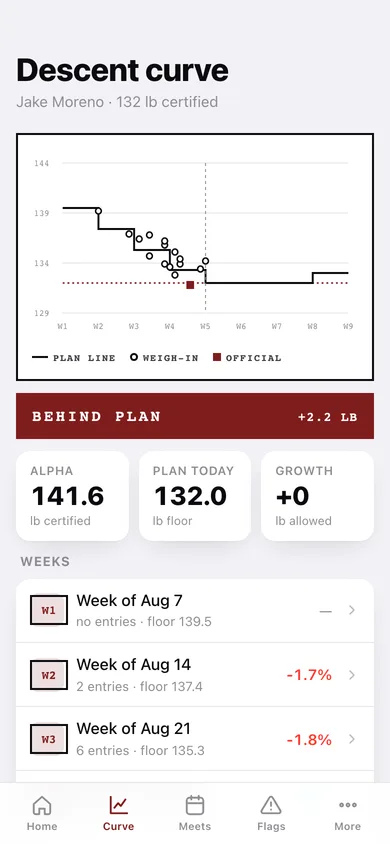
The season chart: the stepped plan line with the growth-allowance step-ups, the certified class floor, a today marker, and every weigh-in plotted on it — circles for daily entries, filled squares for official meet weights.
Meet-day countdown
Hours to the scale, the target class with any growth allowance in effect, the latest logged weight and the gap — then a made-weight record once you enter the official number.
NFHS safety flags
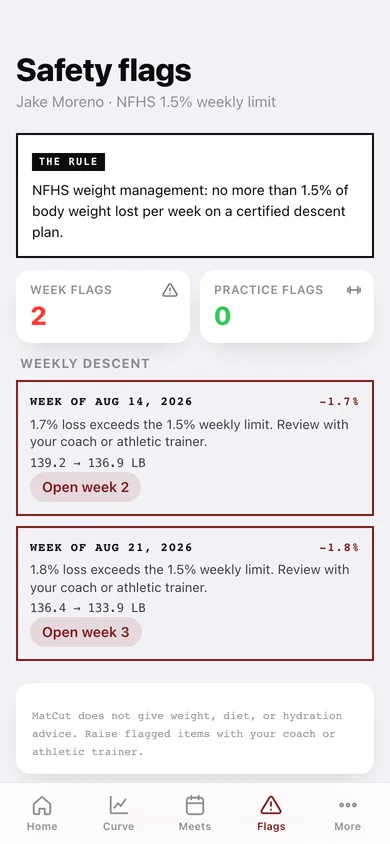
Any seven-day span past the 1.5% limit is flagged in the handbook's own words, and a single practice taking more than 3% of body weight is surfaced. MatCut gives no weight, diet or hydration advice.
Family roster and coach report
Add each wrestler and switch between them; the one-page weekly summary — entries, week verdicts, flags — copies or downloads to hand the coach at practice, plus a full-season CSV.
Screens
Every screen, rebuilt for the browser
-
1
Home
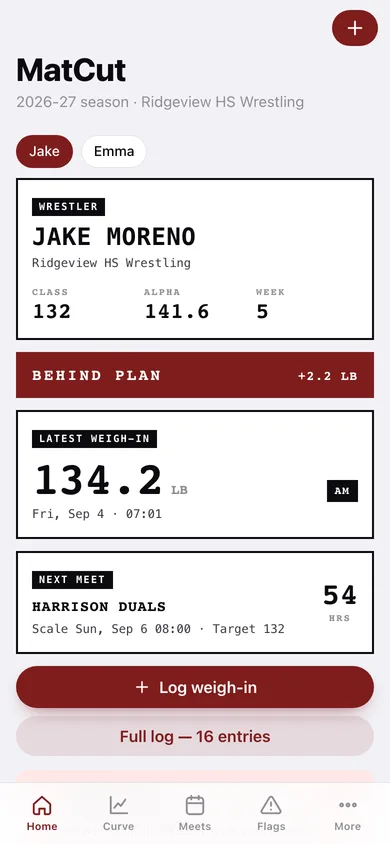
Class, alpha and week, the ON PACE / BEHIND PLAN verdict, the latest weigh-in and the countdown to the next meet.
-
2
Descent curve
Plan line versus every actual weigh-in, with the class floor, growth-allowance steps and a week-by-week loss table.
-
3
Week detail
One seven-day span: within or over the 1.5% limit, the plan floor and every entry that week.
-
4
Weigh-in log
Every entry grouped by day, filterable by context, each showing the gap to the plan line.
-
5
Log weigh-in
Weight, context, date and time with live plan-floor, versus-plan and practice-loss readouts.
-
6
Meets
Countdown to the next scale with target class and gap, plus the made-weight record.
-
7
Meet detail
Name, date, weigh-in time, target class and the official result after the scale.
-
8
Safety flags
Weeks past the NFHS 1.5% limit and unusually large single-practice losses, in plain language.
-
9
Weekly report
The one-page coach summary: last seven days of entries, week verdicts and flags — copy, download or export the season CSV.
-
10
Plan setup
Alpha weight, certified class, season dates, growth-allowance dates and the weekly minimum table.
-
11
Roster
Every wrestler in the family with their class and pace, switch between them or add another.
-
12
More
Roster, plan, log, coach report, privacy, backup, sample data and erase.
Try it with sample data: Loads two wrestlers four weeks into the season — Jake at 132 with sixteen weigh-ins, a made-weight quad and two upcoming meets, and Emma at 115 — including one week that trips the 1.5% flag. You can start fresh at any time.
Ready? It's free.
No account, no install, no subscription. Everything you do stays in this browser.
Your say
What should MatCut do? Tell us before we build it.
Tell us what to build next.
Comments need a free Google sign-in, so every one is from a real person.
Sign in with Google to commentNo comments yet — be the first to say what this app should do next.
Questions
Is the web version of MatCut free?+
Yes. Every screen is free to use: no subscription, no in-app purchases, no account.
Do I need an account?+
No. Open MatCut and start using it right away. Sign in with Google only if you want to upvote an app, save it to your list, or leave a comment.
Where is my data stored?+
Only in this browser's local storage. Nothing you enter is sent to our servers, so we can't see it, back it up, or restore it. Clearing site data, a private window, or another device starts empty. Export a backup from the in-app menu to keep it.
Is there a MatCut app for iPhone or Android?+
Not yet. MatCut is a community proposal: the browser version is complete, and we build the iPhone and Android app once 100 people upvote it. Upvoters get one email when it ships.