
Web app · Sports
MACHbook
Your dog's whole agility career — MACH points and double Qs counted for you
Log a run in fifteen seconds: pick class and level, tap Q or NQ, enter the time. MACHbook computes yards per second and championship points, counts double Qs toward the MACH, and runs the AKC, USDAA, CPE and UKI title ladders. Free, no install.
Stored in your browser only. Nothing you do in the web version is sent to our servers. Clear your browser data and it's gone — so export a backup from the in-app menu if you want to keep it.
This app is a community proposal.
Try the full browser version now. We build the iPhone and Android app once 100 people upvote it.
We'll email you once, when it ships. Unsubscribe anytime.
In your browser
What you can do in MACHbook on the web
Ringside run logger
Venue, class, level, Q/NQ/E/ABS, time, faults, placement and jump height — with yards per second and championship points computed live from the course yardage and standard course time.
MACH & PACH dashboard
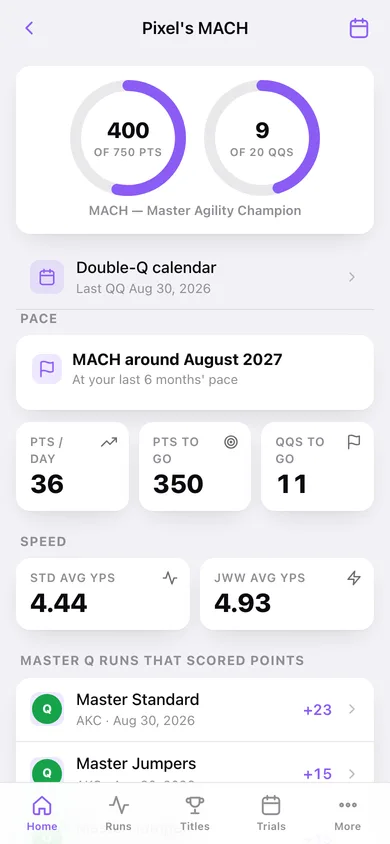
Progress rings for 750 championship points and 20 double Qs, points-to-go, QQs-to-go and a finish-date projection from your last six months' pace. The Preferred mirror appears as soon as you log a Preferred run.
Every title ladder, bundled
47 rulebook titles across AKC (regular and Preferred), USDAA, CPE and UKI — legs earned versus legs required, Super-Q counting for Masters Snooker, ADCH class coverage, and the exact rulebook wording for each.
Double-Q calendar
A month grid of every day your dog took a Master Standard Q and a Master JWW Q — tap a highlighted day to see both runs and the points they scored.
Trial weekends
Club, judge, site and dates in one record; every run you file under it rolls up into that weekend's Q count, championship points and double Qs.
Dog careers and export
A career page per dog with Q rate by class, a yards-per-second trend line and titles with dates — plus a CSV of every run and a paste-ready career summary.
Screens
Every screen, rebuilt for the browser
-
1
Home
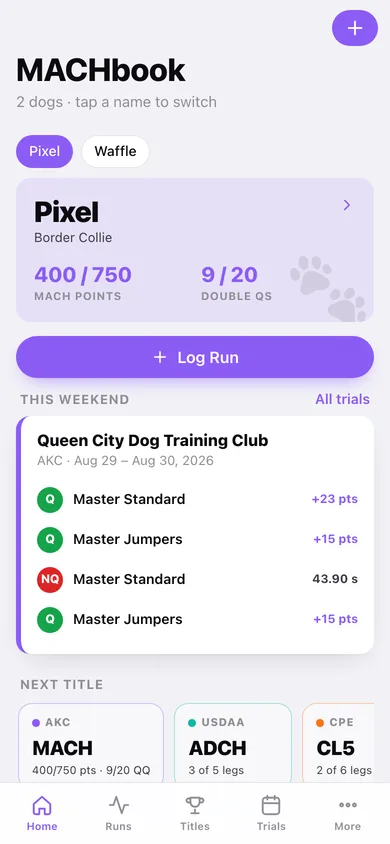
Your active dog's MACH points and double Qs, the Log Run button, this weekend's runs and the next title in each venue.
-
2
MACH dashboard
Rings for 750 points and 20 QQs, pace projection, PACH mirror and Standard/JWW yards-per-second averages.
-
3
Double-Q calendar
Month grid of every double-Q day with the two Master runs behind each one.
-
4
Runs
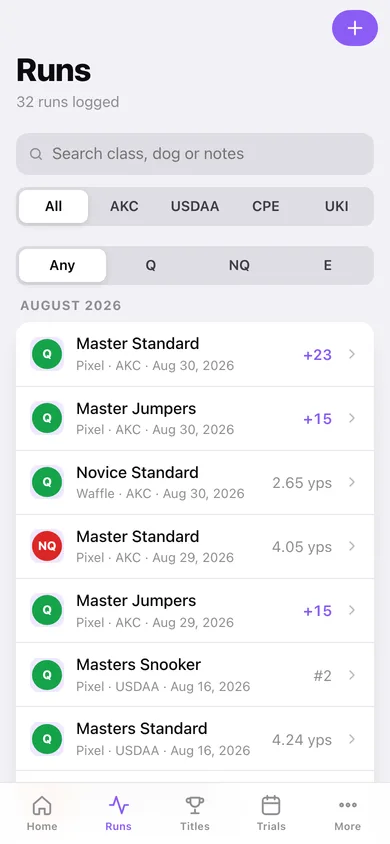
Every run grouped by month with venue and result filters, Q count and points per month.
-
5
Run detail
The full score sheet: time, YPS, faults, placement, seconds under SCT, championship points and the trial it belongs to.
-
6
Log Run
The fifteen-second run form with live YPS and championship-point readouts and a title suggestion when a ladder completes.
-
7
Trials
Every trial weekend with venue, site, dates and its Q count.
-
8
Trial weekend
Club, judge and site with the weekend's runs by day and its points and double Qs totalled.
-
9
Titles
The venue ladders: legs earned against legs required for every title, with Super-Q and double-Q counters.
-
10
Title detail
One title's progress bars, the rulebook requirement and every qualifying run behind it.
-
11
Dogs
Your team with runs, Q rate and titles per dog.
-
12
Dog career
Career page: Q rate by class, yards-per-second trend, titles earned and the full run history.
-
13
Career export
CSV of every run, a paste-ready career summary and a JSON backup.
-
14
More
Active dog, default venue, title suggestions, backup, sample data and erase.
Try it with sample data: Loads two dogs — Pixel's year-long MACH campaign of monthly double-Q weekends plus a Novice A corgi — with four trial weekends, 32 runs across AKC, USDAA and CPE, and four recorded titles. You can start fresh at any time.
Ready? It's free.
No account, no install, no subscription. Everything you do stays in this browser.
Your say
What should MACHbook do? Tell us before we build it.
Tell us what to build next.
Comments need a free Google sign-in, so every one is from a real person.
Sign in with Google to commentNo comments yet — be the first to say what this app should do next.
Questions
Is the web version of MACHbook free?+
Yes. Every screen is free to use: no subscription, no in-app purchases, no account.
Do I need an account?+
No. Open MACHbook and start using it right away. Sign in with Google only if you want to upvote an app, save it to your list, or leave a comment.
Where is my data stored?+
Only in this browser's local storage. Nothing you enter is sent to our servers, so we can't see it, back it up, or restore it. Clearing site data, a private window, or another device starts empty. Export a backup from the in-app menu to keep it.
Is there a MACHbook app for iPhone or Android?+
Not yet. MACHbook is a community proposal: the browser version is complete, and we build the iPhone and Android app once 100 people upvote it. Upvoters get one email when it ships.