
Web app · Health And Fitness
LimbTape
Tape-measure your limb at home and get the volume, not just centimetres
LimbTape walks you through circumferences at the fixed 4 cm landmarks your therapist uses, turns them into limb volume with the truncated-cone formula, and compares every session to your baseline and your other side against a threshold you set. Free, offline, and never a diagnosis.
Stored in your browser only. Nothing you do in the web version is sent to our servers. Clear your browser data and it's gone — so export a backup from the in-app menu if you want to keep it.
This app is a community proposal.
Try the full browser version now. We build the iPhone and Android app once 100 people upvote it.
We'll email you once, when it ships. Unsubscribe anytime.
In your browser
What you can do in LimbTape on the web
Guided measuring session
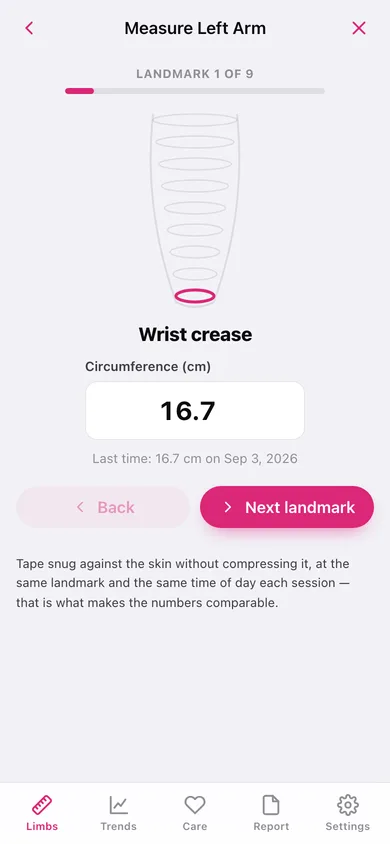
One landmark at a time with a schematic limb showing which ring you are on, a big entry field, and last session's reading for that exact landmark shown underneath.
Volume, computed the clinical way
Consecutive circumferences C1 and C2 spaced h cm apart form a truncated cone of h·(C1² + C1·C2 + C2²) ÷ 12π; nine landmarks give eight segments summed into millilitres.
Baseline, other side, and your own line
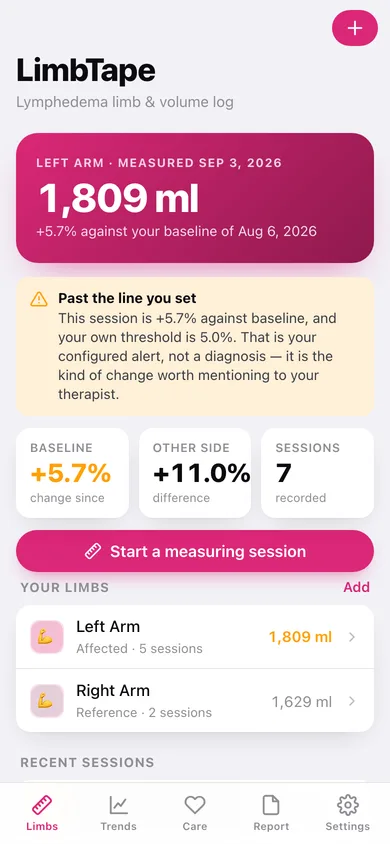
Mark any session as baseline, set a percentage threshold yourself, and every later session shows its change against baseline and against the contralateral limb — flagged, never diagnosed.
See which landmark is moving
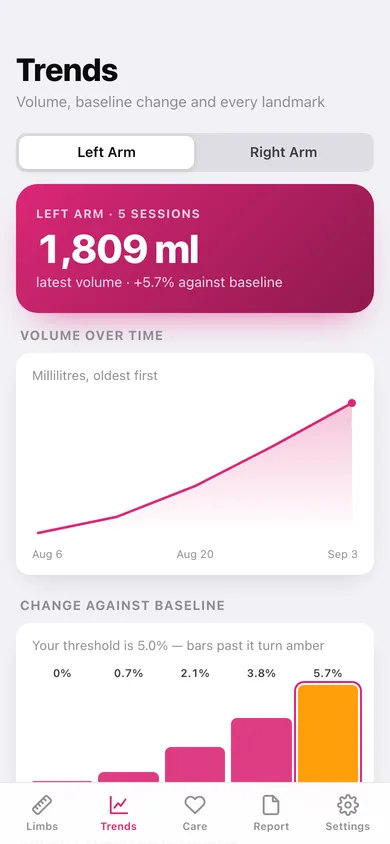
Volume over time, change against baseline as bars that turn amber past your threshold, and a landmark-by-landmark table of what changed since the first session.
Garments and how it feels
Log compression garments with a purchase date and lifespan so you know when they stop compressing, tick off wear days, and rate heaviness, tightness and aching 0–5 alongside the numbers.
A report you can hand over
Every limb, session, volume, percentage, garment and symptom laid out as one page you can copy, download or print — plus a CSV with one row per landmark per session.
Screens
Every screen, rebuilt for the browser
-
1
Limbs
Latest volume on the affected limb, change against baseline and against the other side, and every limb profile.
-
2
Limb detail
One limb: latest volume, baseline and threshold controls, every session and the symptoms logged for it.
-
3
Measuring session
The guided walk through each 4 cm landmark with the limb diagram, then a summary with the computed volume before you save.
-
4
Session detail
One session: volume, change against baseline and previous, every landmark with its delta, and the segment volumes as bars.
-
5
Trends
Volume over time, change against baseline with your threshold, and which landmark is driving it.
-
6
Care
Compression garments with replace-by dates and wear days, plus the symptom log.
-
7
Therapist report
The whole record as one page to copy, download or print, plus a CSV of every measurement.
-
8
Settings
Centimetres or inches, limb profiles, export, backup, sample data and erase.
Try it with sample data: Loads a bilateral arm setup — an affected left arm with five weekly sessions drifting to +5.7% against baseline (crossing a 5% threshold), a stable reference right arm, two compression garments and four symptom entries. You can start fresh at any time.
Ready? It's free.
No account, no install, no subscription. Everything you do stays in this browser.
Your say
What should LimbTape do? Tell us before we build it.
Tell us what to build next.
Comments need a free Google sign-in, so every one is from a real person.
Sign in with Google to commentNo comments yet — be the first to say what this app should do next.
Questions
Is the web version of LimbTape free?+
Yes. Every screen is free to use: no subscription, no in-app purchases, no account.
Do I need an account?+
No. Open LimbTape and start using it right away. Sign in with Google only if you want to upvote an app, save it to your list, or leave a comment.
Where is my data stored?+
Only in this browser's local storage. Nothing you enter is sent to our servers, so we can't see it, back it up, or restore it. Clearing site data, a private window, or another device starts empty. Export a backup from the in-app menu to keep it.
Is there a LimbTape app for iPhone or Android?+
Not yet. LimbTape is a community proposal: the browser version is complete, and we build the iPhone and Android app once 100 people upvote it. Upvoters get one email when it ships.