
Web app · Sports
LeaseCamp
Run your hunting club's books — roster, dues, workdays, stands and the lease
The officer's binder in a browser tab: who's square and who you still need to call, workday credits and make-up fines that post themselves, the stand book, harvests against club and per-member quotas, and a cost split that turns next season's dues into math. Free, everything unlocked.
Stored in your browser only. Nothing you do in the web version is sent to our servers. Clear your browser data and it's gone — so export a backup from the in-app menu if you want to keep it.
This app is a community proposal.
Try the full browser version now. We build the iPhone and Android app once 100 people upvote it.
We'll email you once, when it ships. Unsubscribe anytime.
In your browser
What you can do in LeaseCamp on the web
Roster and dues ledger
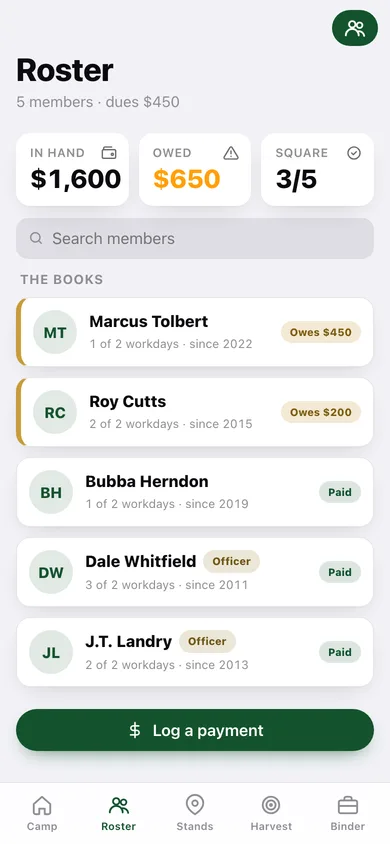
Every member with dues owed against paid, payment history by cash, check or transfer, workday balance and contact notes. Log a payment at the gate in ten seconds and the balance is right everywhere.
Workday credits and fines that post themselves
Set the club's rule once — required workdays and the make-up fine — then tick who showed up to plant plots and clear lanes. One button posts the fine to everyone short of the requirement, straight onto their dues balance.
The stand book
Every ladder, box blind, climber, ground blind and food plot with its condition, location note, last-maintained date and this season's assignment — the end of two trucks at one food plot.
Harvest log against quotas
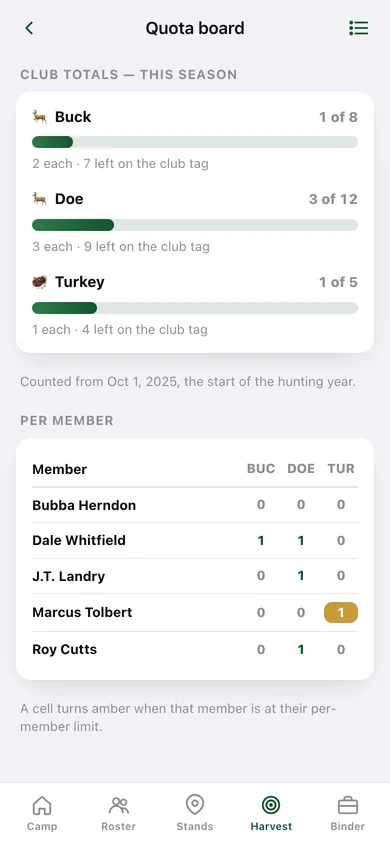
Bucks, does, turkey and hogs tied to member and stand, counted from October 1 so a December kill and a March kill land in the same hunting year, with a quota board for club and per-member limits.
Lease and insurance binder
The lease payment, the liability policy and every shared cost with renewal dates — anything due inside 60 days shows on the home screen before the landowner has to ask.
Cost split and the treasurer's packet
One slider pads the year for the corn nobody budgeted, then sets next season's dues per member. The season report prints dues status, workday balances, harvest vs quota and expenses, plus roster and harvest CSVs.
Screens
Every screen, rebuilt for the browser
-
1
Camp
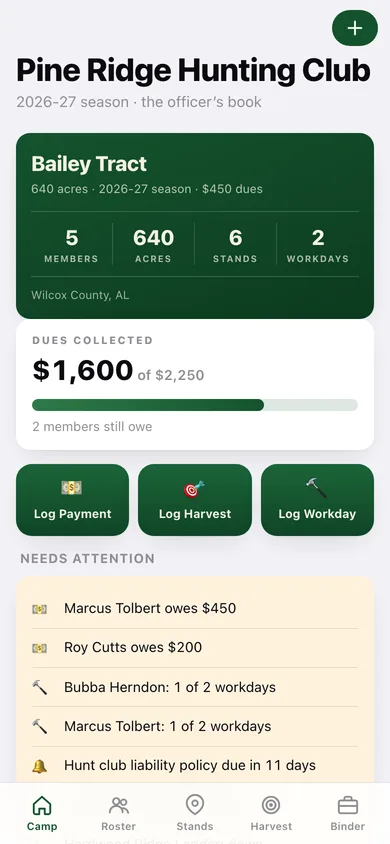
Club stats, dues collected against expected, the three quick logs and everything that needs attention.
-
2
Roster
Every member with what they owe, their workday balance and how long they have been in the club — the ones who owe sort to the top.
-
3
Quota board
Club totals per species against the limit, and a per-member grid that turns amber at somebody's cap.
-
4
Member
One member's balance, dues ledger, workdays and fines, stands assigned and harvests.
-
5
Stand book
Every stand with type, condition and this season's assignment.
-
6
Stand
One stand: condition, assignment, last maintained and everything taken off it.
-
7
Harvest log
Everything off the property this hunting year and before, by species, member and stand.
-
8
Workday ledger
Where every member stands against the requirement, the work events, and one button to post make-up fines.
-
9
Lease binder
The annual cost of the club, renewals inside 60 days and every shared line item.
-
10
Cost split
Total annual cost divided by active members, with an adjustment slider and a Set dues button.
-
11
Season report
The treasurer's packet with toggles for each section, plus roster and harvest CSV exports.
-
12
Club rules
The club's constitution in numbers: tract, dues, required workdays, make-up fine, quotas and the guest policy.
-
13
Settings
Club shortcuts, book totals, renewal warnings, backup, sample data and erase.
Try it with sample data: Loads Pine Ridge Hunting Club on the 640-acre Bailey Tract: five members with dues part-collected, three work events, six stands including one blown down, six harvests against buck, doe and turkey quotas, and a five-line lease binder. You can start fresh at any time.
Ready? It's free.
No account, no install, no subscription. Everything you do stays in this browser.
Your say
What should LeaseCamp do? Tell us before we build it.
Tell us what to build next.
Comments need a free Google sign-in, so every one is from a real person.
Sign in with Google to commentNo comments yet — be the first to say what this app should do next.
Questions
Is the web version of LeaseCamp free?+
Yes. Every screen is free to use: no subscription, no in-app purchases, no account.
Do I need an account?+
No. Open LeaseCamp and start using it right away. Sign in with Google only if you want to upvote an app, save it to your list, or leave a comment.
Where is my data stored?+
Only in this browser's local storage. Nothing you enter is sent to our servers, so we can't see it, back it up, or restore it. Clearing site data, a private window, or another device starts empty. Export a backup from the in-app menu to keep it.
Is there a LeaseCamp app for iPhone or Android?+
Not yet. LeaseCamp is a community proposal: the browser version is complete, and we build the iPhone and Android app once 100 people upvote it. Upvoters get one email when it ships.