
Web app · Lifestyle
Lawnplan
A 12-month lawn calendar timed for your grass type — cool or warm season
Pick fescue/bluegrass or bermuda/zoysia and Lawnplan lays out every pre-emergent, fertilizer, overseed and aeration window with the reason behind the timing, counts the 16-week germination block before you seed, and logs the product and rate you used. Free, nothing to install.
Stored in your browser only. Nothing you do in the web version is sent to our servers. Clear your browser data and it's gone — so export a backup from the in-app menu if you want to keep it.
This app is a community proposal.
Try the full browser version now. We build the iPhone and Android app once 100 people upvote it.
We'll email you once, when it ships. Unsubscribe anytime.
In your browser
What you can do in Lawnplan on the web
Real grass-type templates
The full cool-season and warm-season task sets from the iPhone app — 23 and 24 tasks across all 12 months, each with its timing guidance, not a placeholder list.
The pre-emergent vs overseed guard
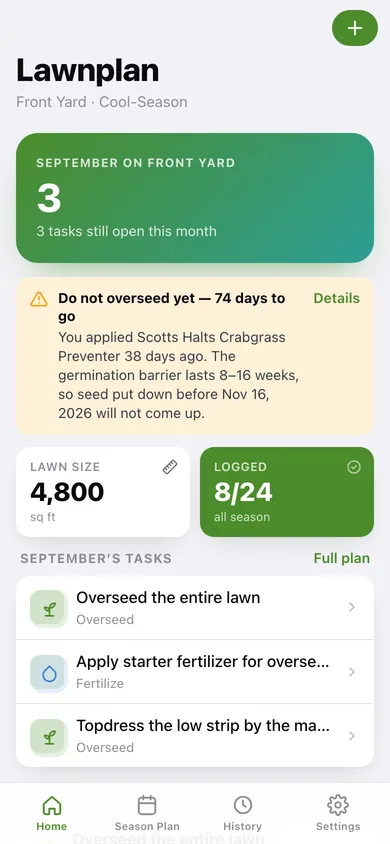
Log a pre-emergent and the home screen counts down the 8–16 week germination block, naming the date seed will actually come up.
Product and rate log
Mark a task complete with the product, the application rate and a note; every completion builds a searchable history you can export as CSV.
Square-footage product calculator
Turn a bag rate like 3.5 lbs per 1,000 sq ft into pounds for your lawn and the number of bags to buy, with the leftover shown.
As many lawns as you have
Front, back and the rental each get their own grass type, square footage and 12-month plan — switch between them from the season plan.
Yours, in this browser
No account and no server: lawns, plans and history are saved locally and exportable as JSON or CSV whenever you want.
Screens
Every screen, rebuilt for the browser
-
1
This month
Open tasks for the current month, the overseeding-block countdown, season progress and what is up next.
-
2
Season plan
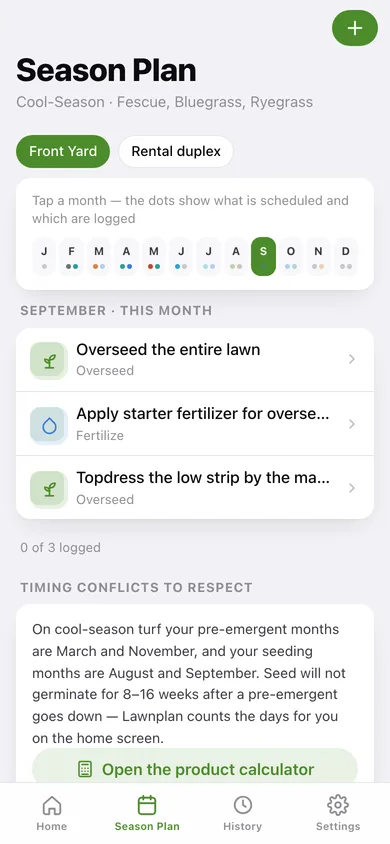
A 12-month ribbon showing what is scheduled and logged, with the task list for whichever month you tap.
-
3
Task detail
The timing guidance for one task plus the product, rate and notes you logged when you did it.
-
4
Custom task
Add your own task to any month of the plan with a category and your own guidance note.
-
5
Product calculator
Scale a bag rate to your square footage and see how many bags to buy.
-
6
History
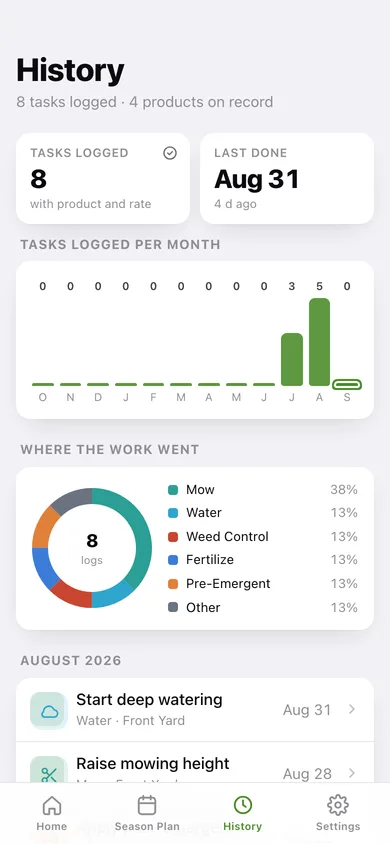
Every logged completion grouped by month, with tasks-per-month bars and a breakdown of where the work went.
-
7
Lawn profile
Name, grass type and square footage — changing grass type rebuilds the 12-month template.
-
8
Settings
All your lawns, CSV and JSON export, sample data and erase.
Try it with sample data: Loads a 4,800 sq ft cool-season Front Yard with eight tasks already logged with real products and rates over the last six weeks, a custom topdressing task, and a 3,200 sq ft warm-season Rental duplex with its own plan. You can start fresh at any time.
Ready? It's free.
No account, no install, no subscription. Everything you do stays in this browser.
Your say
What should Lawnplan do? Tell us before we build it.
Tell us what to build next.
Comments need a free Google sign-in, so every one is from a real person.
Sign in with Google to commentNo comments yet — be the first to say what this app should do next.
Questions
Is the web version of Lawnplan free?+
Yes. Every screen is free to use: no subscription, no in-app purchases, no account.
Do I need an account?+
No. Open Lawnplan and start using it right away. Sign in with Google only if you want to upvote an app, save it to your list, or leave a comment.
Where is my data stored?+
Only in this browser's local storage. Nothing you enter is sent to our servers, so we can't see it, back it up, or restore it. Clearing site data, a private window, or another device starts empty. Export a backup from the in-app menu to keep it.
Is there a Lawnplan app for iPhone or Android?+
Not yet. Lawnplan is a community proposal: the browser version is complete, and we build the iPhone and Android app once 100 people upvote it. Upvoters get one email when it ships.