
Web app · Travel
Lagless
Land sharp: a day-by-day jet-lag plan built before you take off
Pick two of 64 cities, a departure date and whether you are a morning or evening person. Lagless builds the Eastman/Burgess phase-shift plan — bright light, dark, sleep, caffeine and optional melatonin windows as colour-coded bands — and exports the lot to your calendar. Free, offline, no account.
Stored in your browser only. Nothing you do in the web version is sent to our servers. Clear your browser data and it's gone — so export a backup from the in-app menu if you want to keep it.
This app is a community proposal.
Try the full browser version now. We build the iPhone and Android app once 100 people upvote it.
We'll email you once, when it ships. Unsubscribe anytime.
In your browser
What you can do in Lagless on the web
Prep, flight, arrival and recovery
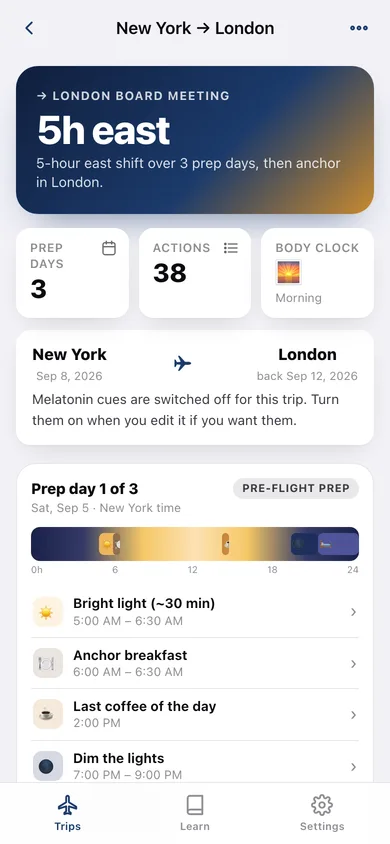
One to four pre-flight prep days that move your clock an hour at a time, a travel day with an in-flight sleep target, then up to four arrival days on destination time.
The 24-hour timeline
Every day is a night-to-day-to-night strip with each action as a coloured band, so you can see the whole shift at a glance instead of reading a list.
Chronotype-aware
Morning, neutral and evening people start from a 10pm, 11pm or midnight bedtime, and every window in the plan moves with it.
Six kinds of cue
Bright light, dark, sleep, caffeine cutoff, anchor meal and optional low-dose melatonin — tap any of them for the reason it is there.
Calendar export
Download an .ics of the whole plan; prep events keep home-city time and arrival events destination time, each with its explainer in the notes.
Twelve why-this-works lessons
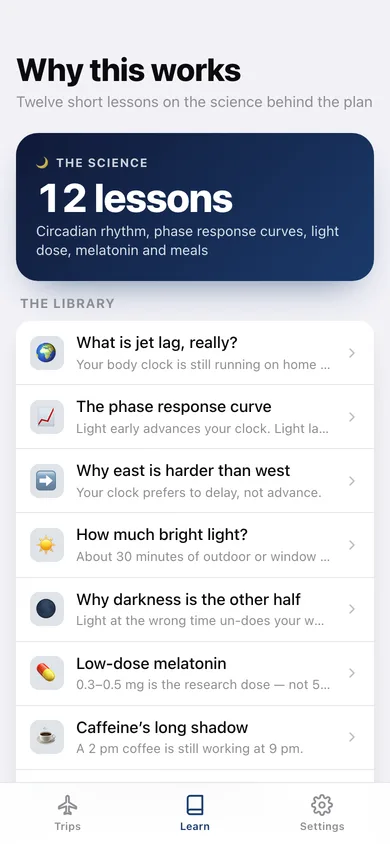
The phase response curve, why east is harder than west, light dose in lux, the 0.3–0.5 mg melatonin dose, caffeine half-life and meals as zeitgebers.
Trip journal that tunes the next plan
Rate how rested you landed from 0 to 10 and Lagless suggests what to change for the next trip in that direction.
Screens
Every screen, rebuilt for the browser
-
1
Trips
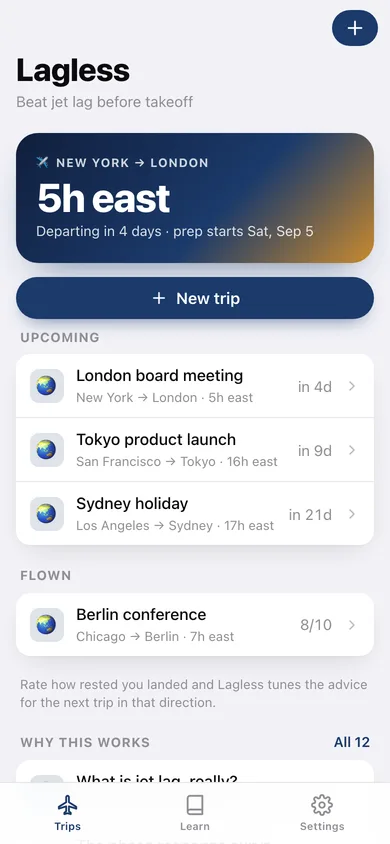
Your next departure, the hours you have to shift and every upcoming and flown trip.
-
2
The plan
Day cards with the 24-hour band timeline, every action and the trip journal.
-
3
New trip
Cities, dates, chronotype and melatonin — with a live preview of the shift and how many actions it takes.
-
4
Export to Calendar
An .ics of every action, or the whole plan as copyable text.
-
5
Trip journal
Rate how rested you landed, add a note and get a suggestion for the next trip.
-
6
Why this works
Twelve short lessons on circadian science, from the phase response curve to melatonin dosing.
-
7
Settings
Home city, chronotype and melatonin defaults, backup, sample data and erase.
Try it with sample data: Loads four trips — a 5-hour east hop to London in four days, Tokyo in nine, Sydney in three weeks and a flown Berlin conference already rated 8/10 — each with its full plan. You can start fresh at any time.
Ready? It's free.
No account, no install, no subscription. Everything you do stays in this browser.
Your say
What should Lagless do? Tell us before we build it.
Tell us what to build next.
Comments need a free Google sign-in, so every one is from a real person.
Sign in with Google to commentNo comments yet — be the first to say what this app should do next.
Questions
Is the web version of Lagless free?+
Yes. Every screen is free to use: no subscription, no in-app purchases, no account.
Do I need an account?+
No. Open Lagless and start using it right away. Sign in with Google only if you want to upvote an app, save it to your list, or leave a comment.
Where is my data stored?+
Only in this browser's local storage. Nothing you enter is sent to our servers, so we can't see it, back it up, or restore it. Clearing site data, a private window, or another device starts empty. Export a backup from the in-app menu to keep it.
Is there a Lagless app for iPhone or Android?+
Not yet. Lagless is a community proposal: the browser version is complete, and we build the iPhone and Android app once 100 people upvote it. Upvoters get one email when it ships.