
Web app · Medical
Labread
Paste a lab panel and read what every marker actually means
Labread is a personal lab binder: paste the results text from your portal, it pulls out each marker, places your number on its reference range, and explains in plain English what that marker measures and why a clinician orders it. Free, no account, nothing uploaded.
Stored in your browser only. Nothing you do in the web version is sent to our servers. Clear your browser data and it's gone — so export a backup from the in-app menu if you want to keep it.
This app is a community proposal.
Try the full browser version now. We build the iPhone and Android app once 100 people upvote it.
We'll email you once, when it ships. Unsubscribe anytime.
In your browser
What you can do in Labread on the web
Paste a panel, get it read back
The line parser pulls marker names, values and units out of the text your portal or at-home kit gives you, matches each against the library, and lets you fix anything it mangled before saving.
45-marker plain-English library
CBC, metabolic, kidney, liver, lipids, thyroid, vitamins, hormones and inflammation markers — each with a one-line definition, a full paragraph on what it measures and why it is ordered, and the typical adult reference range.
Reference-range bar on every result
Each reading is drawn on a padded range bar with a coloured dot, so you can see at a glance whether a number sits in the middle of the band, at its edge, or outside it.
Trends across panels
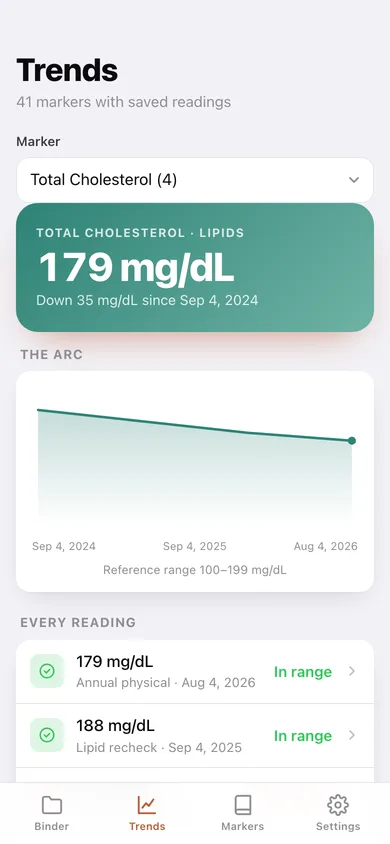
Pick any marker you have saved twice and see its arc over time, the change since your first reading, and every value with the panel it came from.
Notes and a copyable summary
Jot what your doctor said on each panel, and copy the whole panel — values, units and reference ranges — as text to send a specialist who was not copied on the original.
It never diagnoses
Labread explains and places; it does not interpret your health, recommend treatment, or replace the range printed on your own report.
Screens
Every screen, rebuilt for the browser
-
1
Binder
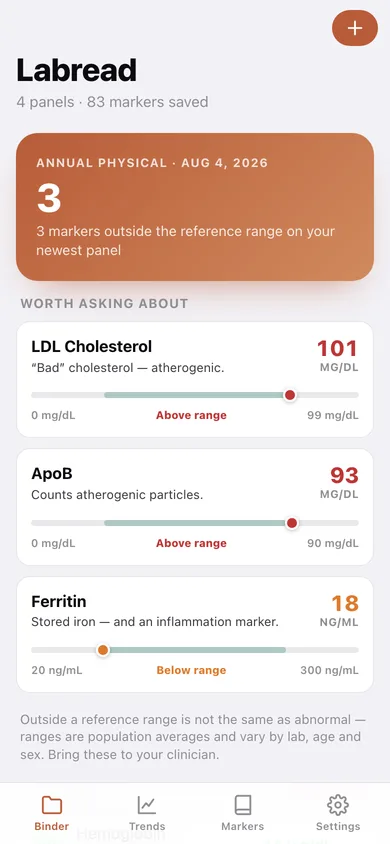
How many markers on your newest panel fall outside their reference range, the flagged ones up front, then every panel you have saved.
-
2
Add a panel
Paste the report text, review the markers the parser found, fix values and label the panel before saving.
-
3
Panel detail
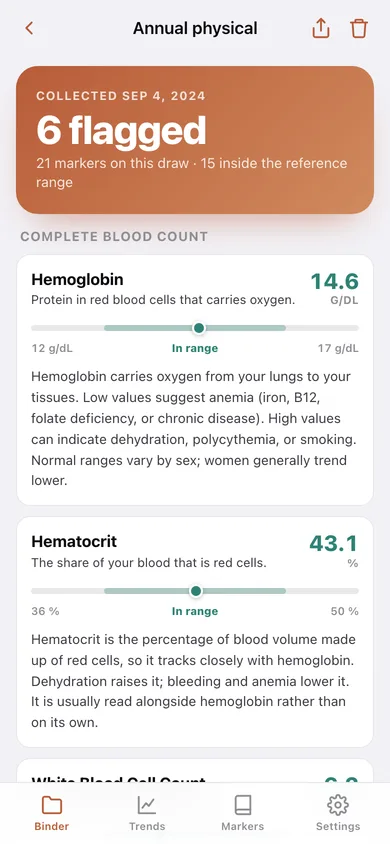
Every reading from one draw, grouped by category, each on its reference bar with the plain-English explanation, plus your notes.
-
4
Trends
One marker's arc across every panel, with the change since your first reading and the reference band called out.
-
5
Markers
The searchable library of markers by category, ticked where you have a saved reading.
-
6
Marker detail
Your latest value on the range, what the marker measures, the names labs print it under, and your arc.
-
7
Settings
CSV and JSON export, sample data, erase, and what Labread does and does not do.
Try it with sample data: Loads four panels spanning two years — an annual physical, two rechecks and a recent full workup — with 80-odd readings so the flagged list, the range bars and the trend arcs are all populated. You can start fresh at any time.
Ready? It's free.
No account, no install, no subscription. Everything you do stays in this browser.
Your say
What should Labread do? Tell us before we build it.
Tell us what to build next.
Comments need a free Google sign-in, so every one is from a real person.
Sign in with Google to commentNo comments yet — be the first to say what this app should do next.
Questions
Is the web version of Labread free?+
Yes. Every screen is free to use: no subscription, no in-app purchases, no account.
Do I need an account?+
No. Open Labread and start using it right away. Sign in with Google only if you want to upvote an app, save it to your list, or leave a comment.
Where is my data stored?+
Only in this browser's local storage. Nothing you enter is sent to our servers, so we can't see it, back it up, or restore it. Clearing site data, a private window, or another device starts empty. Export a backup from the in-app menu to keep it.
Is there a Labread app for iPhone or Android?+
Not yet. Labread is a community proposal: the browser version is complete, and we build the iPhone and Android app once 100 people upvote it. Upvoters get one email when it ships.