
Web app · Reference
Knotbench
Tie any of 30 knots — vector-drawn, step by step, in your browser
Bowline, cleat hitch, figure-8 follow-through, palomar, trucker's hitch and 25 more across boating, climbing, fishing, household and decorative — each drawn as line art that draws itself one step at a time, with when to use it, strength, failure mode, common mistakes and a practice timer. Free, no install.
Stored in your browser only. Nothing you do in the web version is sent to our servers. Clear your browser data and it's gone — so export a backup from the in-app menu if you want to keep it.
This app is a community proposal.
Try the full browser version now. We build the iPhone and Android app once 100 people upvote it.
We'll email you once, when it ships. Unsubscribe anytime.
In your browser
What you can do in Knotbench on the web
30 knots in five categories
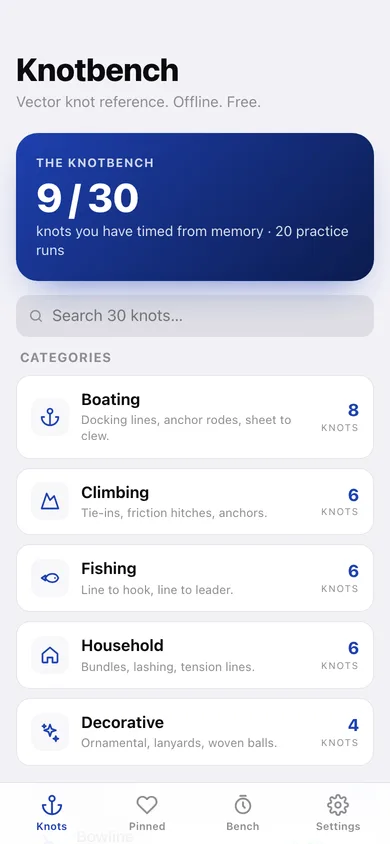
Boating (8), climbing (6), fishing (6), household (6) and decorative (4) — the full bench, nothing locked, nothing behind a subscription.
Vector line art, not photos
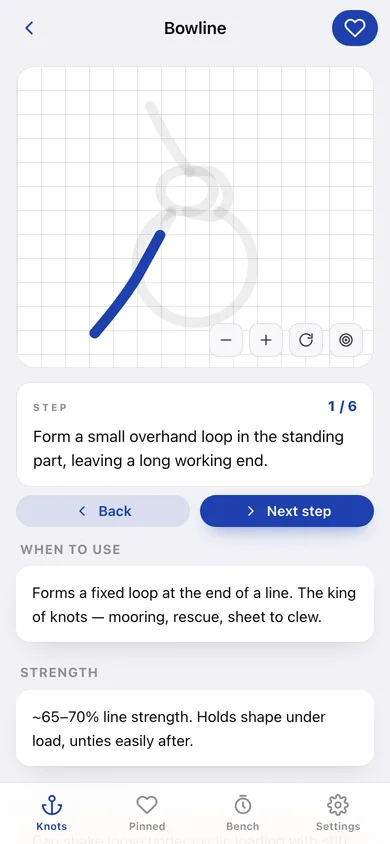
Every knot is an SVG path that stays crisp at any zoom, with zoom, rotate and reset controls on the canvas instead of the phone's pinch and twist.
Step-by-step draw-on
Advance the steps and the rope draws itself segment by segment, with the same wording and the same shorthand hints as the app — "rabbit out of the hole", "same direction!", "one lock only".
When to use, strength, failure mode, mistakes
Each knot carries its real notes: what it's for, roughly what percentage of line strength it holds, how it fails, and the mistakes that cause that failure.
Practice timer with best times
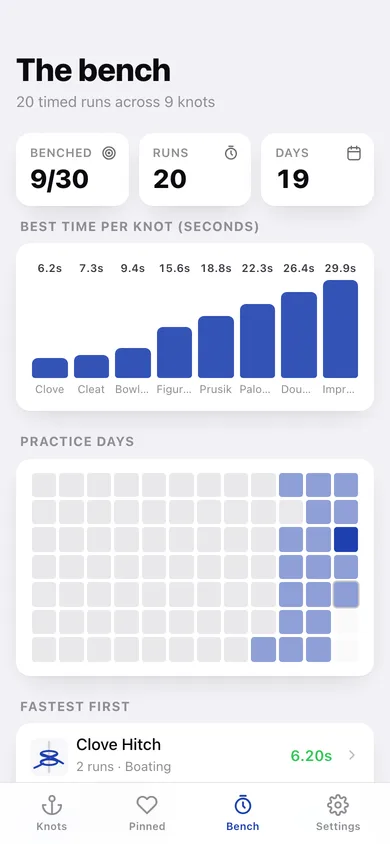
Pick a knot, tap START, tie it from memory, tap DONE. Every run is logged, your best time per knot is kept, and the bench charts what you can tie fast.
Favourites and a practice heatmap
Pin the knots you actually use, and see a 12-week heatmap of the days you practised plus a best-time-per-knot chart.
Screens
Every screen, rebuilt for the browser
-
1
Knotbench
How many knots you can tie from memory, a search across all 30, the five categories and your pinned knots.
-
2
Category
Every knot in one category with a thumbnail of its line art and your best time.
-
3
Knot canvas
The vector canvas with zoom/rotate, step controls, and the use, strength, failure-mode and mistakes notes.
-
4
Practice timer
Pick a knot, time yourself tying it from memory, and keep the best run.
-
5
Favourites
The knots you pinned for quick access at the dock, the crag or the riverbank.
-
6
The bench
Best time per knot, a 12-week practice heatmap and every knot you have timed, fastest first.
-
7
Settings
Rope thickness, canvas grid, backup export, sample data and clearing your times.
Try it with sample data: Pins five knots and adds twenty timed practice runs over the last three weeks — a bowline coming down from 21.9s to 9.4s, plus cleat hitch, clove hitch, figure-8 follow-through, palomar, trucker's hitch and more. You can start fresh at any time.
Ready? It's free.
No account, no install, no subscription. Everything you do stays in this browser.
Your say
What should Knotbench do? Tell us before we build it.
Tell us what to build next.
Comments need a free Google sign-in, so every one is from a real person.
Sign in with Google to commentNo comments yet — be the first to say what this app should do next.
Questions
Is the web version of Knotbench free?+
Yes. Every screen is free to use: no subscription, no in-app purchases, no account.
Do I need an account?+
No. Open Knotbench and start using it right away. Sign in with Google only if you want to upvote an app, save it to your list, or leave a comment.
Where is my data stored?+
Only in this browser's local storage. Nothing you enter is sent to our servers, so we can't see it, back it up, or restore it. Clearing site data, a private window, or another device starts empty. Export a backup from the in-app menu to keep it.
Is there a Knotbench app for iPhone or Android?+
Not yet. Knotbench is a community proposal: the browser version is complete, and we build the iPhone and Android app once 100 people upvote it. Upvoters get one email when it ships.