
Web app · Medical
Kintalk
One calm screen, four huge buttons, and one good question a day
The companion set up for an aging parent: a daily “How was today?”, 50 hand-picked conversation prompts the browser reads aloud, one-tap family and emergency dialling, and a Family review where the adult child reads every answer. Free, no account, nothing uploaded.
Stored in your browser only. Nothing you do in the web version is sent to our servers. Clear your browser data and it's gone — so export a backup from the in-app menu if you want to keep it.
This app is a community proposal.
Try the full browser version now. We build the iPhone and Android app once 100 people upvote it.
We'll email you once, when it ships. Unsubscribe anytime.
In your browser
What you can do in Kintalk on the web
Four buttons, nothing else
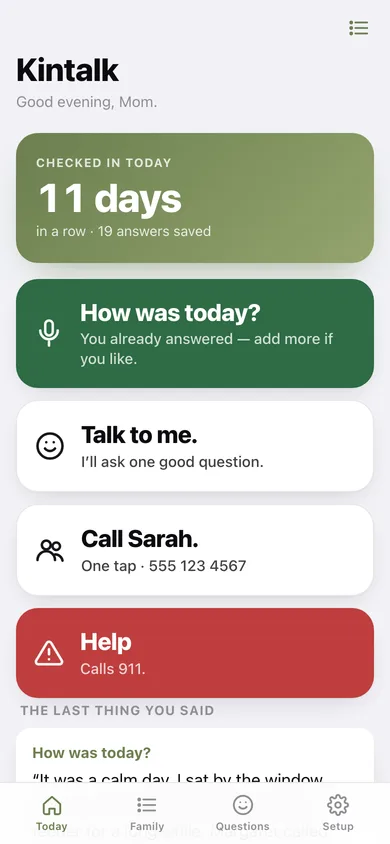
How was today? · Talk to me · Call your daughter · Help. Big type, high contrast, no menus, no swipes, no scrollback to get lost in.
50 hand-picked questions
Open-ended, never yes-or-no, never about health — the first job, the green chair, the song you'd dance to. The browser reads one out loud and waits.
A daily check-in that builds a streak
One answer a day, and the home screen counts the run of days plus every answer saved.
Family review
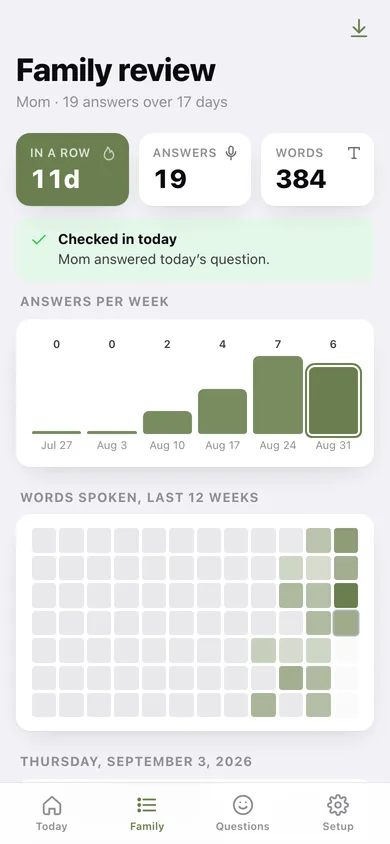
Day-by-day answers with answers-per-week bars, a 12-week words heatmap and a one-tap plain-text transcript to send on.
One-tap calling
The family number becomes a real dial button, and Help asks once before it dials your emergency number.
Set up once, by the family
Their name, who to call, the emergency number and the check-in hour — the setup screen the person using the phone never has to see.
Screens
Every screen, rebuilt for the browser
-
1
Today
The greeting, the check-in streak, and the four large buttons.
-
2
Answer a question
The question in big type, a Read-it-to-me button, and room to write the answer.
-
3
Family review
Streak, answers per week, a words heatmap and every answer grouped by day.
-
4
One answer
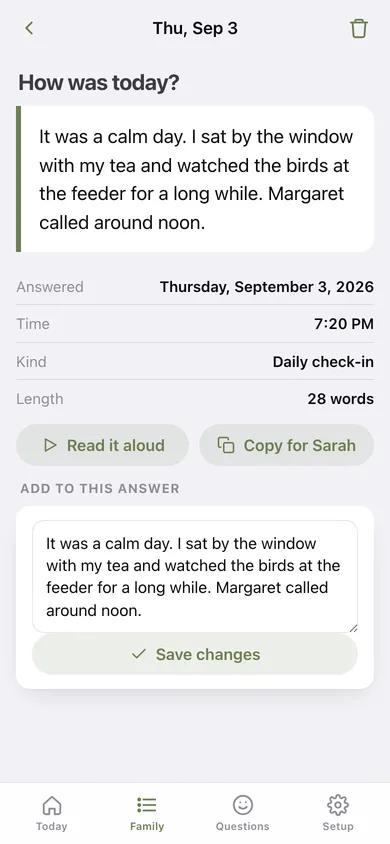
The question, the answer as a pull-quote, read-aloud, copy-for-family and edit.
-
5
Questions
All 50 conversation prompts, searchable, with the ones already answered ticked off.
-
6
Setup
Their name, who to call, emergency number, check-in hour, transcript export and erase.
Try it with sample data: Loads three weeks of Mom's answers — nineteen check-ins mixing the daily question with conversation prompts about her first job, her grandmother's house and the green chair. You can start fresh at any time.
Ready? It's free.
No account, no install, no subscription. Everything you do stays in this browser.
Your say
What should Kintalk do? Tell us before we build it.
Tell us what to build next.
Comments need a free Google sign-in, so every one is from a real person.
Sign in with Google to commentNo comments yet — be the first to say what this app should do next.
Questions
Is the web version of Kintalk free?+
Yes. Every screen is free to use: no subscription, no in-app purchases, no account.
Do I need an account?+
No. Open Kintalk and start using it right away. Sign in with Google only if you want to upvote an app, save it to your list, or leave a comment.
Where is my data stored?+
Only in this browser's local storage. Nothing you enter is sent to our servers, so we can't see it, back it up, or restore it. Clearing site data, a private window, or another device starts empty. Export a backup from the in-app menu to keep it.
Is there a Kintalk app for iPhone or Android?+
Not yet. Kintalk is a community proposal: the browser version is complete, and we build the iPhone and Android app once 100 people upvote it. Upvoters get one email when it ships.