
Web app · Lifestyle
Kindred
Fifty questions worth asking before it’s too late
The whole Kindred prompt deck — 50 one-sentence questions in 9 categories — plus a written archive of the answers, a register of the people you’re recording, and a timeline that draws itself from the years you tag. Free in the browser, no account.
Stored in your browser only. Nothing you do in the web version is sent to our servers. Clear your browser data and it's gone — so export a backup from the in-app menu if you want to keep it.
This app is a community proposal.
Try the full browser version now. We build the iPhone and Android app once 100 people upvote it.
We'll email you once, when it ships. Unsubscribe anytime.
In your browser
What you can do in Kindred on the web
The complete 50-prompt deck
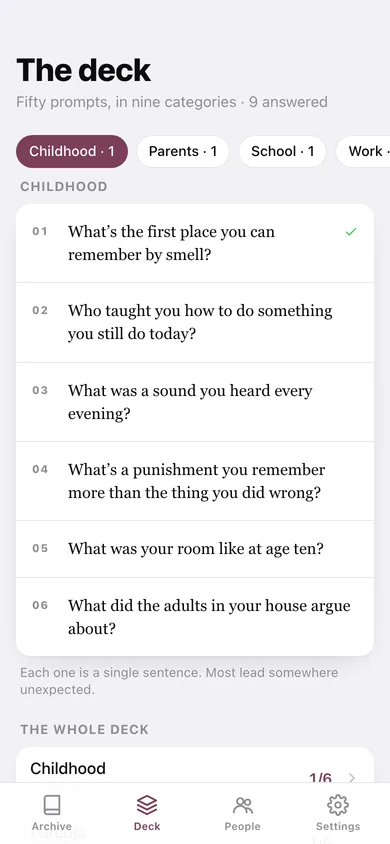
Every question from the iPhone app, in nine categories: childhood, parents, school, work, love, big decisions, faith, family rituals and the year you’d live again. Answered prompts get a tick so you can see what is left.
One prompt a week
The archive puts a single question in front of you and leaves it there for the week — no streaks, no scolding, no notification you have to dismiss.
A written story per answer
Keep the words with a sitting timer running beside you, tag who told it and the year it happened, then edit the transcript whenever you remember more.
The people register
Name, relationship, the years they were here, and the single sentence you’d want to say to them — written now, badly, rather than later, perfectly.
A timeline of a life
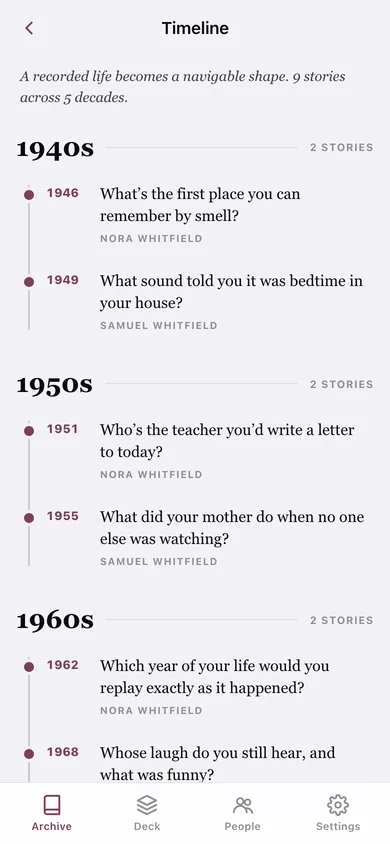
Stories arrange themselves by decade along a spine, so a recorded life becomes a shape you can navigate.
You own the files
Export one story or the whole archive as plain text ready to email a relative, or take a CSV or JSON backup. Nothing is ever uploaded.
Screens
Every screen, rebuilt for the browser
-
1
Archive
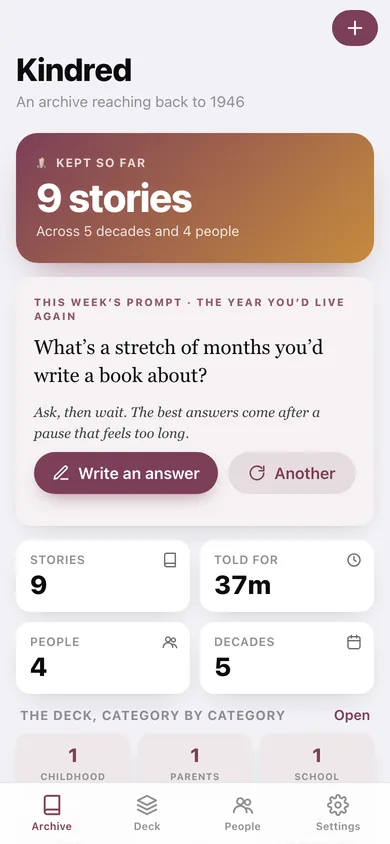
How much is kept, this week’s prompt, coverage across the nine categories, the latest stories and the people.
-
2
The deck
All fifty prompts, filtered by category, with a tick beside the ones you have answered.
-
3
Prompt
One question full-size with the asking tip, the answers you have kept, and the rest of its category.
-
4
Keep this one
The prompt, a sitting clock, the transcript, who told it and the year it happened.
-
5
Story
A kept story with its transcript, teller, year, and one-tap export or share.
-
6
Timeline
Every tagged story on a spine, grouped by decade.
-
7
People
Who you are recording, and who you are recording for.
-
8
Person
Their one sentence, the years, and every story kept for them.
-
9
Add or edit a person
Name, relationship, the years, and the one sentence.
-
10
Settings
What Kindred promises, the deck at a glance, text/CSV/JSON export, sample data and erase.
Try it with sample data: Loads four people — Nora and Samuel Whitfield, Tomás Reyes and Aunt Beatrice — and nine stories tagged from 1946 to 1984, so the archive, the deck ticks and the timeline all fill out. You can start fresh at any time.
Ready? It's free.
No account, no install, no subscription. Everything you do stays in this browser.
Your say
What should Kindred do? Tell us before we build it.
Tell us what to build next.
Comments need a free Google sign-in, so every one is from a real person.
Sign in with Google to commentNo comments yet — be the first to say what this app should do next.
Questions
Is the web version of Kindred free?+
Yes. Every screen is free to use: no subscription, no in-app purchases, no account.
Do I need an account?+
No. Open Kindred and start using it right away. Sign in with Google only if you want to upvote an app, save it to your list, or leave a comment.
Where is my data stored?+
Only in this browser's local storage. Nothing you enter is sent to our servers, so we can't see it, back it up, or restore it. Clearing site data, a private window, or another device starts empty. Export a backup from the in-app menu to keep it.
Is there a Kindred app for iPhone or Android?+
Not yet. Kindred is a community proposal: the browser version is complete, and we build the iPhone and Android app once 100 people upvote it. Upvoters get one email when it ships.