
Web app · Travel
JetLag Quiet
The pre-flight light and sleep schedule that beats jet lag — free
Give it your home zone, where you are flying and when, plus your usual wake time. JetLag Quiet computes a day-by-day plan of bright-light, dim, sleep, caffeine-cutoff and optional melatonin windows, and hands you an .ics file for any calendar. No account, no per-trip fee.
Stored in your browser only. Nothing you do in the web version is sent to our servers. Clear your browser data and it's gone — so export a backup from the in-app menu if you want to keep it.
This app is a community proposal.
Try the full browser version now. We build the iPhone and Android app once 100 people upvote it.
We'll email you once, when it ships. Unsubscribe anytime.
In your browser
What you can do in JetLag Quiet on the web
A real phase-shift plan
The published method (Eastman, Burgess): a conservative one-hour daily shift, up to four prep days, capped so it never overshoots your actual time difference.
Knows east from west
Eastward advances your clock — bright light on waking, earlier sleep. Westward delays it — bright light eleven hours after waking, later sleep. Melatonin timing flips with the direction.
Every window, every day
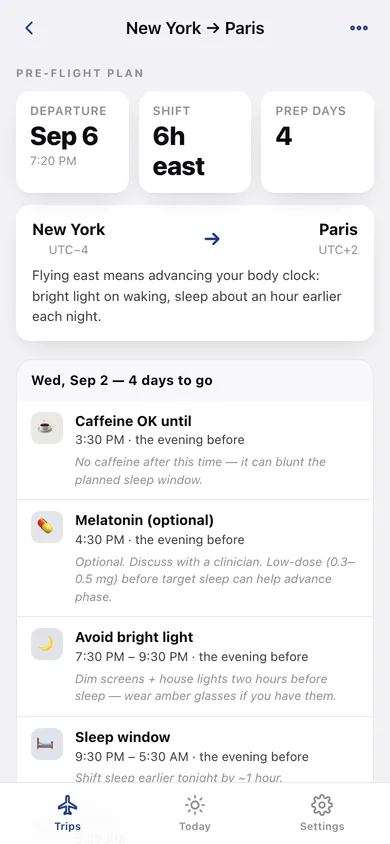
Wake, sleep, bright light, dim, caffeine cutoff and optional low-dose melatonin, from the first prep day through the day after you land.
Calendar export as .ics
One event per action, written in UTC from your home clock, so Apple Calendar, Google Calendar and Outlook all import them correctly.
Today view
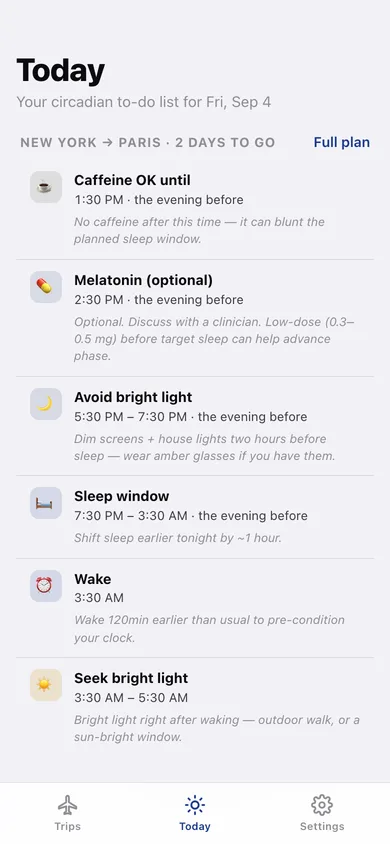
Just the cues for today, across whichever trip is currently shifting your clock.
Real IANA time zones
27 traveller zones plus your own, with daylight saving handled by your browser — offset math, not guesswork.
Screens
Every screen, rebuilt for the browser
-
1
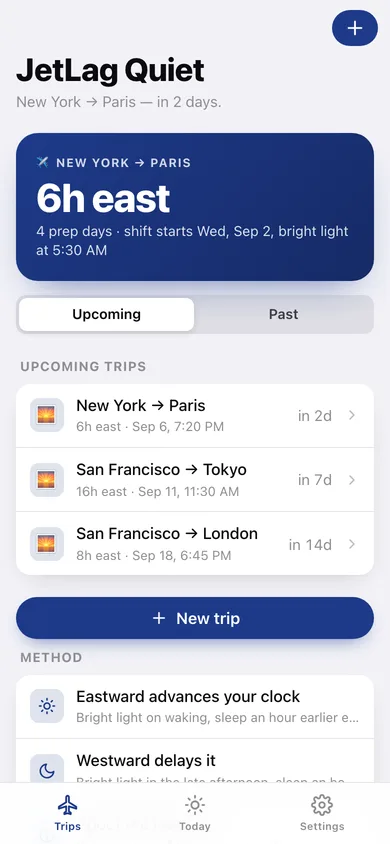
Trips
Your next flight, the hours you have to shift, and every upcoming and past trip.
-
2
Schedule
The day-by-day plan: light, dim, sleep, caffeine and melatonin windows with the reason for each.
-
3
Today
Only the cues that apply today, with the times on your home clock.
-
4
New trip
Home zone, destination, flight date and time, wake time — the shift is computed as you pick.
-
5
Add to Calendar
Download the whole plan as an .ics file or copy it as text.
-
6
Reminders
Choose which cues you want nudges for and see every one of their times.
-
7
Settings
Default wake time and home zone, the method behind the plan, backup, sample data and erase.
Try it with sample data: Loads four routes — New York → Paris in two days (so Today has cues), San Francisco → Tokyo in a week, San Francisco → London in two weeks and a past Chicago → Honolulu — each with its full computed schedule. You can start fresh at any time.
Ready? It's free.
No account, no install, no subscription. Everything you do stays in this browser.
Your say
What should JetLag Quiet do? Tell us before we build it.
Tell us what to build next.
Comments need a free Google sign-in, so every one is from a real person.
Sign in with Google to commentNo comments yet — be the first to say what this app should do next.
Questions
Is the web version of JetLag Quiet free?+
Yes. Every screen is free to use: no subscription, no in-app purchases, no account.
Do I need an account?+
No. Open JetLag Quiet and start using it right away. Sign in with Google only if you want to upvote an app, save it to your list, or leave a comment.
Where is my data stored?+
Only in this browser's local storage. Nothing you enter is sent to our servers, so we can't see it, back it up, or restore it. Clearing site data, a private window, or another device starts empty. Export a backup from the in-app menu to keep it.
Is there a JetLag Quiet app for iPhone or Android?+
Not yet. JetLag Quiet is a community proposal: the browser version is complete, and we build the iPhone and Android app once 100 people upvote it. Upvoters get one email when it ships.