
Web app · Lifestyle
Japa
One tap per repetition, a ring that fills at 108
A calm mala counter for daily sadhana: unlimited mantras with their own daily goal, a big tap surface with a quiet timer, and a history that shows malas, beads and the streak of days you kept coming back. Free in the browser, no account.
Stored in your browser only. Nothing you do in the web version is sent to our servers. Clear your browser data and it's gone — so export a backup from the in-app menu if you want to keep it.
This app is a community proposal.
Try the full browser version now. We build the iPhone and Android app once 100 people upvote it.
We'll email you once, when it ships. Unsubscribe anytime.
In your browser
What you can do in Japa on the web
The 108-bead counter
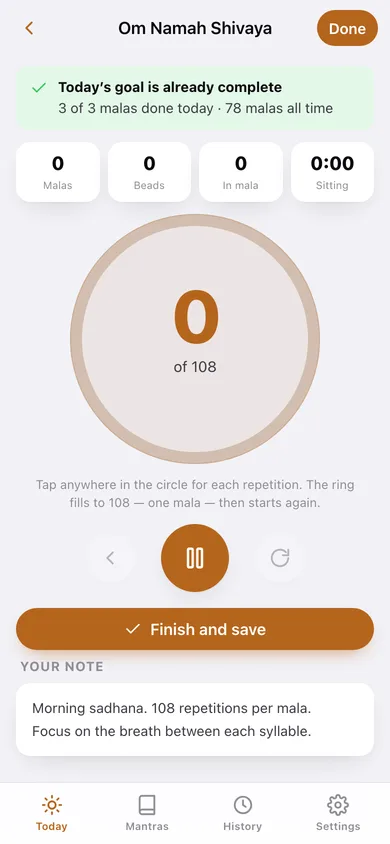
A large tap circle counts each repetition, a ring fills to 108 and starts again, and malas, beads, beads-in-mala and the sitting timer stay on screen the whole time.
A gentle pulse at each mala
Your device vibrates softly on every bead and more firmly when a mala completes, so your eyes can stay closed — with an optional chime if you want one.
Unlimited mantras with notes
Name each mantra, keep a personal note on pronunciation or meaning, and set its own daily goal in malas.
Daily goal and streak
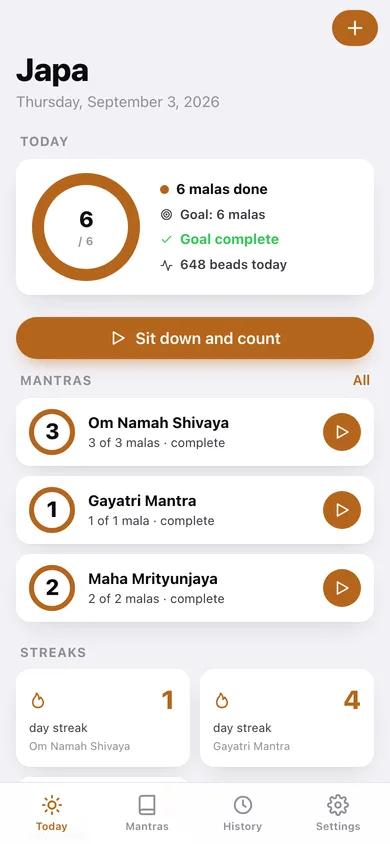
The Today ring shows every mantra's goal combined; each mantra keeps its own streak of consecutive days the goal was met.
Per-mantra history and lifetime totals
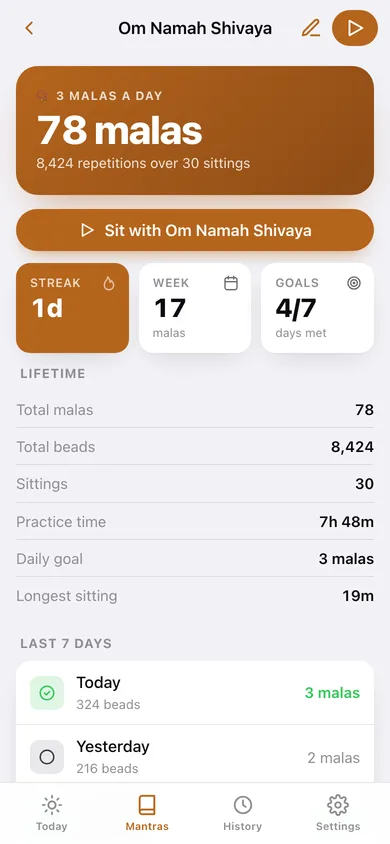
Total malas, beads, sittings and practice time, this week's goals met, a seven-day log and a twelve-week practice map.
Export your practice
Pull every sitting out as a CSV, or take a full JSON backup of your mantras and history.
Screens
Every screen, rebuilt for the browser
-
1
Today
The combined goal ring, a card per mantra with a mini ring and a start button, streaks and this week's malas.
-
2
Counter
The tap surface: ring to 108, malas / beads / in-mala / timer, undo, pause and reset.
-
3
Mantras
Every mantra with today's progress, its daily goal, lifetime malas and current streak.
-
4
Mantra
Lifetime totals, streak, goals met this week, the last seven days and a twelve-week practice map.
-
5
Add or edit a mantra
Name, personal notes and the daily goal in malas.
-
6
History
Every sitting grouped by day, with malas per week and the practice map.
-
7
Settings
Vibration, the optional mala chime, CSV export, backup, sample data and erase.
Try it with sample data: Loads three mantras — Om Namah Shivaya at 3 malas a day, the Gayatri Mantra at 1 and Maha Mrityunjaya at 2 — with sixty-six sittings across the last month. You can start fresh at any time.
Ready? It's free.
No account, no install, no subscription. Everything you do stays in this browser.
Your say
What should Japa do? Tell us before we build it.
Tell us what to build next.
Comments need a free Google sign-in, so every one is from a real person.
Sign in with Google to commentNo comments yet — be the first to say what this app should do next.
Questions
Is the web version of Japa free?+
Yes. Every screen is free to use: no subscription, no in-app purchases, no account.
Do I need an account?+
No. Open Japa and start using it right away. Sign in with Google only if you want to upvote an app, save it to your list, or leave a comment.
Where is my data stored?+
Only in this browser's local storage. Nothing you enter is sent to our servers, so we can't see it, back it up, or restore it. Clearing site data, a private window, or another device starts empty. Export a backup from the in-app menu to keep it.
Is there a Japa app for iPhone or Android?+
Not yet. Japa is a community proposal: the browser version is complete, and we build the iPhone and Android app once 100 people upvote it. Upvoters get one email when it ships.