
Web app · Productivity
Inventr
Disclose. Date-stamp. Defend. The solo inventor's workbench, in your browser
SHA-256 date-stamp every invention the moment you write it down, run the 12-month provisional conversion and grace-period clocks, log prior art with your distinguishing rationale, sketch claims from apparatus/method/CRM templates, and price the April-2025 USPTO fee schedule. Free, nothing uploaded.
Stored in your browser only. Nothing you do in the web version is sent to our servers. Clear your browser data and it's gone — so export a backup from the in-app menu if you want to keep it.
This app is a community proposal.
Try the full browser version now. We build the iPhone and Android app once 100 people upvote it.
We'll email you once, when it ships. Unsubscribe anytime.
In your browser
What you can do in Inventr on the web
Date-stamped disclosure log
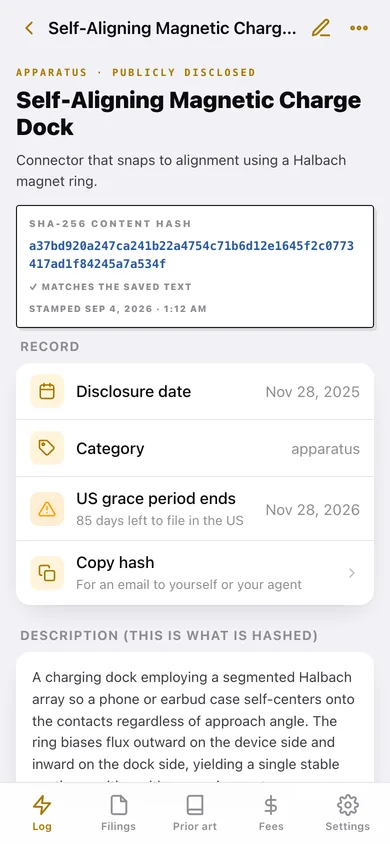
Every invention gets a SHA-256 hash of its title and description computed in this browser the moment you save — and the app re-checks it against the saved text every time you open the record.
The clocks that kill applications
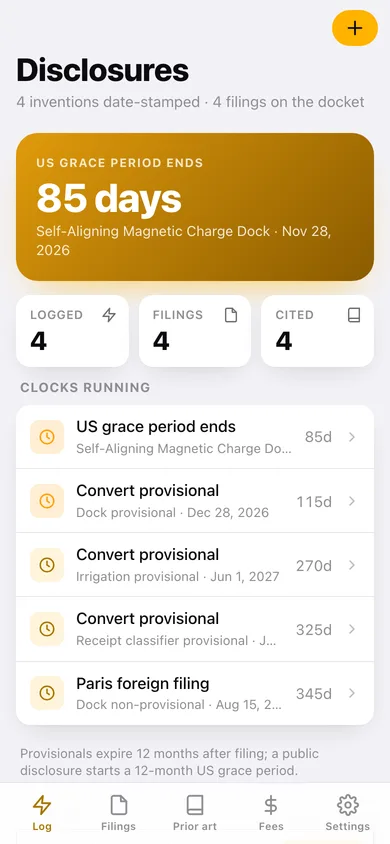
A 12-month conversion countdown on every provisional, the 12-month US grace period from any public disclosure, the Paris convention window and the PCT 30-month national-phase date — all on one board, soonest first.
USPTO filing docket
Provisional, non-provisional, design, PCT, foreign and continuation applications with application number, CPC/USPC classification, examiner and status.
Prior art with a distinguishing rationale
Patents, publications, products, conferences and web references with the excerpt and — the sentence a patent agent asks for first — why your claim is different.
Claim sketch pad
Draft independent and dependent claims, starting from real apparatus, method and CRM (software) claim templates, versioned per invention.
34 bundled USPTO fees
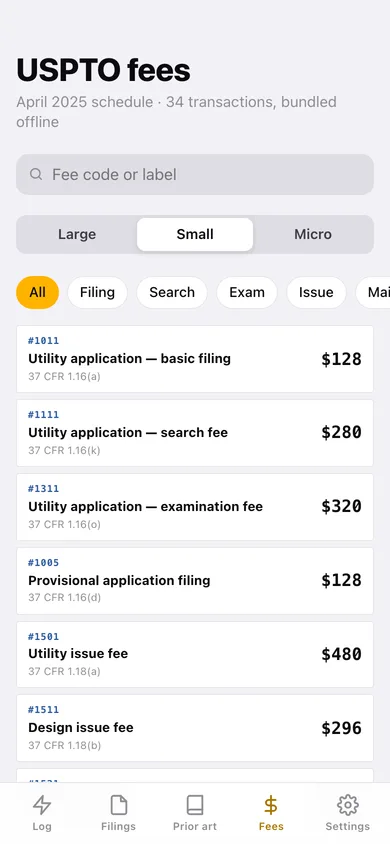
The April 2025 schedule — filing, search, exam, issue, maintenance, RCE, extensions, appeal and petition — re-priced instantly for large, small or micro entity.
Screens
Every screen, rebuilt for the browser
-
1
Disclosure log
The nearest statutory deadline, the clocks running, and every date-stamped invention with its hash.
-
2
Disclosure record
The full SHA-256 stamp with a match check, grace clock, description, filings, prior art and claim drafts for one invention.
-
3
New disclosure
Title, summary, category, date, public-disclosure switch and the description that gets hashed.
-
4
Filings
The USPTO docket with statutory clock cards and every application's number, classification, examiner and status.
-
5
Prior art
Every citation grouped by invention, with the excerpt and your distinguishing rationale.
-
6
USPTO fees
The bundled April 2025 fee schedule, searchable and filtered by category, priced for large, small or micro entity.
-
7
Settings
Default entity size, docket counts, backup, sample workbench and erase.
Try it with sample data: Loads four inventions — a magnetic charge dock, an adaptive irrigation method, an on-device receipt classifier and a beehive frame lifter — with four filings (two with live conversion countdowns), four prior-art citations and two claim drafts. You can start fresh at any time.
Ready? It's free.
No account, no install, no subscription. Everything you do stays in this browser.
Your say
What should Inventr do? Tell us before we build it.
Tell us what to build next.
Comments need a free Google sign-in, so every one is from a real person.
Sign in with Google to commentNo comments yet — be the first to say what this app should do next.
Questions
Is the web version of Inventr free?+
Yes. Every screen is free to use: no subscription, no in-app purchases, no account.
Do I need an account?+
No. Open Inventr and start using it right away. Sign in with Google only if you want to upvote an app, save it to your list, or leave a comment.
Where is my data stored?+
Only in this browser's local storage. Nothing you enter is sent to our servers, so we can't see it, back it up, or restore it. Clearing site data, a private window, or another device starts empty. Export a backup from the in-app menu to keep it.
Is there a Inventr app for iPhone or Android?+
Not yet. Inventr is a community proposal: the browser version is complete, and we build the iPhone and Android app once 100 people upvote it. Upvoters get one email when it ships.