
Web app · Lifestyle
Ins & Outs
Turn your opinions into a card worth posting
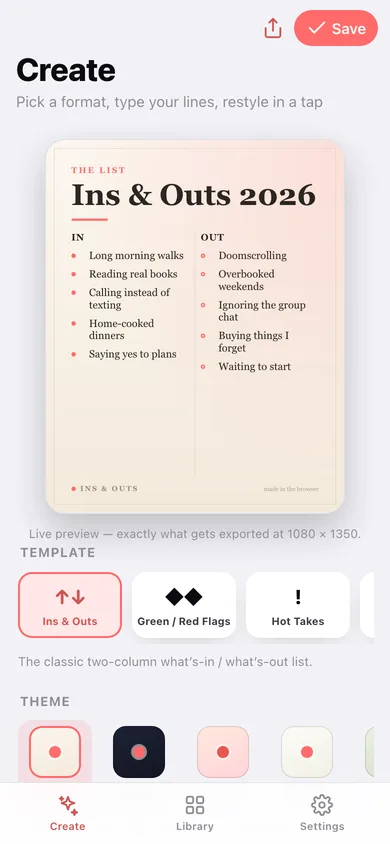
Five viral list formats — Ins & Outs, Green/Red Flags, Hot Takes, The Roster and 2026 Bingo — restyled in one tap with five curated themes, previewed live and exported at 1080 × 1350. Free in the browser, no account, no install.
Stored in your browser only. Nothing you do in the web version is sent to our servers. Clear your browser data and it's gone — so export a backup from the in-app menu if you want to keep it.
In your browser
What you can do in Ins & Outs on the web
Five list-card templates
The two-column Ins & Outs, the Green Flags / Red Flags checklist with pennant markers, Hot Takes with arrows, a numbered Roster, and a 3×3 2026 Bingo grid — each with its own kicker, markers and line limit.
Five curated themes
Editorial cream serif, Midnight deep-ink, playful Sorbet peach, zine-style Mono and botanical Sage — all built from system fonts and warm colour, swapped in a single tap.
The preview is the export
One drawing routine renders the 1080 × 1350 card on screen and in the file, so what you see is exactly what you share — no surprises after the download.
PNG for social, SVG for print
Save the ideal 4:5 share image, or take the vector version that stays sharp blown up to a poster. You can also copy the whole list as plain text for a caption.
Ten starter lists
Two ready-made cards per format — Ins & Outs 2026, Flatmate Flag Check, Food Hot Takes, Albums Of The Year, Group Chat Bingo — that drop straight into the editor for you to rewrite.
A library of your cards
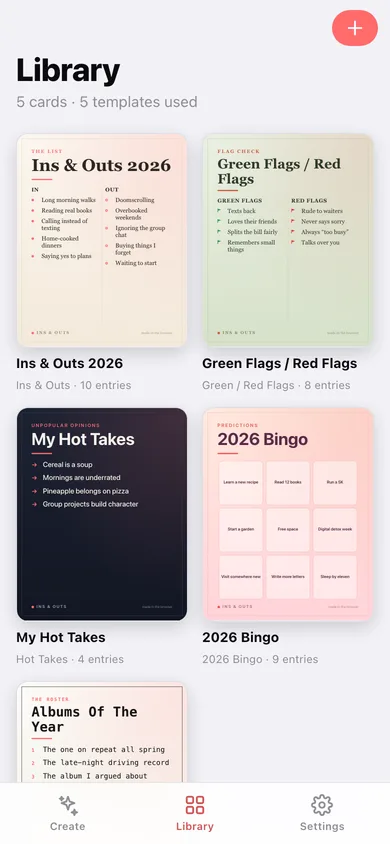
Every card you save is kept as a thumbnail you can reopen, edit, duplicate into a different theme, or re-share.
Screens
Every screen, rebuilt for the browser
-
1
Create
Live preview, template chips, theme chips, title and your lines — the whole editor on one screen.
-
2
Library
Every saved card as a real thumbnail, grouped by format.
-
3
Card
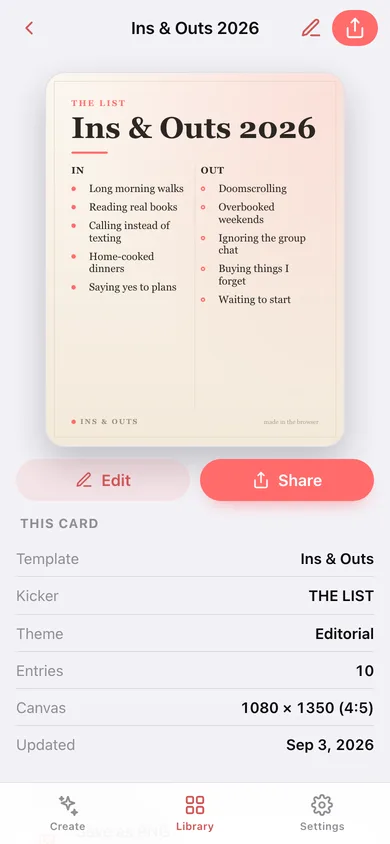
The finished card full-size with share, PNG and SVG export, duplicate-and-restyle and delete.
-
4
Edit card
The same editor bound to a saved card.
-
5
Starter lists
Ten ready-made cards, two per format, previewed and one tap from the editor.
-
6
Settings
Default template and theme, the theme reference, export, sample cards and erase.
Try it with sample data: Loads five finished cards — Ins & Outs 2026 in Editorial, Green Flags / Red Flags in Sage, My Hot Takes in Midnight, 2026 Bingo in Sorbet and Albums Of The Year in Mono. You can start fresh at any time.
Ready? It's free.
No account, no install, no subscription. Everything you do stays in this browser.
Your say
Is Ins & Outs useful? Tell us what to build next.
Sign in with Google to vote.
Tell us what to build next.
Comments need a free Google sign-in, so every one is from a real person.
Sign in with Google to commentNo comments yet — be the first to say what this app should do next.
Questions
Is the web version of Ins & Outs free?+
Yes. Every screen is free to use: no subscription, no in-app purchases, no account.
Do I need an account?+
No. Open Ins & Outs and start using it right away. Sign in with Google only if you want to upvote an app, save it to your list, or leave a comment.
Where is my data stored?+
Only in this browser's local storage. Nothing you enter is sent to our servers, so we can't see it, back it up, or restore it. Clearing site data, a private window, or another device starts empty. Export a backup from the in-app menu to keep it.
How is the web version different from the Ins & Outs phone app?+
The card is drawn as vector artwork, so it uses the fonts your browser has rather than the iPhone's system faces — a serif or monospaced theme may look slightly different from the phone. Sharing opens your browser's share sheet where one exists; otherwise the list is copied to your clipboard and the image is saved as a file you attach yourself. Cards are saved in this browser only, so a different device or a cleared cache starts empty; use the JSON export to move a library across.