
Web app · Health And Fitness
InnerSense
Learn to feel hunger, thirst and a full bladder before the crisis
The occupational-therapy interoception protocol, running end to end in your browser: a guided six-region body scan with a controlled sensation vocabulary and intensity dial, a matching action for every cue, check-ins that fade as you tune in, and a pattern view that names the ignored signal. Free, no account.
Stored in your browser only. Nothing you do in the web version is sent to our servers. Clear your browser data and it's gone — so export a backup from the in-app menu if you want to keep it.
This app is a community proposal.
Try the full browser version now. We build the iPhone and Android app once 100 people upvote it.
We'll email you once, when it ships. Unsubscribe anytime.
In your browser
What you can do in InnerSense on the web
The guided body scan
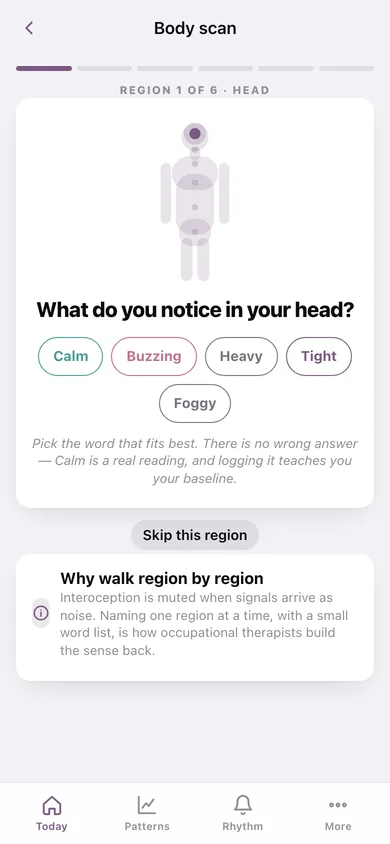
Head, jaw, throat, chest, stomach, bladder — one region at a time on a body diagram, each with its own short word list so the choice stays small enough to make while you are dysregulated.
A 15-word sensation vocabulary
Tight, empty, buzzing, heavy, dry, lumpy, knotted, foggy and the rest, each with a felt-sense hint, plus a 1–5 intensity dial — so you don't have to invent words for feelings you were never taught to name.
A matching action for every cue
Every region-and-sensation pair maps to one concrete next step — eat, drink, use the bathroom, unclench, step away, breathe, move, rest — and you mark whether you did it or skipped it.
Check-ins that fade
The cadence thins from every 3 hours to every 8 as your own quick logs pile up, because the goal is noticing without the phone. Your active hours set where the prompts land.
Leading indicators, not hindsight
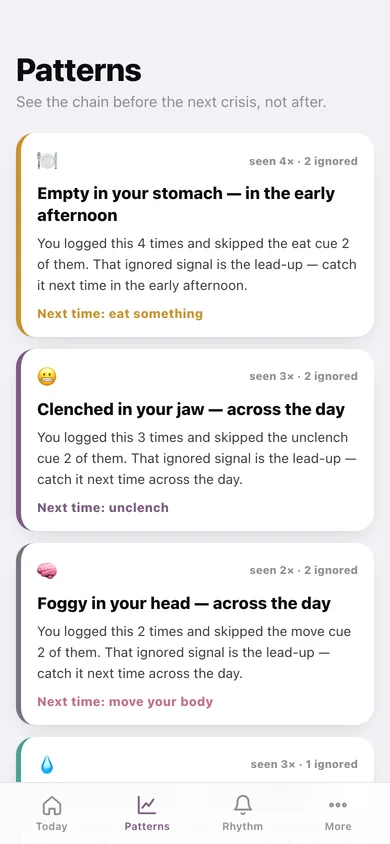
A cue you logged twice and ignored twice becomes a named pattern — "Empty in your stomach, in the early afternoon" — with the time of day it tends to hit and the action to take before it builds.
Quick cues between scans
Noticed something on your own? Log one cue in three taps, see its matching action, and watch that self-log push the prompts further apart.
Screens
Every screen, rebuilt for the browser
-
1
Today
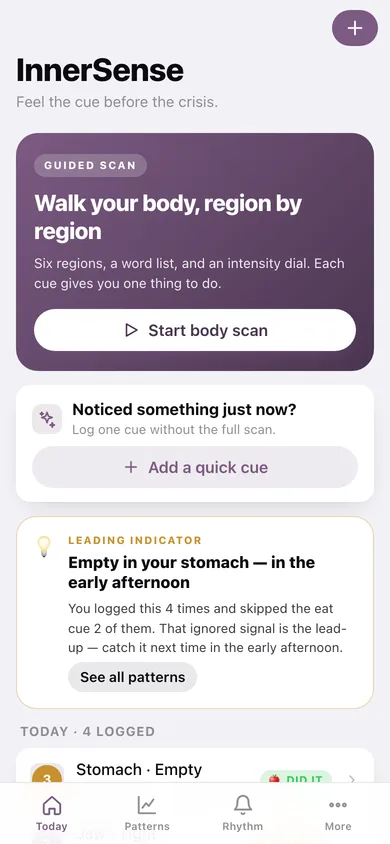
Start a scan, log a quick cue, read the leading indicator, and see everything you noticed today.
-
2
Body scan
The guided walk: a body diagram with the region lit, its word list, the intensity dial and a matching action per cue.
-
3
Quick cue
One cue without the full scan — pick the region, the word, the intensity, and log it done or not now.
-
4
Scan detail
Everything one scan turned up, which actions you followed through, and the note you left.
-
5
History
Every saved scan and quick cue, grouped by day, with the cues each one caught.
-
6
Patterns
Recurring cues ranked by how often you ignored them, with the time of day they land and where cues cluster on the body.
-
7
Rhythm
Your current cadence, the check-in times inside your active hours, and how the fade works.
-
8
Sensation words
All 15 words with their felt-sense hints, which words belong to which region, and the eight matching actions.
-
9
More
Practice counts, what interoception is, cue CSV and JSON export, sample data and erase.
Try it with sample data: Loads a week of practice: a repeating 2pm 'empty stomach' cue ignored twice then finally caught, a second jaw-clenching chain, an all-calm morning baseline, an evening bladder cue acted on, and two quick self-logs — enough for two leading indicators to surface. You can start fresh at any time.
Ready? It's free.
No account, no install, no subscription. Everything you do stays in this browser.
Your say
What should InnerSense do? Tell us before we build it.
Tell us what to build next.
Comments need a free Google sign-in, so every one is from a real person.
Sign in with Google to commentNo comments yet — be the first to say what this app should do next.
Questions
Is the web version of InnerSense free?+
Yes. Every screen is free to use: no subscription, no in-app purchases, no account.
Do I need an account?+
No. Open InnerSense and start using it right away. Sign in with Google only if you want to upvote an app, save it to your list, or leave a comment.
Where is my data stored?+
Only in this browser's local storage. Nothing you enter is sent to our servers, so we can't see it, back it up, or restore it. Clearing site data, a private window, or another device starts empty. Export a backup from the in-app menu to keep it.
Is there a InnerSense app for iPhone or Android?+
Not yet. InnerSense is a community proposal: the browser version is complete, and we build the iPhone and Android app once 100 people upvote it. Upvoters get one email when it ships.