
Web app · Lifestyle
Inkwell
Know exactly what’s inked and which nib is due a flush
A pen catalogue with nib grade and filling system, an ink library you browse as a colour-swatch grid, and pairings that count the days since the fill so ink never dries in a feed. Free in the browser, no account, no install.
Stored in your browser only. Nothing you do in the web version is sent to our servers. Clear your browser data and it's gone — so export a backup from the in-app menu if you want to keep it.
This app is a community proposal.
Try the full browser version now. We build the iPhone and Android app once 100 people upvote it.
We'll email you once, when it ships. Unsubscribe anytime.
In your browser
What you can do in Inkwell on the web
Pen catalogue
Brand, model, nib grade (EF through Fude), filling system — cartridge, converter, piston, vacuum, eyedropper, button, lever, crescent, snorkel — body colour and notes, grouped by brand and searchable.
Ink library as a colour grid
Every bottle and sample with its real swatch hex, shown as a scrollable palette with a live writing preview when you pick the colour, or as a plain list.
Pairings with a cleaning clock
Pair a pen with an ink, set the flush window in days, and a progress ring counts the days since the fill — amber the moment it is overdue.
Ink a pen that’s already loaded
Filling an inked pen files the previous fill as cleaned first, so the history stays honest without any bookkeeping.
Full history per pen and per ink
Every ink a pen has ever run, every pen an ink has been in, with fill and clean dates and how many days it sat.
Export the collection
Pull every pairing out as a CSV, or take a full JSON backup of pens, inks and fills.
Screens
Every screen, rebuilt for the browser
-
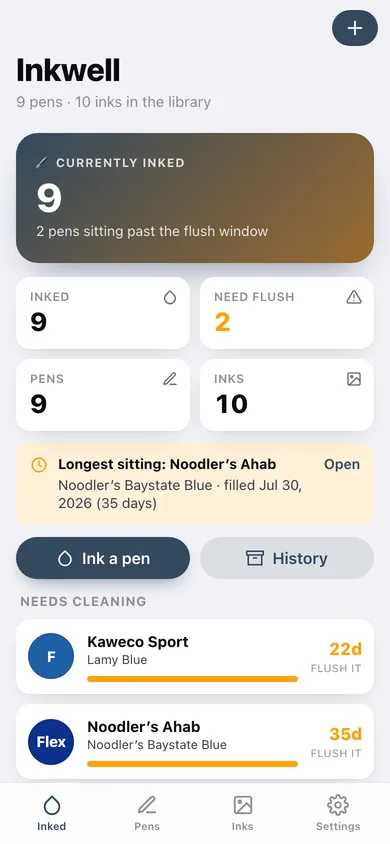
1
Inked
How many pens are inked, which are past their flush window, and a card per pairing with a cleaning bar.
-
2
Pen case
Every pen grouped by brand with its nib grade, filling system and what is loaded right now.
-
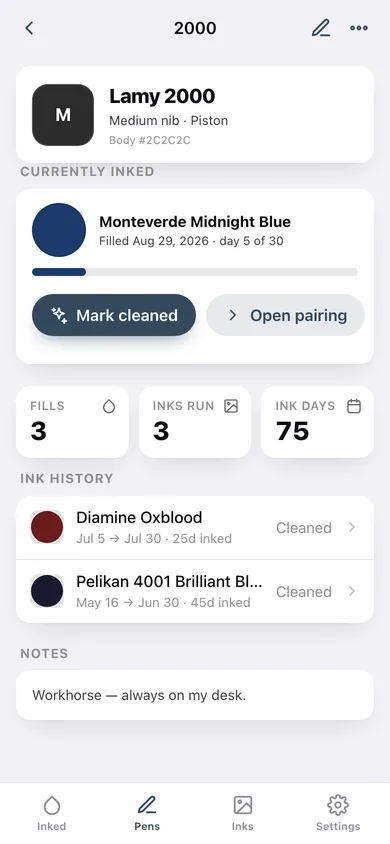
3
Pen detail
Body colour, nib, filling system, the current fill with its cleaning bar, and every ink this pen has run.
-
4
Add or edit a pen
Brand, model, nib grade, filling system, body colour and notes.
-
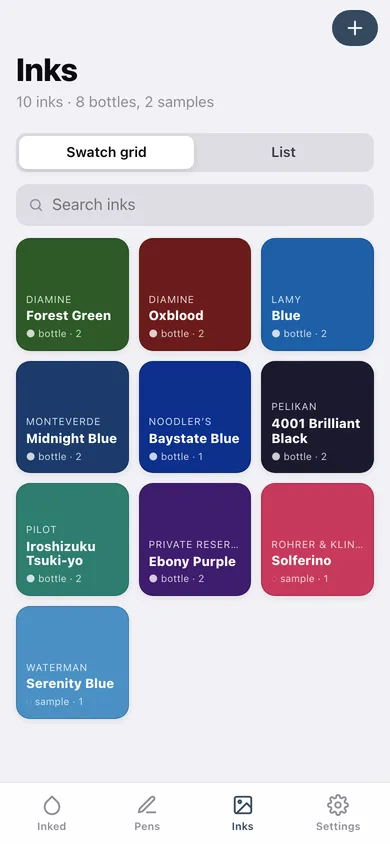
5
Ink library
The whole collection as a colour-swatch grid or a list, searchable by brand and name.
-
6
Ink detail
A full-bleed swatch, bottle or sample, and every pen that has run it.
-
7
Add or edit an ink
Brand, name, swatch colour with a writing preview and a fountain-pen palette, bottle or sample, notes.
-
8
Ink a pen
Pick a pen and an ink, set the fill date and the flush window.
-
9
Pairing
The cleaning ring, days left before a flush, full details and Mark cleaned.
-
10
Pairing history
Every fill month by month, with average days from fill to flush and your most-used ink.
-
11
Settings
Default flush window, library view, CSV export, backup, sample data and erase.
Try it with sample data: Loads nine pens (Lamy 2000, Pelikan M400, TWSBI Eco, Noodler’s Ahab and more), ten inks with real swatch colours, nine current fills — one already past its flush window — and eight cleaned pairings going back four months. You can start fresh at any time.
Ready? It's free.
No account, no install, no subscription. Everything you do stays in this browser.
Your say
What should Inkwell do? Tell us before we build it.
Tell us what to build next.
Comments need a free Google sign-in, so every one is from a real person.
Sign in with Google to commentNo comments yet — be the first to say what this app should do next.
Questions
Is the web version of Inkwell free?+
Yes. Every screen is free to use: no subscription, no in-app purchases, no account.
Do I need an account?+
No. Open Inkwell and start using it right away. Sign in with Google only if you want to upvote an app, save it to your list, or leave a comment.
Where is my data stored?+
Only in this browser's local storage. Nothing you enter is sent to our servers, so we can't see it, back it up, or restore it. Clearing site data, a private window, or another device starts empty. Export a backup from the in-app menu to keep it.
Is there a Inkwell app for iPhone or Android?+
Not yet. Inkwell is a community proposal: the browser version is complete, and we build the iPhone and Android app once 100 people upvote it. Upvoters get one email when it ships.