
Web app · Utilities
Homewarden
Every model, serial and warranty in your house — kept where no company can delete it
Log your furnace, fridge and water heater room by room, track warranty end dates and filter sizes, work the bundled seasonal-maintenance checklist, and export the whole home binder. Free, no install, no account — it lives in this browser.
Stored in your browser only. Nothing you do in the web version is sent to our servers. Clear your browser data and it's gone — so export a backup from the in-app menu if you want to keep it.
This app is a community proposal.
Try the full browser version now. We build the iPhone and Android app once 100 people upvote it.
We'll email you once, when it ships. Unsubscribe anytime.
In your browser
What you can do in Homewarden on the web
Room-by-room appliance log
Kitchen, Laundry, HVAC, Garage, Bathroom, Basement, Exterior and Other — with brand, model number, serial number, purchase date, filter size and notes on every record.
Data-plate reader
Paste the text off the label and the same parser the iPhone camera feeds pulls out the model and serial — it understands 'MODEL NO.', 'S/N', 'Serial number' and label-then-value plates.
The bundled seasonal checklist
All eight tasks from the iPhone app — HVAC filter, smoke and CO detectors, water-heater flush, gutters, HVAC service, ceiling fans, softener salt, roof and flashing — each with its cadence, season and next-due date.
Warranty and filter tracker
Warranties sorted soonest-to-lapse with Covered / days-left / Lapsed badges and a coverage bar, plus every filter size in one tappable list you can copy at the store.
The home binder
A one-page binder of every appliance grouped by room with model, serial, warranty, filter and manual reference — downloadable as text or CSV for insurance or a house sale.
Nothing to shut down
Records stay in this browser. No account, no cloud, no subscription — the exact opposite of the cloud home apps that vanished and took their users' manuals with them.
Screens
Every screen, rebuilt for the browser
-
1
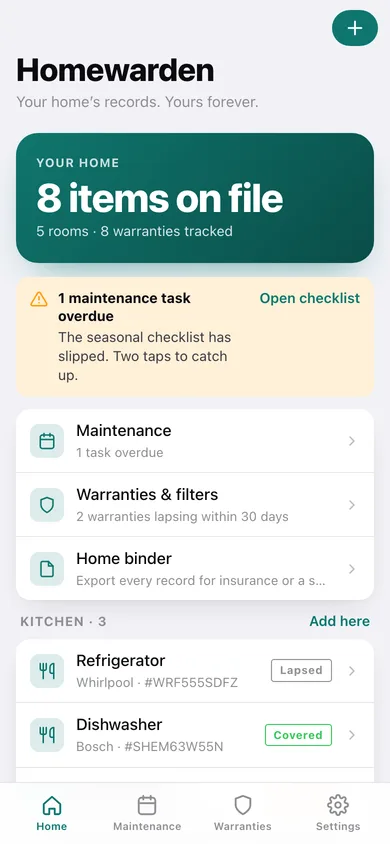
Your home
Items on file, overdue maintenance and lapsing warranties up top, then every appliance grouped by room with its warranty badge.
-
2
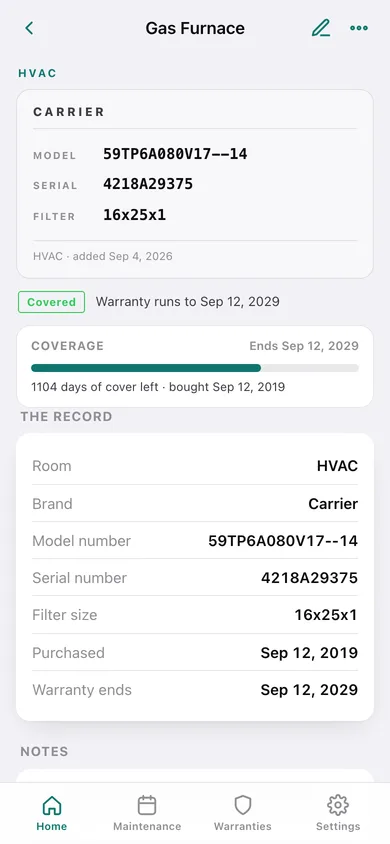
Appliance record
The data plate — model, serial and filter size in monospace — with a warranty coverage bar, notes, and manual and receipt references.
-
3
Add or edit an appliance
Name, room, brand, identifiers, purchase and warranty dates, references and notes, with the plate-text reader to fill model and serial.
-
4
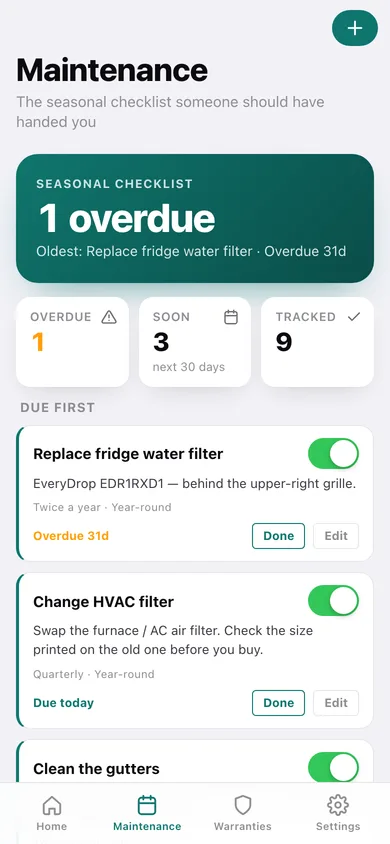
Maintenance
The seasonal checklist sorted due-first, each task with its cadence, season, due countdown and a Done button that rolls it forward.
-
5
Maintenance task
Add or edit a task: title, detail, cadence from monthly to every two years, season and when you last did it.
-
6
Warranties & filters
Coverage counts, every warranty soonest-to-lapse, and the filter sizes for each appliance.
-
7
Home binder
A printable one-page binder of the whole house, downloadable as text or a CSV spreadsheet.
-
8
Settings
Warning window, checklist restore, backup and restore, sample data and erase.
Try it with sample data: Loads an eight-appliance house — furnace, water heater, fridge, dishwasher, washer, garage-door opener, range hood and sump pump across five rooms — with real model and serial numbers, warranties that are covered, lapsing and lapsed, filter sizes, and the nine-task maintenance checklist staggered so some tasks read overdue. You can start fresh at any time.
Ready? It's free.
No account, no install, no subscription. Everything you do stays in this browser.
Your say
What should Homewarden do? Tell us before we build it.
Tell us what to build next.
Comments need a free Google sign-in, so every one is from a real person.
Sign in with Google to commentNo comments yet — be the first to say what this app should do next.
Questions
Is the web version of Homewarden free?+
Yes. Every screen is free to use: no subscription, no in-app purchases, no account.
Do I need an account?+
No. Open Homewarden and start using it right away. Sign in with Google only if you want to upvote an app, save it to your list, or leave a comment.
Where is my data stored?+
Only in this browser's local storage. Nothing you enter is sent to our servers, so we can't see it, back it up, or restore it. Clearing site data, a private window, or another device starts empty. Export a backup from the in-app menu to keep it.
Is there a Homewarden app for iPhone or Android?+
Not yet. Homewarden is a community proposal: the browser version is complete, and we build the iPhone and Android app once 100 people upvote it. Upvoters get one email when it ships.