
Web app · Health And Fitness
Histamine Bucket
A histamine bucket that fills as you eat and drains as you clear
The cumulative-load food diary built on bucket theory: 230 bundled histamine/DAO food ratings, a live bucket with your points and overflow risk, a reaction log charted against your reconstructed level, and a threshold you calibrate from your own data. Free, offline.
Stored in your browser only. Nothing you do in the web version is sent to our servers. Clear your browser data and it's gone — so export a backup from the in-app menu if you want to keep it.
This app is a community proposal.
Try the full browser version now. We build the iPhone and Android app once 100 people upvote it.
We'll email you once, when it ships. Unsubscribe anytime.
In your browser
What you can do in Histamine Bucket on the web
The bucket, live
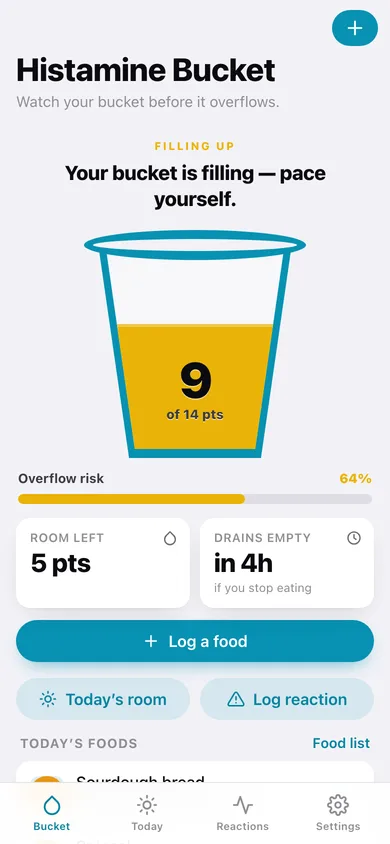
Every logged food adds points — very low 0, low 1, moderate 3, high 6 — and the bucket drains at your own rate per hour, so the number you see is your real cumulative load right now.
230 bundled food ratings
Nine categories from Dairy & Eggs to Fish & Seafood, each food rated very low, low, moderate or high with the points it adds. Search or browse; nothing is looked up over a network.
Today's room
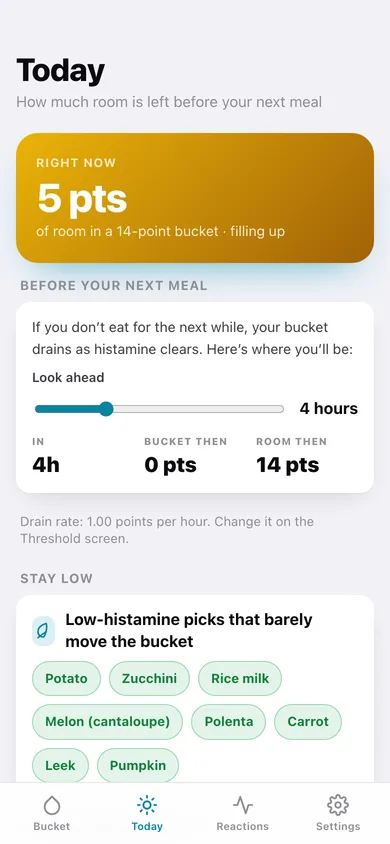
How many points of headroom are left before the rim, plus a projection of where the bucket will be in one to twelve hours if you stop eating — and low-histamine picks that barely move it.
Reactions against your level
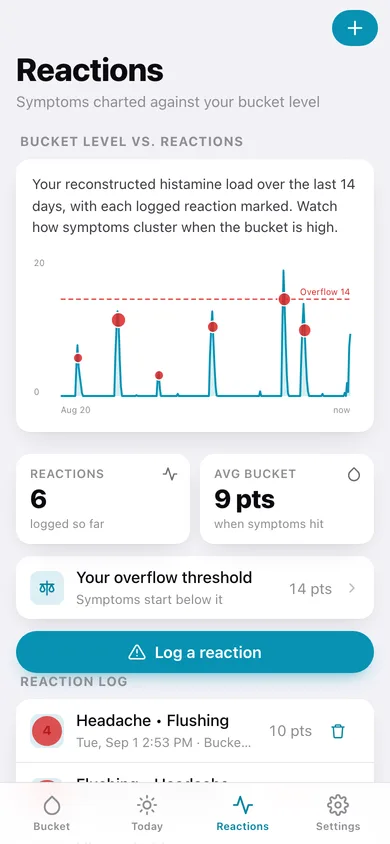
Log flushing, headache, hives, congestion, gut upset or itching with a 1–5 severity, and see each one plotted on the reconstructed 14-day bucket curve with your overflow line.
Personal threshold calibration
The app averages the bucket level at the moment of every reaction you have logged, tells you whether your threshold is set too high or too low, and offers to set it to that number.
Yours, in this browser
No account, no cloud, no analytics on what you eat. Export a JSON backup or a CSV of every logged food any time.
Screens
Every screen, rebuilt for the browser
-
1
The bucket
Status headline, the filling bucket with your points, overflow risk, room left and today's foods.
-
2
Log a food
Search or browse 230 rated foods by category and tap to log now, 2h, 5h or 12h ago.
-
3
Food list
The whole bundled reference, filterable by histamine level, with the points each food adds.
-
4
Today's room
Points of headroom now, a drain projection up to twelve hours out, safe picks and the habits that keep the bucket low.
-
5
Reactions
Your bucket curve for the last 14 days with every logged reaction marked, plus the full reaction log.
-
6
Log a reaction
Tag symptoms, set severity 1–5, say when it started and add a note.
-
7
Threshold
The bucket theory explained, your overflow threshold and drain-rate sliders, and the calibration hint from your own reactions.
-
8
Settings
Bucket settings, record counts, CSV and JSON export, sample data and erase.
Try it with sample data: Loads two weeks of eating: four foods stacking up today, six high-histamine days each followed by a reaction (flushing, hives, gut, headache), and seven quiet low-histamine days in between so the bucket curve shows real contrast. You can start fresh at any time.
Ready? It's free.
No account, no install, no subscription. Everything you do stays in this browser.
Your say
What should Histamine Bucket do? Tell us before we build it.
Tell us what to build next.
Comments need a free Google sign-in, so every one is from a real person.
Sign in with Google to commentNo comments yet — be the first to say what this app should do next.
Questions
Is the web version of Histamine Bucket free?+
Yes. Every screen is free to use: no subscription, no in-app purchases, no account.
Do I need an account?+
No. Open Histamine Bucket and start using it right away. Sign in with Google only if you want to upvote an app, save it to your list, or leave a comment.
Where is my data stored?+
Only in this browser's local storage. Nothing you enter is sent to our servers, so we can't see it, back it up, or restore it. Clearing site data, a private window, or another device starts empty. Export a backup from the in-app menu to keep it.
Is there a Histamine Bucket app for iPhone or Android?+
Not yet. Histamine Bucket is a community proposal: the browser version is complete, and we build the iPhone and Android app once 100 people upvote it. Upvoters get one email when it ships.