
Web app · Lifestyle
Helperpay
The household staff ledger both sides can point at
A profile for each maid, cook, driver or nanny; every salary, advance, bonus and deduction on the record; advances netted off future salary; a tap-to-mark leave calendar; and a yearly summary for bonus season. Free in your browser, no account, nothing uploaded.
Stored in your browser only. Nothing you do in the web version is sent to our servers. Clear your browser data and it's gone — so export a backup from the in-app menu if you want to keep it.
This app is a community proposal.
Try the full browser version now. We build the iPhone and Android app once 100 people upvote it.
We'll email you once, when it ships. Unsubscribe anytime.
In your browser
What you can do in Helperpay on the web
Who is still owed this month
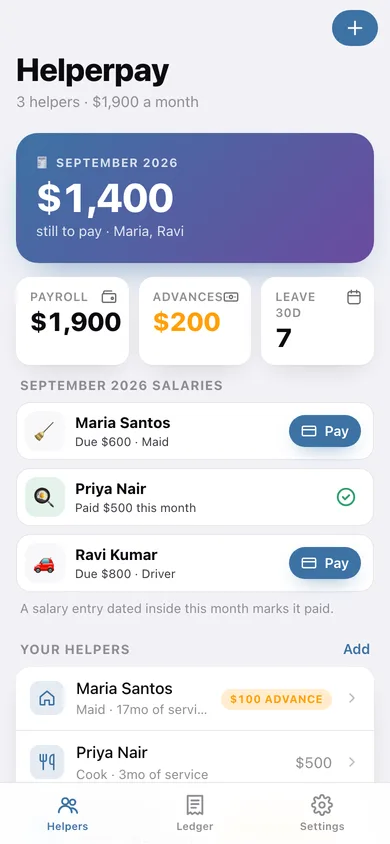
The home screen opens on the one number that matters — what is left to pay this month, and which helper it belongs to, with a Pay button beside each name.
Salary, advance, bonus, deduction
Four entry types with the right maths behind them: an advance is a loan and never counts as pay, a deduction comes off, and every entry carries a date and a note.
Advances that settle themselves
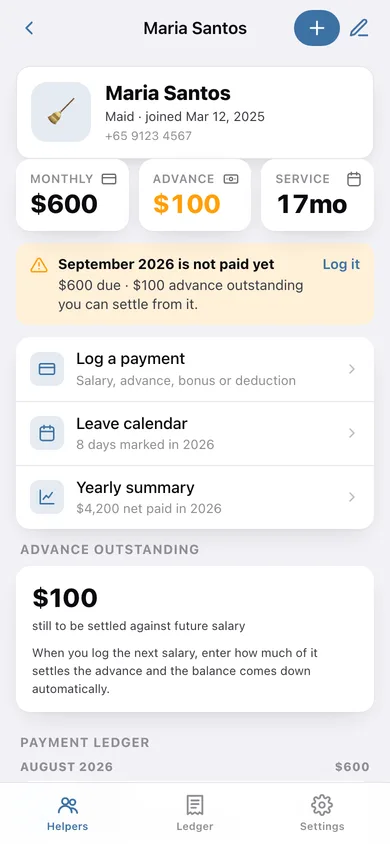
When you log the next salary you say how much of it settles the outstanding advance, and the balance comes down — so nobody argues about what is left.
Leave calendar you tap
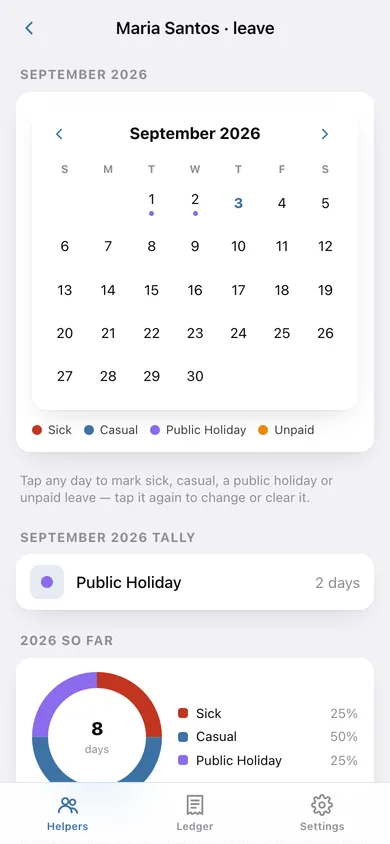
Mark sick, casual, public holiday or unpaid on any day. Monthly and yearly tallies update on their own, and public holidays are counted apart so they never read as absence.
Yearly summary for bonus season
Salary, bonuses, deductions, net paid, advances outstanding, leave taken, a month-by-month chart and a pro-rated thirteenth-month suggestion you can log with one tap.
Your currency, exportable
USD, SGD, HKD, AED, INR, MYR, PHP or GBP; export the ledger and the leave days as CSV, or the whole thing as a JSON backup.
Screens
Every screen, rebuilt for the browser
-
1
Helpers
What is still to pay this month, payroll and advances at a glance, and every helper with their advance balance.
-
2
Helper
Profile, monthly salary, advance due, months of service, this month's status and the payment ledger grouped by month.
-
3
Add or edit a helper
Name, role, monthly salary, join date and a phone note.
-
4
Leave calendar
A month grid you tap to mark sick, casual, public holiday or unpaid leave, with monthly and yearly tallies.
-
5
Yearly summary
Salary, bonus, deductions, net paid, month-by-month chart, leave taken, advance status and the bonus planner.
-
6
Ledger
Every entry across the household by month, with six-month totals and a per-helper breakdown.
-
7
Settings
Currency, salary day, CSV and JSON export, sample data and erase.
Try it with sample data: Loads a three-helper household — Maria the maid on 600 a month with an old medical advance, Ravi the driver with a festival advance and a small deduction, and Priya the cook already paid this month — with six months of ledger entries and twelve marked leave days. You can start fresh at any time.
Ready? It's free.
No account, no install, no subscription. Everything you do stays in this browser.
Your say
What should Helperpay do? Tell us before we build it.
Tell us what to build next.
Comments need a free Google sign-in, so every one is from a real person.
Sign in with Google to commentNo comments yet — be the first to say what this app should do next.
Questions
Is the web version of Helperpay free?+
Yes. Every screen is free to use: no subscription, no in-app purchases, no account.
Do I need an account?+
No. Open Helperpay and start using it right away. Sign in with Google only if you want to upvote an app, save it to your list, or leave a comment.
Where is my data stored?+
Only in this browser's local storage. Nothing you enter is sent to our servers, so we can't see it, back it up, or restore it. Clearing site data, a private window, or another device starts empty. Export a backup from the in-app menu to keep it.
Is there a Helperpay app for iPhone or Android?+
Not yet. Helperpay is a community proposal: the browser version is complete, and we build the iPhone and Android app once 100 people upvote it. Upvoters get one email when it ships.