
Web app · Reference
Hearing Binder
Walk into your benefits fair hearing organized, not overwhelmed
Enter the date on your SNAP, Medicaid or cash-assistance termination notice and this binder computes your appeal window and keep-benefits deadline, letters your exhibits A/B/C, names the rule the agency got wrong, and builds the sheet you read from. Free, no install, nothing uploaded.
Stored in your browser only. Nothing you do in the web version is sent to our servers. Clear your browser data and it's gone — so export a backup from the in-app menu if you want to keep it.
This app is a community proposal.
Try the full browser version now. We build the iPhone and Android app once 100 people upvote it.
We'll email you once, when it ships. Unsubscribe anytime.
In your browser
What you can do in Hearing Binder on the web
Deadlines counted from your notice date
The appeal window (90-day federal default) and the aid-paid-pending window (10 days) are computed the moment you type the date on the notice — with days-left, urgency colour, and adjustable defaults for your state.
Evidence-packet checklist
The five standard steps — request the agency's case file in writing, ask for continued benefits, get a date stamp, log the packet when it lands, gather your own documents — each dated when you tick it, plus any step you add.
Exhibits that letter themselves
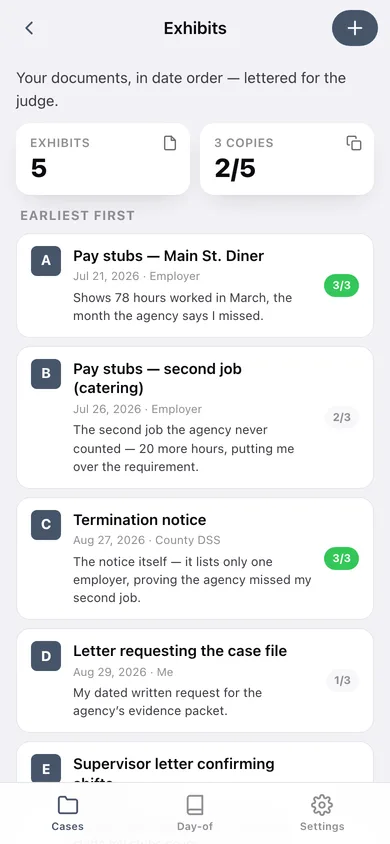
Add a document with its date, source and one-line relevance and it slots into chronological order as Exhibit A, B, C. Delete one and the rest renumber. Each carries the three-copies check: yours, the agency's, the judge's.
"Why they're wrong" worksheet
Pick the denial reason from your notice — work-requirement hours, redetermination paperwork, income calculation, household composition — and read the rule to point to and the proof that rebuts it, then write your one-line argument.
Testimony script + judge-question deck
Five prompted parts from opening to closing ask, and a flip-card deck of the questions a judge is likely to ask, tuned to your denial reason, with your own answers and a rehearsed count.
Day-of running sheet
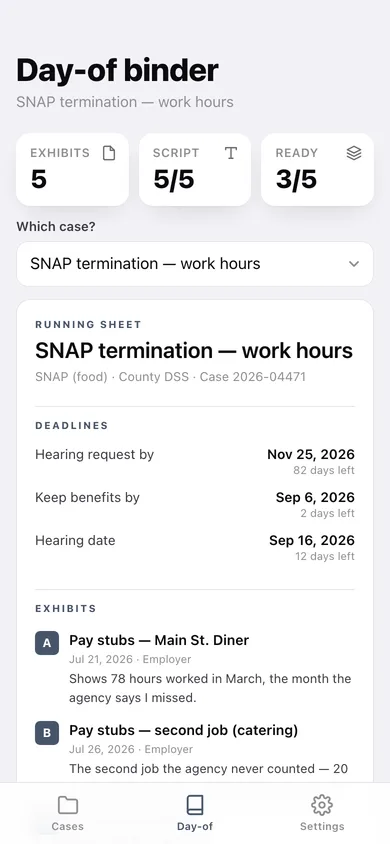
One page pulling deadlines, lettered exhibits, your argument, the script and the questions together — copy it or download it as text to print and carry in.
Screens
Every screen, rebuilt for the browser
-
1
Your hearings
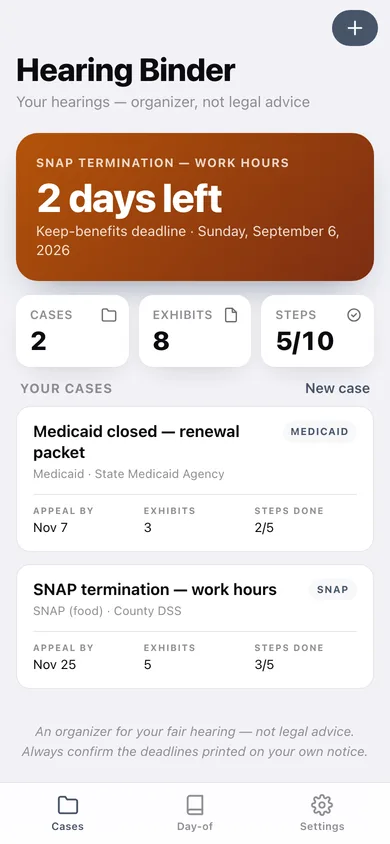
The soonest deadline across every case, then a card per case with appeal date, exhibit count and steps done.
-
2
New case
What was cut off, the program, the notice date, the reason the notice gives, agency and case number.
-
3
Case binder
The spine of one case: readiness stats, the next deadline, and a link into every part of the binder.
-
4
Deadlines
Hearing-request-by, keep-benefits-by and hearing date on a colour-coded ladder counted from your notice.
-
5
Evidence packet
The dated checklist for requesting the agency's case file and logging what arrived.
-
6
Exhibits
Your documents in date order, auto-lettered for the judge, each showing how many of the three copies are ready.
-
7
One exhibit
Exhibit letter, document date, source, why it matters, and the yours/agency/judge copy checklist.
-
8
Why they're wrong
The denial-reason picker with the rule to point to, the proof that rebuts it, and your one-line argument.
-
9
Testimony script
Opening, what happened, the rule they got wrong, my exhibits, closing ask — each with a prompt.
-
10
Rehearsal deck
Flip cards of anticipated judge questions with your answers and a ready count.
-
11
Day-of binder
The one-page running sheet you print and walk in with.
-
12
Settings
Appeal and keep-benefits window defaults, backup export, sample data, erase, and the privacy note.
Try it with sample data: Loads two prepared cases — a SNAP work-requirement termination noticed 8 days ago with five lettered exhibits, a written script and a rehearsed deck, plus a Medicaid renewal-packet closure from 26 days ago — so every screen shows a real binder. You can start fresh at any time.
Ready? It's free.
No account, no install, no subscription. Everything you do stays in this browser.
Your say
What should Hearing Binder do? Tell us before we build it.
Tell us what to build next.
Comments need a free Google sign-in, so every one is from a real person.
Sign in with Google to commentNo comments yet — be the first to say what this app should do next.
Questions
Is the web version of Hearing Binder free?+
Yes. Every screen is free to use: no subscription, no in-app purchases, no account.
Do I need an account?+
No. Open Hearing Binder and start using it right away. Sign in with Google only if you want to upvote an app, save it to your list, or leave a comment.
Where is my data stored?+
Only in this browser's local storage. Nothing you enter is sent to our servers, so we can't see it, back it up, or restore it. Clearing site data, a private window, or another device starts empty. Export a backup from the in-app menu to keep it.
Is there a Hearing Binder app for iPhone or Android?+
Not yet. Hearing Binder is a community proposal: the browser version is complete, and we build the iPhone and Android app once 100 people upvote it. Upvoters get one email when it ships.