
Web app · Productivity
H1B Clock
Every full day you spent outside the U.S. can go back on your H-1B clock — this counts them
Log each trip once and H1B Clock applies the full-24-hour-day convention automatically, keeps a running recaptured-days total, moves your projected max-out date out with every trip, and builds the chronological table your attorney asks for. Free, offline, nothing sent to a server.
Stored in your browser only. Nothing you do in the web version is sent to our servers. Clear your browser data and it's gone — so export a backup from the in-app menu if you want to keep it.
This app is a community proposal.
Try the full browser version now. We build the iPhone and Android app once 100 people upvote it.
We'll email you once, when it ships. Unsubscribe anytime.
In your browser
What you can do in H1B Clock on the web
The max-out clock
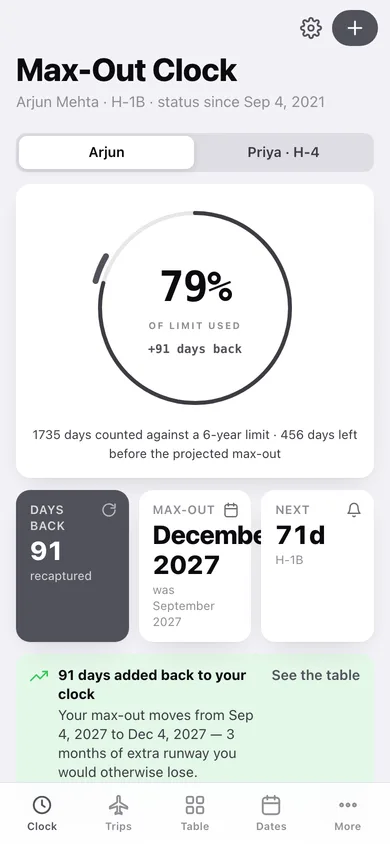
A ring showing how much of your six-year H-1B (or seven-year L-1A, five-year L-1B) limit is used, with the recaptured days drawn as a separate arc past the elapsed mark, plus your base and projected max-out dates side by side.
The counting rule spreadsheets get wrong
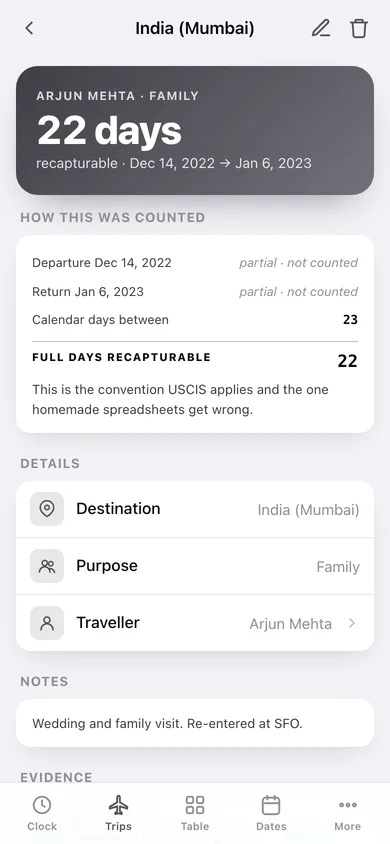
Only complete 24-hour days abroad are recapturable — the day you fly out and the day you land back are partial days in the U.S. and are excluded. Every trip screen shows the arithmetic line by line.
Attorney-format recapture table
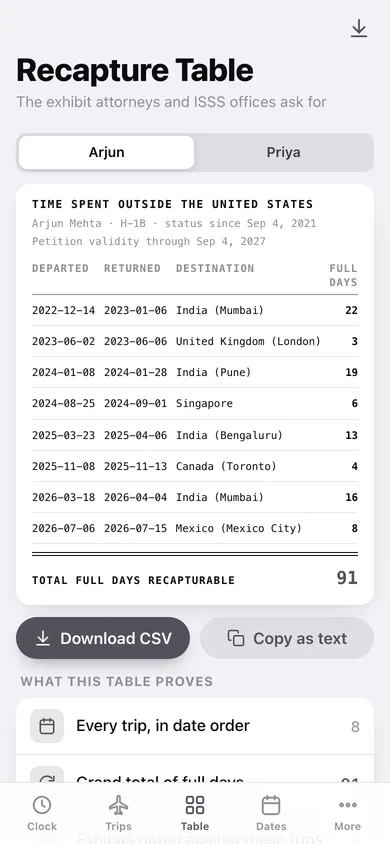
The chronological exhibit — departed, returned, destination, full days, with a double rule above the grand total — downloadable as CSV or copyable as monospaced text you can paste into an email.
Evidence noted per trip
Record which passport stamp, I-94 printout, boarding pass or ticket backs each trip, and whether you actually have it in hand or still need to find it.
Family ledgers
A spouse on H-4 or a child on L-2 gets their own trip ledger, status dates and key dates — dependent statuses correctly follow the principal's clock rather than getting one of their own.
Key dates that move independently
Visa stamp expiry, passport expiry, I-94 end date and petition validity, each with its own lead time, flagged when the window opens.
Screens
Every screen, rebuilt for the browser
-
1
Max-Out Clock
The limit-used ring with the recaptured arc, days recaptured, projected max-out and the next key date.
-
2
Trips
Every trip by year with its full-day badge, totals, and the counting convention spelled out.
-
3
Trip
One trip: the full-day arithmetic line by line, purpose, traveller, notes and the evidence noted against it.
-
4
Log a trip
Destination, departure and return dates with a live full-day count, purpose, traveller and notes.
-
5
Recapture Table
The printed exhibit — chronological trips, per-trip full days and the grand total — with CSV and copy-as-text.
-
6
Key Dates
Visa stamp, passport, I-94 and petition dates per person, flagged when they enter their reminder window.
-
7
Key date
Kind, label, date and how far ahead to flag it.
-
8
People
Everyone on file with their visa type, status start and recaptured-day total.
-
9
Person
One person's clock, statutory limit, projected max-out, trips and key dates.
-
10
Status setup
Name, visa type, status start date, petition end, limit override and notes.
-
11
More
Reminder lead time, CSV export of every trip, backup, sample data, the counting rule and the CBP I-94 link.
Try it with sample data: Loads a five-year H-1B record for a principal and an H-4 spouse: eight trips abroad, three of them travelled together, six evidence notes and four key dates — enough recaptured days to move the max-out date by three months. You can start fresh at any time.
Ready? It's free.
No account, no install, no subscription. Everything you do stays in this browser.
Your say
What should H1B Clock do? Tell us before we build it.
Tell us what to build next.
Comments need a free Google sign-in, so every one is from a real person.
Sign in with Google to commentNo comments yet — be the first to say what this app should do next.
Questions
Is the web version of H1B Clock free?+
Yes. Every screen is free to use: no subscription, no in-app purchases, no account.
Do I need an account?+
No. Open H1B Clock and start using it right away. Sign in with Google only if you want to upvote an app, save it to your list, or leave a comment.
Where is my data stored?+
Only in this browser's local storage. Nothing you enter is sent to our servers, so we can't see it, back it up, or restore it. Clearing site data, a private window, or another device starts empty. Export a backup from the in-app menu to keep it.
Is there a H1B Clock app for iPhone or Android?+
Not yet. H1B Clock is a community proposal: the browser version is complete, and we build the iPhone and Android app once 100 people upvote it. Upvoters get one email when it ships.