
Web app · Health And Fitness
Growthly
Plot your child's checkup numbers on the WHO percentile bands
Log height, weight and head circumference after each well-child visit and watch the curve land on the WHO 3rd–97th percentile bands — for every child, with a milestone timeline alongside. Offline, no account, free.
Stored in your browser only. Nothing you do in the web version is sent to our servers. Clear your browser data and it's gone — so export a backup from the in-app menu if you want to keep it.
This app is a community proposal.
Try the full browser version now. We build the iPhone and Android app once 100 people upvote it.
We'll email you once, when it ships. Unsubscribe anytime.
In your browser
What you can do in Growthly on the web
Real WHO percentile maths
The WHO Child Growth Standards LMS tables for 0–60 months are embedded in the page, so every measurement gets an exact percentile for that child's sex and age in months — computed here, never looked up.
Growth chart with shaded bands
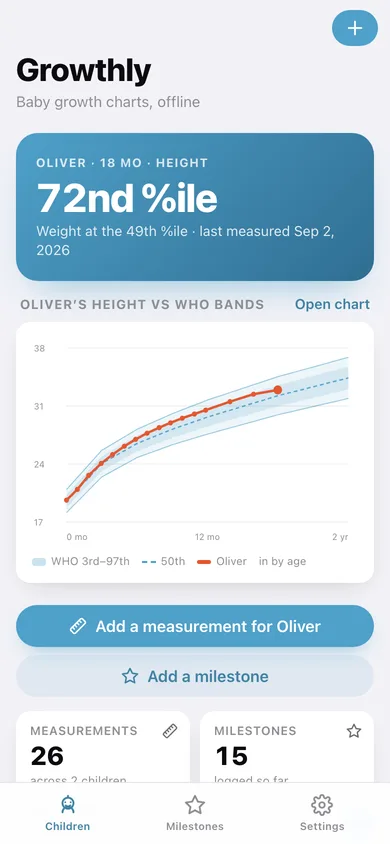
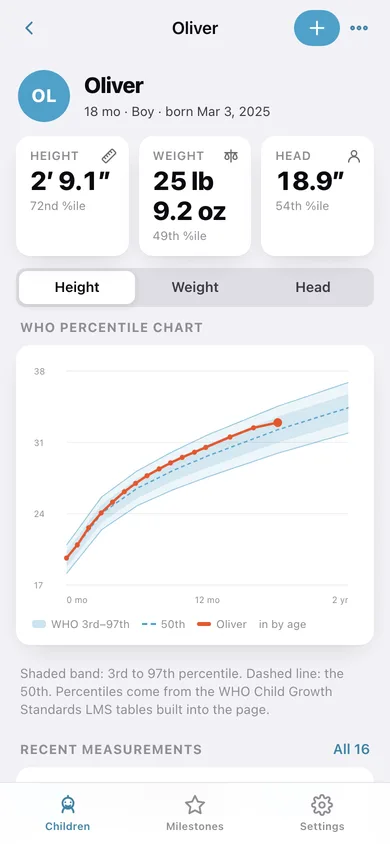
Height, weight or head circumference drawn over the 3rd, 15th, 50th, 85th and 97th percentile curves, with your child's own line and a dot on every visit.
Every child, their own timeline
Add as many children as you like with name, birthdate and biological sex; the home screen shows each one's age and latest percentile at a glance.
Percentile preview as you type
The add-measurement screen shows the child's exact age on that date and the percentile for each number the moment you enter it.
Milestone log
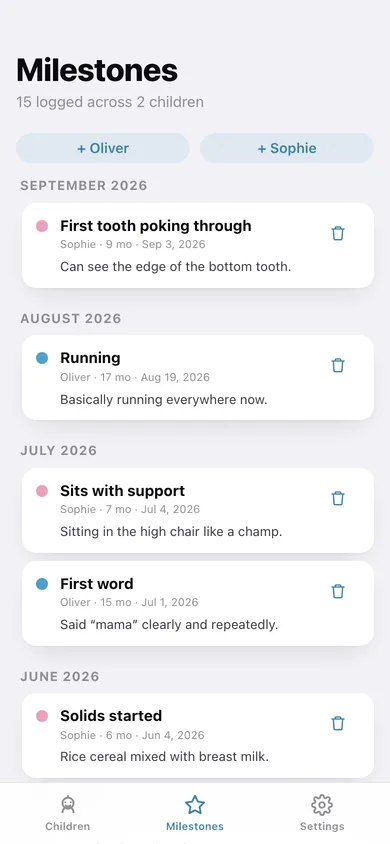
First smile, first tooth, first steps — logged with a date and note, shown with the age they happened at, on a timeline across all your children.
Imperial or metric, and a CSV for the pediatrician
Switch units any time; percentiles always come from the metric tables. Export a CSV of every measurement with ages and percentiles, or a full JSON backup.
Screens
Every screen, rebuilt for the browser
-
1
Children
The focus child's percentile, a live growth chart, and every child with their latest percentile.
-
2
Growth chart
Latest height, weight and head with percentiles, the WHO band chart, recent visits and milestones.
-
3
Add measurement
Date, height, weight and head circumference with a live percentile preview.
-
4
Measurements
Every recorded visit for one child, newest first, each with its age and percentile.
-
5
Add milestone
Name the moment, date it, and pick from ten common milestones.
-
6
Milestones
First words, first steps and first teeth for every child on one month-by-month timeline.
-
7
Add child
Name, birthdate and biological sex — which selects the right WHO reference chart.
-
8
Edit child
Fix a name, birthdate or sex on an existing child.
-
9
Settings
Imperial or metric units, record counts, CSV and JSON export, sample data and erase.
Try it with sample data: Adds Oliver (18 months, 16 visits from birth to today) and Sophie (9 months, 10 visits), with fifteen milestones between them — enough to fill both growth charts and the milestone timeline. You can start fresh at any time.
Ready? It's free.
No account, no install, no subscription. Everything you do stays in this browser.
Your say
What should Growthly do? Tell us before we build it.
Tell us what to build next.
Comments need a free Google sign-in, so every one is from a real person.
Sign in with Google to commentNo comments yet — be the first to say what this app should do next.
Questions
Is the web version of Growthly free?+
Yes. Every screen is free to use: no subscription, no in-app purchases, no account.
Do I need an account?+
No. Open Growthly and start using it right away. Sign in with Google only if you want to upvote an app, save it to your list, or leave a comment.
Where is my data stored?+
Only in this browser's local storage. Nothing you enter is sent to our servers, so we can't see it, back it up, or restore it. Clearing site data, a private window, or another device starts empty. Export a backup from the in-app menu to keep it.
Is there a Growthly app for iPhone or Android?+
Not yet. Growthly is a community proposal: the browser version is complete, and we build the iPhone and Android app once 100 people upvote it. Upvoters get one email when it ships.