
Web app · Lifestyle
Giftwise
Every gift idea, budget and past present — one private page per person
Capture the idea the moment they hint at it, move it idea → bought → given with one tap, keep a budget per occasion, and check what you already gave before you buy. Free in your browser, no account, no shared wishlist.
Stored in your browser only. Nothing you do in the web version is sent to our servers. Clear your browser data and it's gone — so export a backup from the in-app menu if you want to keep it.
This app is a community proposal.
Try the full browser version now. We build the iPhone and Android app once 100 people upvote it.
We'll email you once, when it ships. Unsubscribe anytime.
In your browser
What you can do in Giftwise on the web
A page per person
Emoji, relationship, birthday countdown and the notes you always forget in the shop — sizes, shoe size, allergies, the brands they love.
Ideas that move in one tap
Every gift idea carries a price and a status badge. Tap it and it goes idea → bought → given, so the shopping list and the totals stay honest.
Occasions with a real budget bar
Birthday, Christmas, Anniversary and ten more presets, each with a date, a budget, a running spend and an over-budget warning in red.
Gift history so you never repeat
Log what you actually gave, what it cost and how it landed. Each person's page lists everything they have already unwrapped.
One shopping list across everyone
The Ideas tab totals what is still to buy, what is already committed, and shows a donut of spend per person.
Your currency, your browser
Pick USD, EUR, GBP, CAD, AUD, INR or SGD; export the gift history as CSV or a full JSON backup. Nothing is uploaded anywhere.
Screens
Every screen, rebuilt for the browser
-
1
People
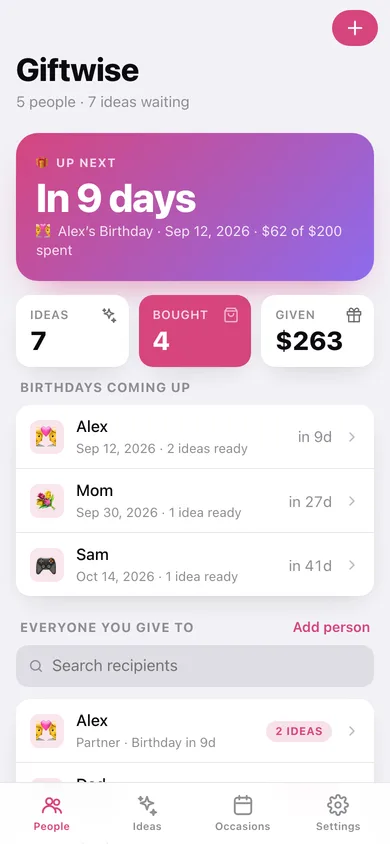
Countdown to the next occasion, open-idea counts, birthdays coming up and everyone you give to.
-
2
Person page
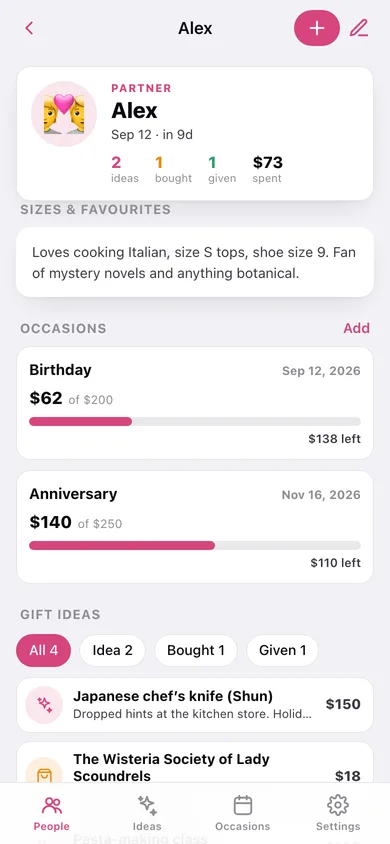
Sizes and favourites, their occasions with budget bars, their gift ideas by status, and everything already given.
-
3
Add or edit a person
Emoji avatar, name, relationship, birthday and the sizes-and-favourites note.
-
4
Ideas
The whole shopping list: still-to-buy total, filters by status and committed spend per person.
-
5
Occasions
Upcoming and past occasions with budget bars, totals and a budget-vs-spend chart.
-
6
Occasion detail
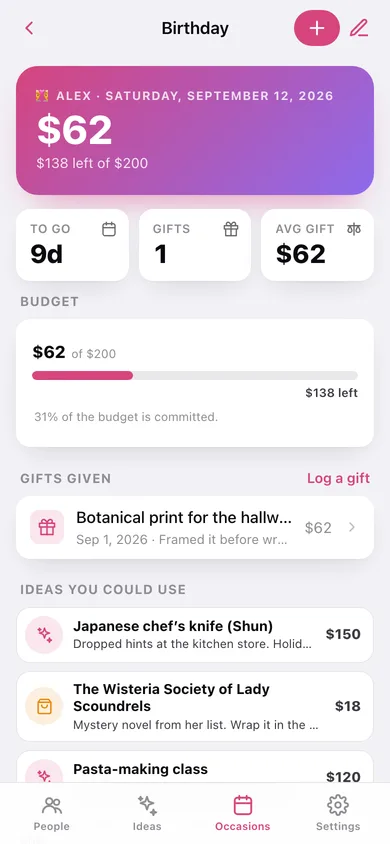
Spend against budget, days to go, every gift given, and the ideas you could still use.
-
7
Settings
Currency, default budget, birthday window, CSV and JSON export, sample data and erase.
Try it with sample data: Loads five recipients — Alex, Mom, Jordan, Dad and 11-year-old Sam — with fourteen gift ideas across idea/bought/given, six occasions with budgets (two birthdays inside a month), and six gifts already given going back a year. You can start fresh at any time.
Ready? It's free.
No account, no install, no subscription. Everything you do stays in this browser.
Your say
What should Giftwise do? Tell us before we build it.
Tell us what to build next.
Comments need a free Google sign-in, so every one is from a real person.
Sign in with Google to commentNo comments yet — be the first to say what this app should do next.
Questions
Is the web version of Giftwise free?+
Yes. Every screen is free to use: no subscription, no in-app purchases, no account.
Do I need an account?+
No. Open Giftwise and start using it right away. Sign in with Google only if you want to upvote an app, save it to your list, or leave a comment.
Where is my data stored?+
Only in this browser's local storage. Nothing you enter is sent to our servers, so we can't see it, back it up, or restore it. Clearing site data, a private window, or another device starts empty. Export a backup from the in-app menu to keep it.
Is there a Giftwise app for iPhone or Android?+
Not yet. Giftwise is a community proposal: the browser version is complete, and we build the iPhone and Android app once 100 people upvote it. Upvoters get one email when it ships.