
Web app · Utilities
GasBook
Know how many days of LPG are left — and the one day you must book the refill
GasBook learns your kitchen's kg-per-day burn rate from your own refill history, counts down the days left in the cylinder on the stove, and works backwards through your dealer's delivery lag and the 25-day booking gap to one clear book-by date. Free, offline, no OTP.
Stored in your browser only. Nothing you do in the web version is sent to our servers. Clear your browser data and it's gone — so export a backup from the in-app menu if you want to keep it.
This app is a community proposal.
Try the full browser version now. We build the iPhone and Android app once 100 people upvote it.
We'll email you once, when it ships. Unsubscribe anytime.
In your browser
What you can do in GasBook on the web
Days-left countdown
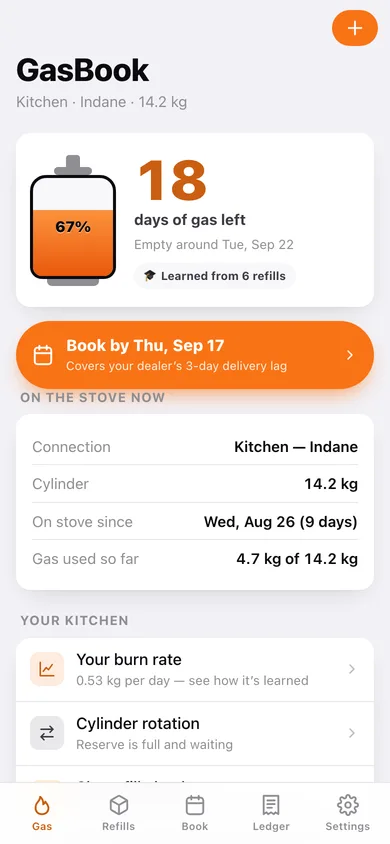
A live cylinder gauge showing days of gas remaining, computed from your learned kg-per-day rate — it starts from a family-size estimate and sharpens with every completed refill.
Refill log that teaches the app
Booked date, delivered date, price paid, subsidy credited and the day the old cylinder ran empty — the single entry that resets the countdown and updates the burn rate.
One clear book-by date
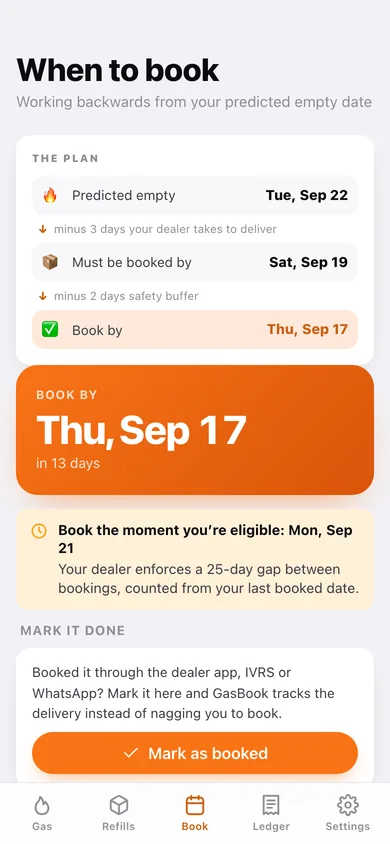
Predicted empty, minus your dealer's learned delivery lag, minus your safety buffer — with the booking-gap eligibility window so you never book a day too early.
Price and subsidy ledger
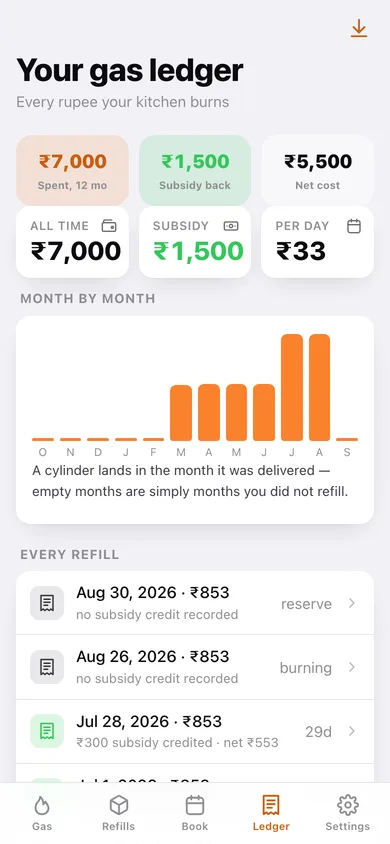
Twelve-month spend, subsidy credited back, net cost, cost per day and a month-by-month chart of what cooking gas costs your family — exportable as CSV.
Double-cylinder rotation
Which cylinder is on the stove, which is in reserve, a one-tap swap that closes the old cycle and starts the new one, and the swap history.
Short-fill check
Every completed cylinder plotted against your normal burn band — anything more than 20% over average is flagged with the dates and numbers to quote to the agency.
Screens
Every screen, rebuilt for the browser
-
1
Gas
The cylinder gauge with days of gas left, the book-by pill, what's on the stove and your learned burn rate.
-
2
Refills
Every cylinder you have taken, with its status, price, subsidy and how many days it lasted.
-
3
Cylinder detail
One cycle end to end: booked, delivered, on-stove, emptied, delivery lag, price, subsidy, net cost and cost per day.
-
4
Log a refill
Delivered and booked dates, price, subsidy, cylinder size, put-on-stove and close-the-previous-cylinder toggles.
-
5
When to book
The step-down plan from predicted empty to book-by, the eligibility window under the gap rule, and Mark as booked.
-
6
Gas ledger
Spent, subsidy back and net cost over twelve months, a month-by-month bar chart and every refill with its net.
-
7
Burn rate
Your kg-per-day figure, how many days each cylinder lasted, the household-size fallback and how the prediction works.
-
8
Cylinder rotation
The stove cylinder and the reserve side by side, a one-tap swap and the swap history.
-
9
Short-fill check
Burn rate per cylinder against your normal band, with the flagged cylinders and what to tell the agency.
-
10
Your connection
Name, gas company, cylinder size, household size, double-cylinder, dealer, booking-gap rule and delivery-lag override.
-
11
Settings
Safety buffer, nudge window, connection shortcuts, backup export, sample data and erase.
Try it with sample data: Loads a four-person Indane kitchen on 14.2 kg cylinders with eight refills over the last six months — one on the stove, one in reserve, three logged swaps, and a cylinder that emptied fast enough to trip the short-fill flag. You can start fresh at any time.
Ready? It's free.
No account, no install, no subscription. Everything you do stays in this browser.
Your say
What should GasBook do? Tell us before we build it.
Tell us what to build next.
Comments need a free Google sign-in, so every one is from a real person.
Sign in with Google to commentNo comments yet — be the first to say what this app should do next.
Questions
Is the web version of GasBook free?+
Yes. Every screen is free to use: no subscription, no in-app purchases, no account.
Do I need an account?+
No. Open GasBook and start using it right away. Sign in with Google only if you want to upvote an app, save it to your list, or leave a comment.
Where is my data stored?+
Only in this browser's local storage. Nothing you enter is sent to our servers, so we can't see it, back it up, or restore it. Clearing site data, a private window, or another device starts empty. Export a backup from the in-app menu to keep it.
Is there a GasBook app for iPhone or Android?+
Not yet. GasBook is a community proposal: the browser version is complete, and we build the iPhone and Android app once 100 people upvote it. Upvoters get one email when it ships.