
Web app · Utilities
Fuelbook
What your bike, scooter or car really costs per kilometre
Log odometer, litres and amount paid and Fuelbook works out km/l and cost per km for every vehicle you own, charts the efficiency trend and monthly running cost, and reminds you about oil changes by date or by distance. Free, metric, no account.
Stored in your browser only. Nothing you do in the web version is sent to our servers. Clear your browser data and it's gone — so export a backup from the in-app menu if you want to keep it.
This app is a community proposal.
Try the full browser version now. We build the iPhone and Android app once 100 people upvote it.
We'll email you once, when it ships. Unsubscribe anytime.
In your browser
What you can do in Fuelbook on the web
km/l and cost/km, worked out for you
Every fill-up is measured against the one before it: distance since, litres in, mileage and cost per kilometre — the same maths as the iPhone app, with a live preview while you type.
Metric and two-wheeler first
Litres, kilometres, km/l and cost/km throughout, with bikes, scooters, cars and trucks/SUVs and a currency symbol you choose — no gallons, no mpg.
Every vehicle in its own logbook
Each bike, scooter or car keeps its own fill-ups, services, average km/l, cost per km, total distance, litres fuelled and money spent.
Efficiency trend and monthly spend
Insights charts km/l per fill-up against your best and worst, cost per km over time, and eight months of fuel spend so a vehicle that starts drinking more is obvious.
Service log with date or distance reminders
All eight service types — oil change, tyre pressure, tyres, chain, brakes, air filter, spark plug, general — with the usual interval one tap away, and due-soon at 30 days or 500 km.
Yours, offline, exportable
Everything stays in this browser; export the whole logbook as JSON or your fill-ups with km/l and cost/km as a CSV.
Screens
Every screen, rebuilt for the browser
-
1
Vehicles
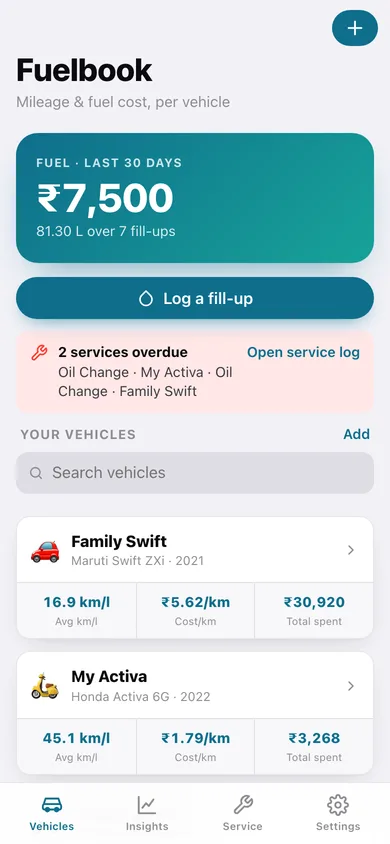
Fuel spent in the last 30 days, service alerts, and a card per vehicle showing average km/l, cost per km and total spent.
-
2
Vehicle
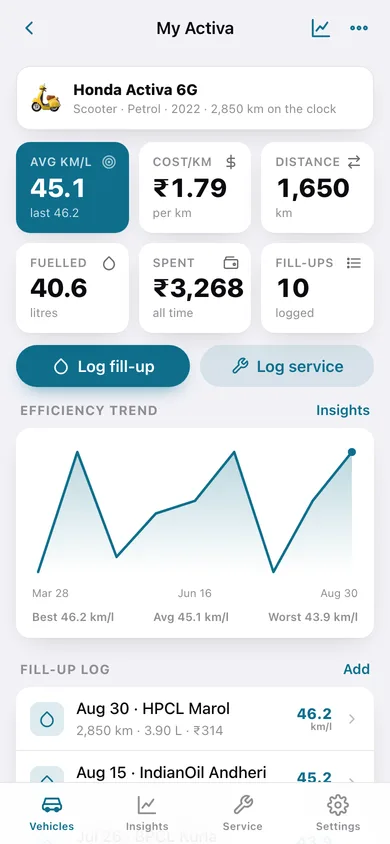
One vehicle's six headline numbers, its efficiency trend line, the recent fill-up log and its service log.
-
3
Insights
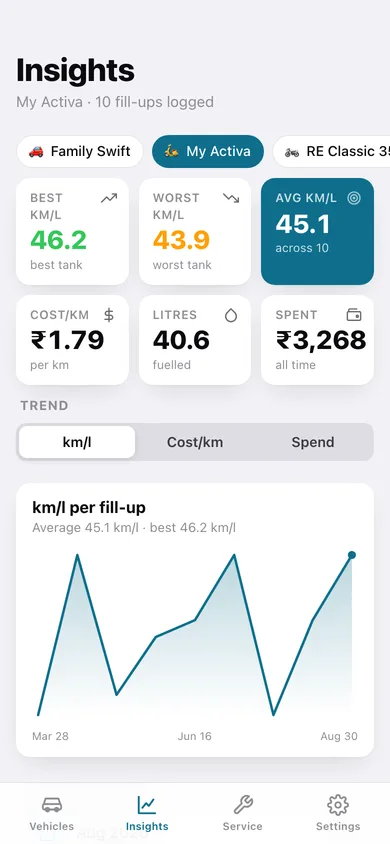
Best, worst and average km/l with switchable charts for mileage, cost per km and monthly fuel spend.
-
4
Fill-up log
Every fill-up for one vehicle grouped by month with that month's spend, each row showing odometer, litres, amount and km/l.
-
5
Service log
Overdue and due-soon services across all your vehicles, then the full history per vehicle.
-
6
Log a fill-up
Odometer, litres, amount paid, date, station note and fuel type, with the km/l and cost per km previewed live before you save.
-
7
Log a service
Service type, date, odometer, cost and notes, plus reminders by date, by odometer, or prefilled from the usual interval.
-
8
Add or edit a vehicle
Name, vehicle type, fuel type, make, model and year.
-
9
Settings
Currency symbol, the due-soon thresholds, CSV and JSON export, sample data and erase.
Try it with sample data: Loads three vehicles — a Honda Activa scooter, a Maruti Swift and a Royal Enfield Classic 350 — with 29 fill-ups going back a year and 15 services, some already overdue. You can start fresh at any time.
Ready? It's free.
No account, no install, no subscription. Everything you do stays in this browser.
Your say
What should Fuelbook do? Tell us before we build it.
Tell us what to build next.
Comments need a free Google sign-in, so every one is from a real person.
Sign in with Google to commentNo comments yet — be the first to say what this app should do next.
Questions
Is the web version of Fuelbook free?+
Yes. Every screen is free to use: no subscription, no in-app purchases, no account.
Do I need an account?+
No. Open Fuelbook and start using it right away. Sign in with Google only if you want to upvote an app, save it to your list, or leave a comment.
Where is my data stored?+
Only in this browser's local storage. Nothing you enter is sent to our servers, so we can't see it, back it up, or restore it. Clearing site data, a private window, or another device starts empty. Export a backup from the in-app menu to keep it.
Is there a Fuelbook app for iPhone or Android?+
Not yet. Fuelbook is a community proposal: the browser version is complete, and we build the iPhone and Android app once 100 people upvote it. Upvoters get one email when it ships.