
Web app · Lifestyle
Frond
Your plant shelf, and the one list that says who needs water today
Add each houseplant with its room, light level and watering interval, then let Frond keep the schedule: a one-tap water list, fertilise and repot reminders, a growth curve and a full care log. Free, no install, nothing leaves your browser.
Stored in your browser only. Nothing you do in the web version is sent to our servers. Clear your browser data and it's gone — so export a backup from the in-app menu if you want to keep it.
This app is a community proposal.
Try the full browser version now. We build the iPhone and Android app once 100 people upvote it.
We'll email you once, when it ships. Unsubscribe anytime.
In your browser
What you can do in Frond on the web
A shelf you can read at a glance
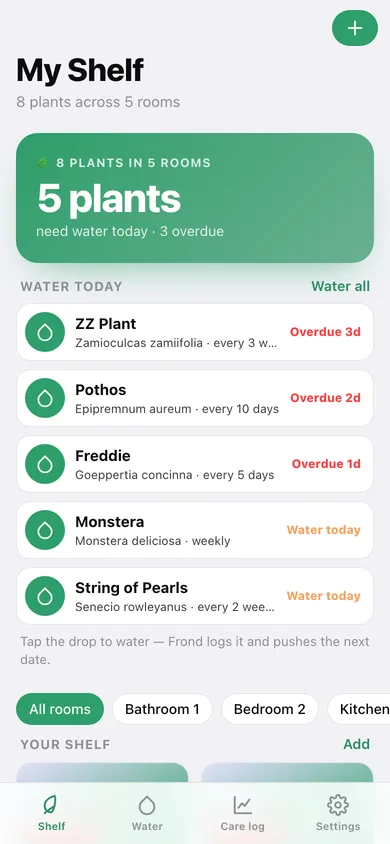
Every plant is a card with its emoji, species, light level and a colour-coded badge — green when it is fine, amber when it is due today, red when it is overdue. Filter by room with one tap.
One-tap watering that resets the clock
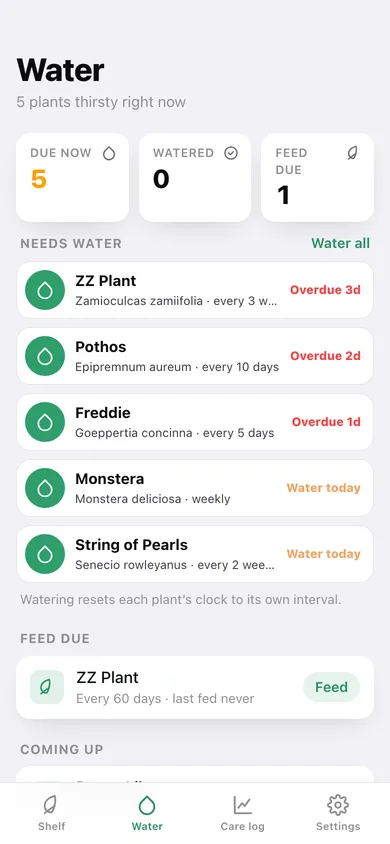
The Water list sorts your thirstiest plants first. Tap the drop and Frond writes a Watered event and pushes the next date out by that plant's own interval — 5 days for a Calathea, 21 for a ZZ.
Fertilise and repot on their own intervals
Set a feed interval (30 days by default) and a repot interval, and Frond surfaces 'Feed due' and 'Repot due' lists alongside watering, each with a one-tap log button.
Growth timeline without a camera
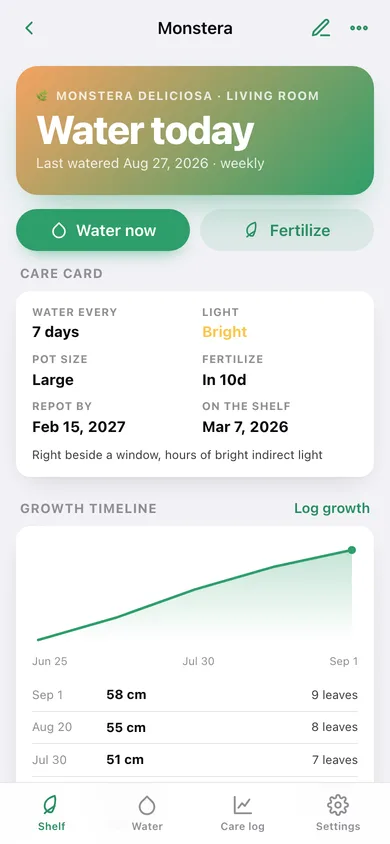
Log height in cm and leaf count whenever a leaf unfurls. Frond draws the height curve, a leaf-count bar chart and a 'grown +13 cm, +3 leaves' summary for each plant.
18 houseplants pre-filled
Pick Monstera, Pothos, Fiddle Leaf Fig, Snake Plant, Calathea, Alocasia and a dozen more and the species, emoji, light level and watering interval fill themselves in.
A care log you can export
Twelve weeks of care days as a heatmap, events per week, what you do most, and a CSV of every watering, feed, repot and note.
Screens
Every screen, rebuilt for the browser
-
1
My Shelf
How many plants need water today, the tap-to-water list, room filters and the whole shelf as cards.
-
2
Water
Today's round: thirsty plants first, then feed due, repot due, and everything coming up.
-
3
Plant care card
Watering status, light, pot size, next feed and repot dates, growth timeline, care history and notes.
-
4
Growth log
Height curve, leaf-count chart and the form for logging a new measurement.
-
5
Add or edit a plant
Name, species shortcuts, room, light level, pot size, watering interval, fertilise and repot reminders, notes.
-
6
Care log
Care-day heatmap, events per week, the mix of watering vs feeding, and every logged event by day.
-
7
Settings
Shelf sorting, new-plant defaults, rooms, CSV and JSON export, sample data and erase.
Try it with sample data: Loads eight houseplants across five rooms — Monstera, Pothos, Fiddle Leaf Fig, Snake Plant, String of Pearls, Peace Lily, ZZ Plant and a Calathea called Freddie — with six weeks of watering history, feeds, notes and growth measurements, so five of them are already thirsty. You can start fresh at any time.
Ready? It's free.
No account, no install, no subscription. Everything you do stays in this browser.
Your say
What should Frond do? Tell us before we build it.
Tell us what to build next.
Comments need a free Google sign-in, so every one is from a real person.
Sign in with Google to commentNo comments yet — be the first to say what this app should do next.
Questions
Is the web version of Frond free?+
Yes. Every screen is free to use: no subscription, no in-app purchases, no account.
Do I need an account?+
No. Open Frond and start using it right away. Sign in with Google only if you want to upvote an app, save it to your list, or leave a comment.
Where is my data stored?+
Only in this browser's local storage. Nothing you enter is sent to our servers, so we can't see it, back it up, or restore it. Clearing site data, a private window, or another device starts empty. Export a backup from the in-app menu to keep it.
Is there a Frond app for iPhone or Android?+
Not yet. Frond is a community proposal: the browser version is complete, and we build the iPhone and Android app once 100 people upvote it. Upvoters get one email when it ships.