
Web app · Medical
Foundling
The rare-disease binder: symptoms, diagnoses, drugs, doctors and one timeline
Log severity 1–10 with the body systems it hit, register diagnoses from a bundled 82-condition ICD-10 library, track medications and specialists, prep every visit, work through trial criteria, and export one chronological medical timeline. Free, stays in your browser.
Stored in your browser only. Nothing you do in the web version is sent to our servers. Clear your browser data and it's gone — so export a backup from the in-app menu if you want to keep it.
This app is a community proposal.
Try the full browser version now. We build the iPhone and Android app once 100 people upvote it.
We'll email you once, when it ships. Unsubscribe anytime.
In your browser
What you can do in Foundling on the web
Symptom journal with real trends
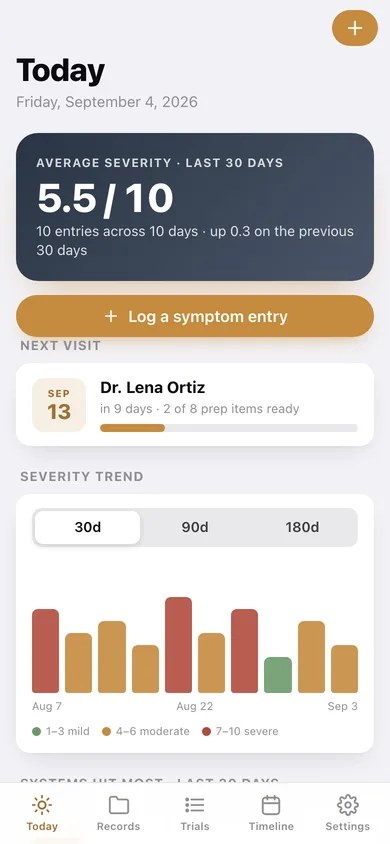
Severity 0–10, the affected body systems from the same twelve-system list, and a private note — charted over 30, 90 or 180 days with an average that compares against the window before.
82 rare diseases, ICD-10 indexed
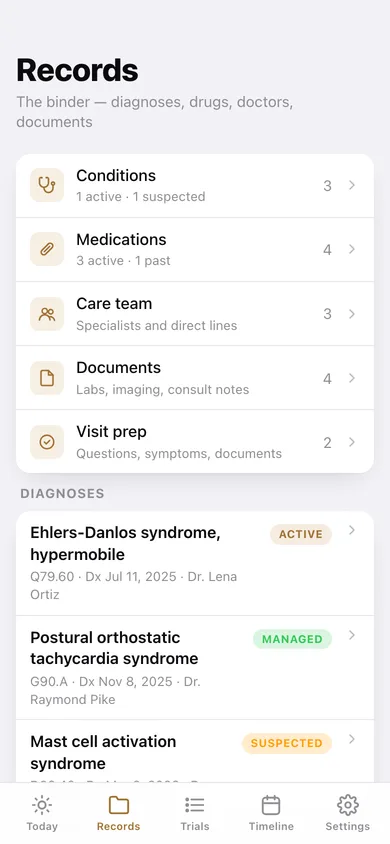
The bundled library the iPhone app ships — Ehlers-Danlos, POTS, MCAS, Fabry, Pompe, Wilson’s and 76 more — searchable by name, ICD-10 code, disease group or abbreviation, with Suspected / Active / Managed / Resolved status.
Medications and care team
Drug, dose, route, schedule, who prescribed it, start and stop dates, side-effect notes — plus every specialist with their practice and a tap-to-dial direct line.
A searchable document vault
Add a lab panel, imaging report or consult note with its text (typed, pasted or imported from a .txt file) and search every word of every report at once.
Visit prep you tick off in the room
Three questions to ask, three symptoms to mention, three documents to bring — with a progress bar on the home screen counting down to the appointment.
Trial criteria worksheet
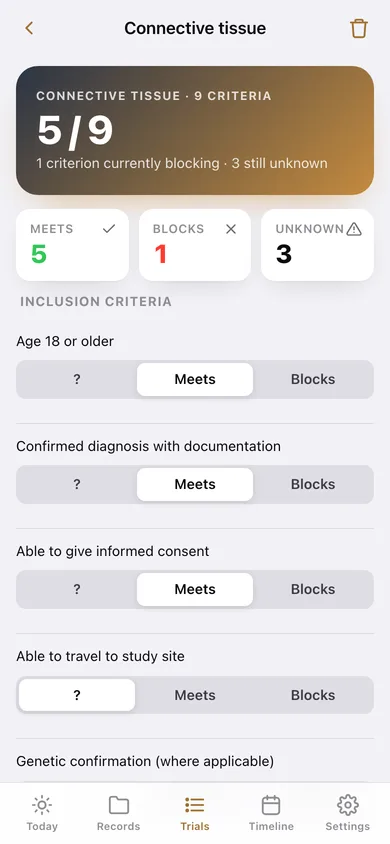
Six disease classes, nine inclusion and exclusion criteria each, marked Meets / Blocks / unknown, with a running count of what is blocking enrollment.
One timeline, exportable
Diagnoses, medication starts and stops, severe symptom days, documents and visits merged into one chronological page you can download and hand to a new specialist on visit one.
Screens
Every screen, rebuilt for the browser
-
1
Today
Average severity for the window, the next visit with its prep progress, the severity trend, the systems hit most, and recent entries.
-
2
Symptom entry
One logged entry — severity, systems, note — with edit and delete.
-
3
Records
The binder hub: conditions, medications, care team, documents and visit prep with live counts.
-
4
Conditions
Every diagnosis with its ICD-10 code, diagnosing physician and status.
-
5
Condition
Edit one diagnosis — name, ICD-10, group, status, diagnosis date, physician and notes.
-
6
Rare-disease library
Search 82 bundled rare diseases by name, ICD-10, group or abbreviation and add one in a tap.
-
7
Medications
Active and past drugs with dose, route, schedule and prescriber.
-
8
Care team
Specialists, practices, direct lines to dial, and your notes on each.
-
9
Documents
The vault — search across the full text of every report, filtered by kind.
-
10
Document
One report with its text on file, copy and download.
-
11
Visit prep
Upcoming and past appointments with how much of each checklist is ready.
-
12
Visit
The checklist for one appointment — questions, symptoms and documents, ticked off as you go.
-
13
Trials
Every trial-criteria worksheet with how many criteria you meet and what is blocking.
-
14
Trial worksheet
Inclusion and exclusion criteria for one disease class, marked Meets / Blocks / unknown.
-
15
Timeline
Diagnoses, drugs, severe days, documents and visits in one chronological rail, filterable and exportable.
-
16
Settings
Default trend range, binder counts, backup, sample data and erase.
Try it with sample data: Loads a worked binder: hEDS, POTS and suspected MCAS with ICD-10 codes and diagnosis dates, four medications (one stopped), three specialists with direct lines, sixteen symptom entries across seven weeks, four documents with their report text, two visit-prep checklists and a connective-tissue trial worksheet. You can start fresh at any time.
Ready? It's free.
No account, no install, no subscription. Everything you do stays in this browser.
Your say
What should Foundling do? Tell us before we build it.
Tell us what to build next.
Comments need a free Google sign-in, so every one is from a real person.
Sign in with Google to commentNo comments yet — be the first to say what this app should do next.
Questions
Is the web version of Foundling free?+
Yes. Every screen is free to use: no subscription, no in-app purchases, no account.
Do I need an account?+
No. Open Foundling and start using it right away. Sign in with Google only if you want to upvote an app, save it to your list, or leave a comment.
Where is my data stored?+
Only in this browser's local storage. Nothing you enter is sent to our servers, so we can't see it, back it up, or restore it. Clearing site data, a private window, or another device starts empty. Export a backup from the in-app menu to keep it.
Is there a Foundling app for iPhone or Android?+
Not yet. Foundling is a community proposal: the browser version is complete, and we build the iPhone and Android app once 100 people upvote it. Upvoters get one email when it ships.