
Web app · Productivity
Forecastly
Write down what you think will happen, then find out how often you're actually right
A private calibration journal: pose a prediction with a probability and a date, resolve it when the date arrives, and watch your Brier score, your calibration curve and your per-category accuracy. No money, no leaderboard, no account — free in any browser.
Stored in your browser only. Nothing you do in the web version is sent to our servers. Clear your browser data and it's gone — so export a backup from the in-app menu if you want to keep it.
This app is a community proposal.
Try the full browser version now. We build the iPhone and Android app once 100 people upvote it.
We'll email you once, when it ships. Unsubscribe anytime.
In your browser
What you can do in Forecastly on the web
Pose a prediction in ten categories
Politics, weather, sports, work, household, markets, science, culture, personal and other — one sentence, a probability slider from 0 to 100 in 5-point steps, a resolution date and optional reasoning you can read back later.
Resolve, don't forget
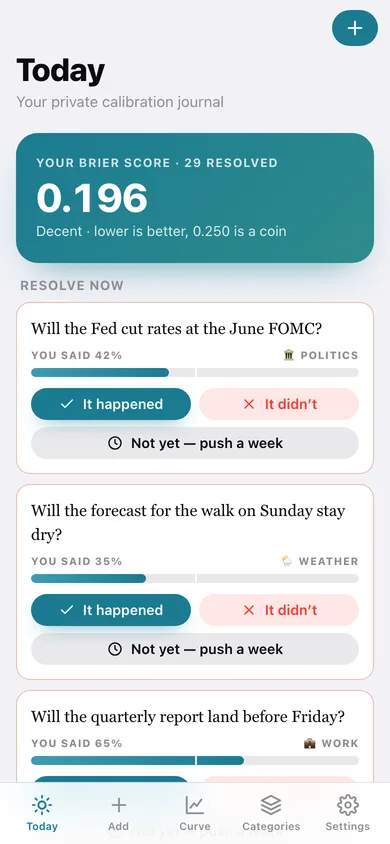
Today puts every prediction whose date has passed in front of you with It happened / It didn't / Not yet, and tells you the Brier contribution the moment you answer.
The calibration curve
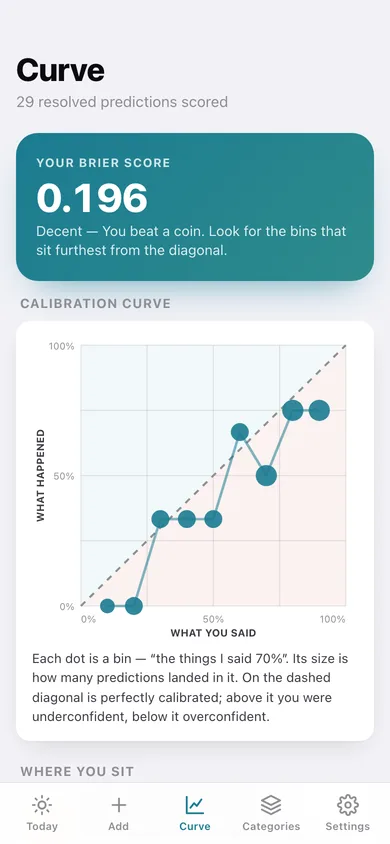
Every 10-point bin plotted against how often those things actually happened, with the perfect-calibration diagonal, over- and under-confident regions shaded, and dot size showing how many predictions landed in each bin.
Brier score, the Tetlock way
(p − outcome)² averaged across everything you have resolved, with the 0.250 coin-flip benchmark, a plain-English verdict, and your running score plotted as each prediction resolved.
Per-category accuracy
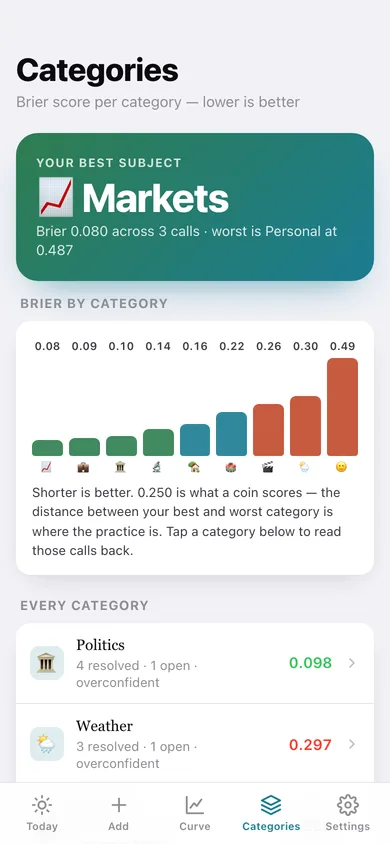
A Brier score for each of the ten categories, ranked best to worst, so you can see whether you really are better at sports than at politics (most people are).
Your journal, exportable
Search and filter every prediction by open / resolved / hit / miss and category, export the lot as CSV, or copy a plain-text scorecard.
Screens
Every screen, rebuilt for the browser
-
1
Today
Your Brier score, everything waiting to be resolved, and your open predictions.
-
2
Add a prediction
The question, category, probability slider with a plain-English confidence word, and the resolution date.
-
3
Prediction
One call: your probability on the scale, the outcome, its Brier contribution, and how often you have been right at that confidence.
-
4
Calibration curve
The classic confidence-versus-outcome plot with the diagonal, bin-by-bin gaps and your Brier score over time.
-
5
Categories
Brier score per category, ranked, with a chart and whether you run over- or under-confident in each.
-
6
The journal
Every prediction, filterable by open, resolved, hits, misses and category, searchable by text.
-
7
Settings
Default resolution window, confidence wording, CSV export, scorecard, backup, sample data and erase.
Try it with sample data: Loads six weeks of a slightly overconfident forecaster: 29 resolved predictions spread across every probability band and all ten categories, plus eight still open — two of them due to resolve today. You can start fresh at any time.
Ready? It's free.
No account, no install, no subscription. Everything you do stays in this browser.
Your say
What should Forecastly do? Tell us before we build it.
Tell us what to build next.
Comments need a free Google sign-in, so every one is from a real person.
Sign in with Google to commentNo comments yet — be the first to say what this app should do next.
Questions
Is the web version of Forecastly free?+
Yes. Every screen is free to use: no subscription, no in-app purchases, no account.
Do I need an account?+
No. Open Forecastly and start using it right away. Sign in with Google only if you want to upvote an app, save it to your list, or leave a comment.
Where is my data stored?+
Only in this browser's local storage. Nothing you enter is sent to our servers, so we can't see it, back it up, or restore it. Clearing site data, a private window, or another device starts empty. Export a backup from the in-app menu to keep it.
Is there a Forecastly app for iPhone or Android?+
Not yet. Forecastly is a community proposal: the browser version is complete, and we build the iPhone and Android app once 100 people upvote it. Upvoters get one email when it ships.