
Web app · Health And Fitness
Footfall
A step counter with nothing in the way — goal ring, trends, milestones, free
Close the goal ring, see your steps hour by hour and week by week, scrub 7/30/90-day and 1-year trends against your goal line, find your weekday pattern, and walk your way to 1 million lifetime steps. No ads, no subscription, no account, nothing to buy.
Stored in your browser only. Nothing you do in the web version is sent to our servers. Clear your browser data and it's gone — so export a backup from the in-app menu if you want to keep it.
In App Review — coming to the App Store
Footfall is with Apple now. You can use the full browser version today, and we'll email you the day the app is live.
0 waiting for launch
We'll email you once, when it ships. Unsubscribe anytime.
In your browser
What you can do in Footfall on the web
The goal ring
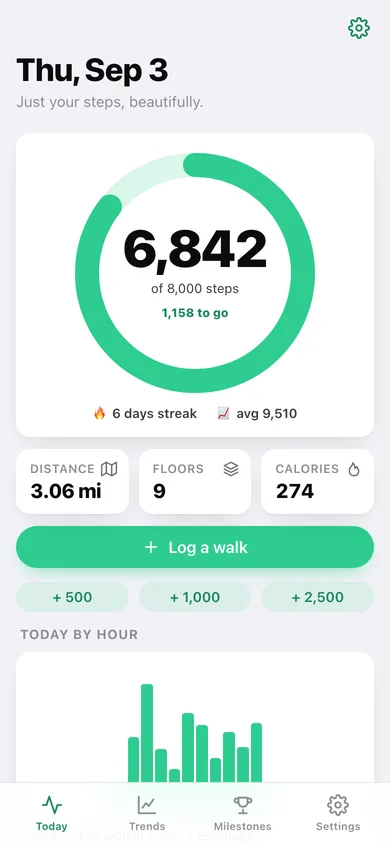
Today's steps against your goal with steps-to-go, distance from your height, floors climbed and calories from your weight — plus your streak and week average.
Hour by hour
Every walk you log lands in an hour bucket, so the Today chart tells you exactly when you move and names your most active hour.
Trends with a goal line
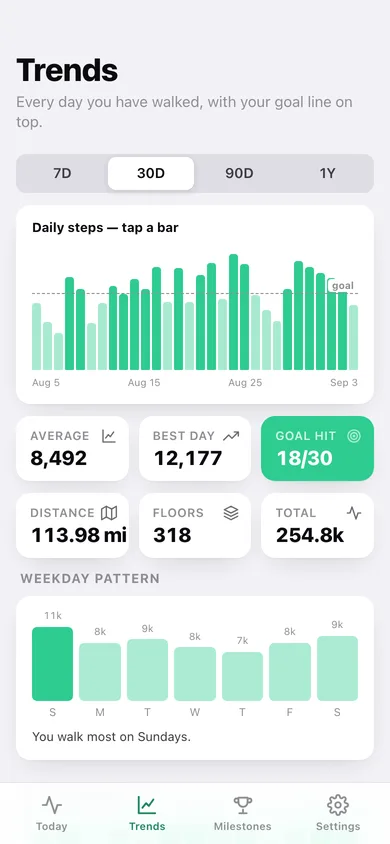
7-day, 30-day, 90-day and 1-year views. Bars that hit your goal fill in solid, the dashed goal line sits on top, and tapping any bar reads out that day.
Weekday pattern and 13-week heat map
Average steps for every day of the week — "you walk most on Saturdays" — and a quarter of walking as one block of squares.
Milestones and lifetime landmarks
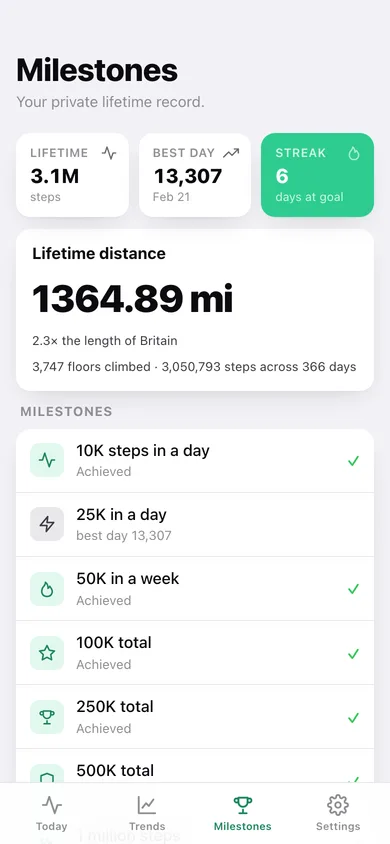
10K day, 25K day, 50K week and 100K through 1 million lifetime steps, with your total distance translated into marathons, the Camino de Santiago, or lengths of Britain.
Goal, units and body settings
Set the daily goal in 500-step steps, switch metric or imperial, and set height and weight so distance and calories use the same maths as the iPhone app.
Screens
Every screen, rebuilt for the browser
-
1
Today
The goal ring with steps-to-go, distance/floors/calories, the hourly chart and this week's rings.
-
2
Log a walk
Add steps, minutes, floors and the hour to any day — the browser stand-in for the iPhone's motion coprocessor.
-
3
Day detail
One day's totals, its hour-by-hour breakdown and a form to correct the exact numbers.
-
4
Trends
7D/30D/90D/1Y bars with the goal line and tap-to-scrub, averages and goal days, the weekday pattern and the 13-week heat map.
-
5
Milestones
Lifetime steps, best day, streak, lifetime distance with a landmark, the seven milestones and your biggest days.
-
6
Settings
Daily goal, metric or imperial, height and weight, CSV and JSON export, sample data and erase.
Try it with sample data: Loads a full year of walking — 366 days with weekend peaks, hour-by-hour detail for the last fortnight and a five-day goal streak running into today. You can start fresh at any time.
Ready? It's free.
No account, no install, no subscription. Everything you do stays in this browser.
Your say
What should Footfall do? Tell us before we build it.
Tell us what to build next.
Comments need a free Google sign-in, so every one is from a real person.
Sign in with Google to commentNo comments yet — be the first to say what this app should do next.
Questions
Is the web version of Footfall free?+
Yes. Every screen is free to use: no subscription, no in-app purchases, no account.
Do I need an account?+
No. Open Footfall and start using it right away. Sign in with Google only if you want to upvote an app, save it to your list, or leave a comment.
Where is my data stored?+
Only in this browser's local storage. Nothing you enter is sent to our servers, so we can't see it, back it up, or restore it. Clearing site data, a private window, or another device starts empty. Export a backup from the in-app menu to keep it.
When is the Footfall iPhone app out?+
Footfall is in App Review with Apple now. Tap “Notify me at launch” and we'll email you once, the day it's live.