
Web app · Sports
Flybox
Know what's already in the box — and what you're short before you sit at the vise
Build a visual inventory of every fly box with per-compartment pattern counts, write a recipe card for each fly listing hook, bead, thread, dubbing and hackle, and Flybox joins the two into a living materials shelf with low-stock flags and a restock list. Free, offline, no account.
Stored in your browser only. Nothing you do in the web version is sent to our servers. Clear your browser data and it's gone — so export a backup from the in-app menu if you want to keep it.
This app is a community proposal.
Try the full browser version now. We build the iPhone and Android app once 100 people upvote it.
We'll email you once, when it ships. Unsubscribe anytime.
In your browser
What you can do in Flybox on the web
Visual fly-box inventory
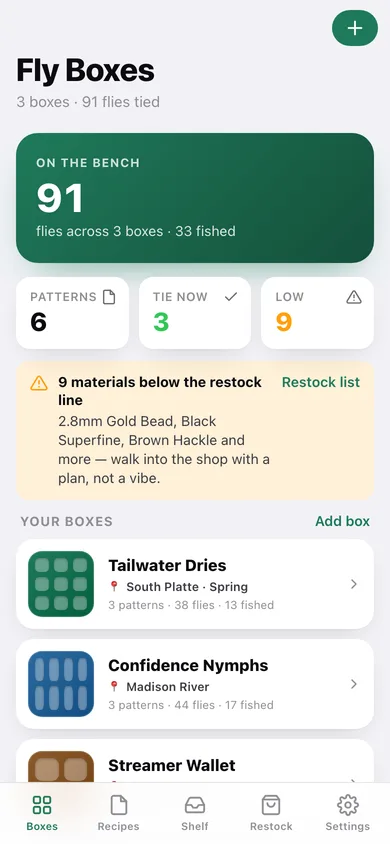
A coloured compartment tile per box, tagged to a river or season, holding the patterns you have tied with a count for tied and a count for fished.
Recipe cards with every material
Hook, bead, thread, dubbing, hackle, wing, tail, rib, body and wire — each line joined to a real item on your shelf, with a per-fly quantity.
The derived materials shelf
Recipes joined against on-hand stock: every material shows how many recipes call for it and whether it is under your restock line.
Tie-now or short a material
Each pattern says whether every material it needs is on the shelf, or names exactly what you are missing — before you sit down, not after.
Restock list you can take to the shop
Low materials grouped by category with tick-off checkboxes, per-material thresholds you can tune inline, and a CSV export.
Stays on your device
Boxes, recipes and shelf live in this browser only — no account, no cloud, nothing synced.
Screens
Every screen, rebuilt for the browser
-
1
Fly Boxes
Flies tied across every box, tie-ready patterns, low-stock count and each box as a compartment tile.
-
2
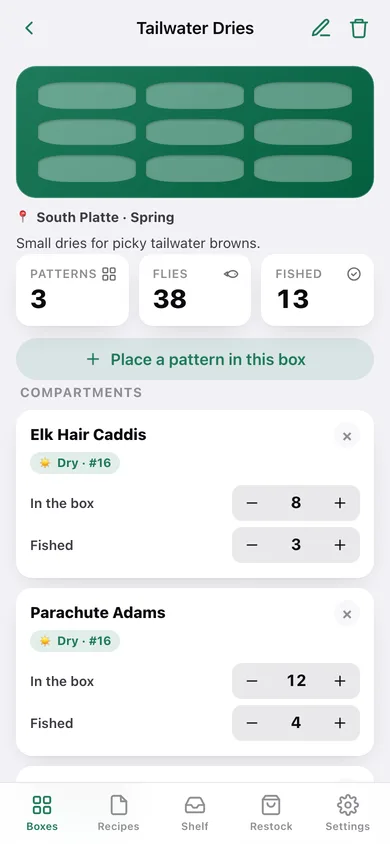
Fly box
The box tile, its river tag and note, pattern and fly counts, and a stepper per compartment.
-
3
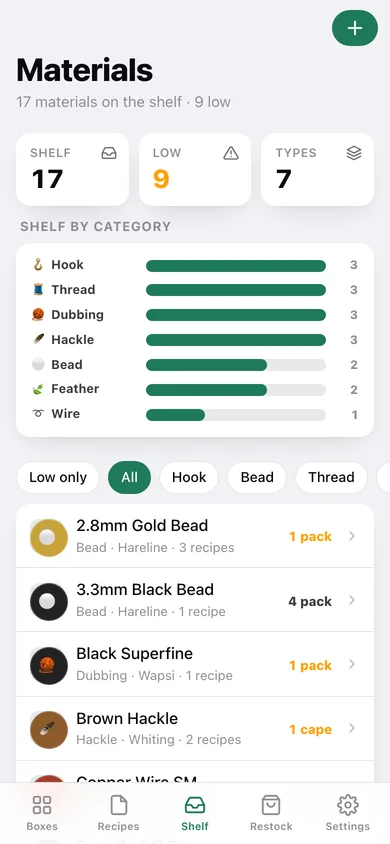
Materials
The shelf with a by-category breakdown, low-only and category filters, and stock per material.
-
4
Edit box
Name, river or season tag, note, compartment layout and colour, with a live preview.
-
5
Place a pattern
Put a pattern into a box from a recipe or by name, with tied and fished counts.
-
6
Recipes
Every pattern card, searchable by pattern or material and filterable by fly type, flagged tie-now or short.
-
7
Recipe
The full material list by role with live shelf stock, tying notes and which boxes carry it.
-
8
Edit recipe
Pattern name, fly type, hook size, tying notes and one line per material with quantity.
-
9
Material
On-hand stepper, restock-line gauge and every recipe that calls for it.
-
10
Edit material
Name, category, brand, unit, on-hand amount, restock line and shelf colour.
-
11
Restock
Everything below its line, grouped by category, tick-off ready, with thresholds and CSV export.
-
12
Settings
Bench defaults, shelf and box CSV export, backup, sample data and erase.
Try it with sample data: Loads three boxes tagged to real rivers — Tailwater Dries, Confidence Nymphs and a Streamer Wallet — six classic recipe cards from the Parachute Adams to the Woolly Bugger, and a seventeen-item shelf where the grizzly cape, olive dubbing and #12 nymph hooks have all run out. You can start fresh at any time.
Ready? It's free.
No account, no install, no subscription. Everything you do stays in this browser.
Your say
What should Flybox do? Tell us before we build it.
Tell us what to build next.
Comments need a free Google sign-in, so every one is from a real person.
Sign in with Google to commentNo comments yet — be the first to say what this app should do next.
Questions
Is the web version of Flybox free?+
Yes. Every screen is free to use: no subscription, no in-app purchases, no account.
Do I need an account?+
No. Open Flybox and start using it right away. Sign in with Google only if you want to upvote an app, save it to your list, or leave a comment.
Where is my data stored?+
Only in this browser's local storage. Nothing you enter is sent to our servers, so we can't see it, back it up, or restore it. Clearing site data, a private window, or another device starts empty. Export a backup from the in-app menu to keep it.
Is there a Flybox app for iPhone or Android?+
Not yet. Flybox is a community proposal: the browser version is complete, and we build the iPhone and Android app once 100 people upvote it. Upvoters get one email when it ships.