
Web app · Medical
Firstyear
The CDC milestone checklist and WHO growth curves, kept where you can keep them
Mark all 108 “Learn the Signs. Act Early.” milestones by age window, plot weight, length and head circumference against bundled WHO percentile curves, see gentle act-early prompts, and print a first-year keepsake. Free, no account, no install.
Stored in your browser only. Nothing you do in the web version is sent to our servers. Clear your browser data and it's gone — so export a backup from the in-app menu if you want to keep it.
This app is a community proposal.
Try the full browser version now. We build the iPhone and Android app once 100 people upvote it.
We'll email you once, when it ships. Unsubscribe anytime.
In your browser
What you can do in Firstyear on the web
All 108 CDC milestones, by window
The full “Learn the Signs. Act Early.” checklist across nine age windows — 2, 4, 6, 9, 12, 15, 18, 24 and 30 months — in the CDC’s own plain-language wording, grouped by social, language, cognitive and movement.
Mark it the day you see it
Tap a milestone, flip “Saw this happen,” pick the date and write a line about the moment. The date and note follow it into the keepsake.
Growth against the real WHO curves
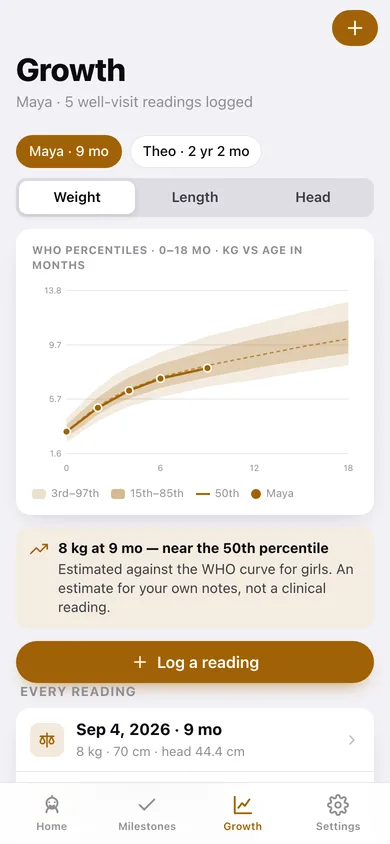
The bundled WHO 3rd/15th/50th/85th/97th percentile tables for weight, length and head circumference, 0–36 months, drawn as shaded bands with your child’s readings on top and a “near the 50th” estimate.
Gentle act-early prompts
The CDC’s published “when to act early” signs surface only for windows your child has passed with nothing marked — informational, never diagnostic, with the pediatrician link.
A printable first-year keepsake
One tap builds a formatted book — every marked milestone with its date and note, grouped by window, plus a growth table — downloaded straight to your computer to print or save as PDF.
More than one child, all offline
Each child gets their own stamped checklist, their own curves and their own windows. Everything stays in this browser; export a JSON backup any time.
Screens
Every screen, rebuilt for the browser
-
1
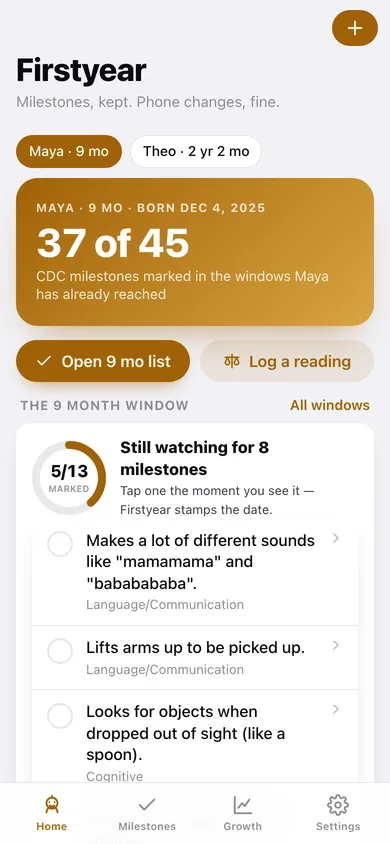
Home
The active child’s age, milestones marked in the windows they have reached, what the current window is still watching for, and the last well-visit numbers.
-
2
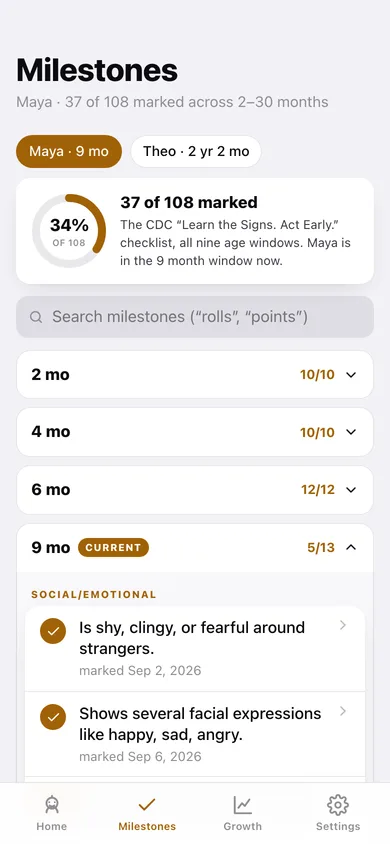
Milestones
The whole CDC checklist as collapsible age windows with a search box and a progress ring.
-
3
Milestone
One milestone: mark it, date it, write the note, and see the rest of that window.
-
4
Growth
Weight, length or head circumference plotted on the WHO percentile bands, with every logged reading underneath.
-
5
Log a reading
Add or edit a well-visit reading — any combination of weight, length and head circumference.
-
6
When to act early
CDC act-early signs for the windows already passed with nothing marked, plus what to ask a pediatrician.
-
7
Keepsake
Preview and download the printable first-year book of milestones, dates, notes and growth.
-
8
Child
One child’s profile — name, date of birth, WHO curve, totals, and delete.
-
9
Add child
Add a child and stamp the full 108-item CDC checklist onto them.
-
10
Settings
Metric or US units, hide future windows, local data counts, backup, sample data and erase.
Try it with sample data: Loads Maya (9 months) with every 2/4/6-month milestone marked, five well-visit readings and two notes, plus Theo (2 years) with six windows complete and eight readings from birth to his two-year check-up. You can start fresh at any time.
Ready? It's free.
No account, no install, no subscription. Everything you do stays in this browser.
Your say
What should Firstyear do? Tell us before we build it.
Tell us what to build next.
Comments need a free Google sign-in, so every one is from a real person.
Sign in with Google to commentNo comments yet — be the first to say what this app should do next.
Questions
Is the web version of Firstyear free?+
Yes. Every screen is free to use: no subscription, no in-app purchases, no account.
Do I need an account?+
No. Open Firstyear and start using it right away. Sign in with Google only if you want to upvote an app, save it to your list, or leave a comment.
Where is my data stored?+
Only in this browser's local storage. Nothing you enter is sent to our servers, so we can't see it, back it up, or restore it. Clearing site data, a private window, or another device starts empty. Export a backup from the in-app menu to keep it.
Is there a Firstyear app for iPhone or Android?+
Not yet. Firstyear is a community proposal: the browser version is complete, and we build the iPhone and Android app once 100 people upvote it. Upvoters get one email when it ships.