
Web app · Productivity
First Step
Name the task you can't start — get one physical first move and 90 seconds to make it
The offline ADHD task-initiation app in your browser: a curated on-device library of 34 physical-first-action primitives, a 90-second start timer, a win log, and stuck-pattern surfacing. No AI, no account, nothing sent to a server — it still works with the wifi off.
Stored in your browser only. Nothing you do in the web version is sent to our servers. Clear your browser data and it's gone — so export a backup from the in-app menu if you want to keep it.
This app is a community proposal.
Try the full browser version now. We build the iPhone and Android app once 100 people upvote it.
We'll email you once, when it ships. Unsubscribe anytime.
In your browser
What you can do in First Step on the web
On-device decomposer, no AI
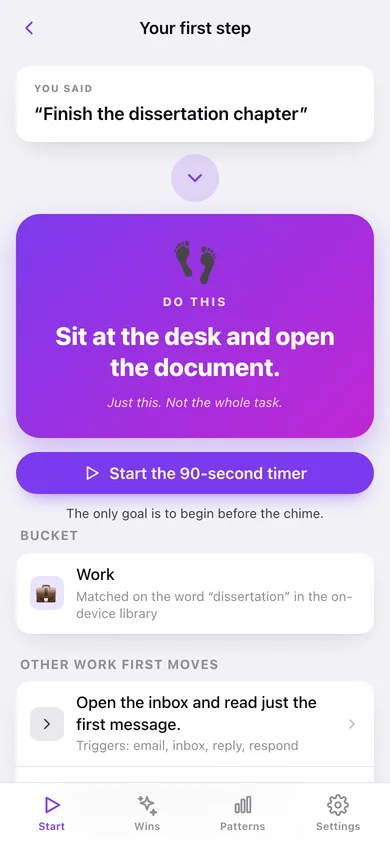
Type 'finish the dissertation chapter' and it answers 'Sit at the desk and open the document.' — matched against a curated keyword library that ships inside the page, so there is no model, no server call and nothing to hallucinate.
The full 34-action library
Every primitive across work, home, health, social and catch-alls, searchable by action or trigger word, each showing exactly which words fire it — pick one directly and go.
90-second start timer
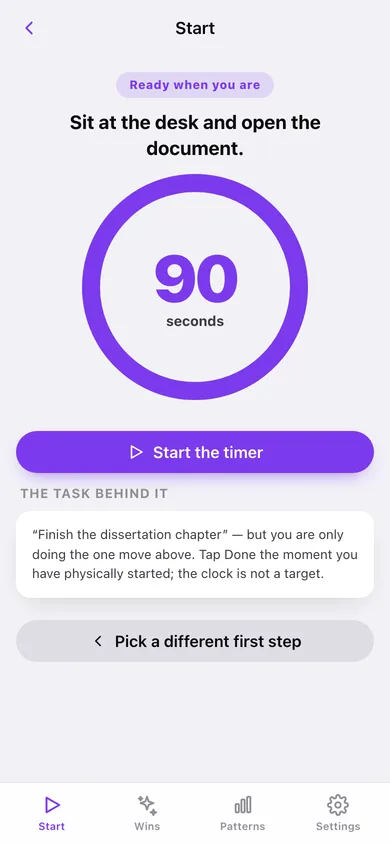
A big draining ring with the one move written above it, a chime when time is up, and a Done button the moment you have physically started. 60 / 90 / 120 seconds is a setting.
Win log
Every Done tap is recorded with the task, the first action that worked and how long it took — grouped by day, with a 12-week heatmap and a day streak. Evidence the brain takes seriously.
Stuck patterns after 10 wins
Which categories trap you, which physical first actions most often ended in a Done tap, the words that keep showing up in your task text, and your median time to first move.
Everything stays here
Wins live in this browser only; export the log as CSV or a full JSON backup whenever you want.
Screens
Every screen, rebuilt for the browser
-
1
Start
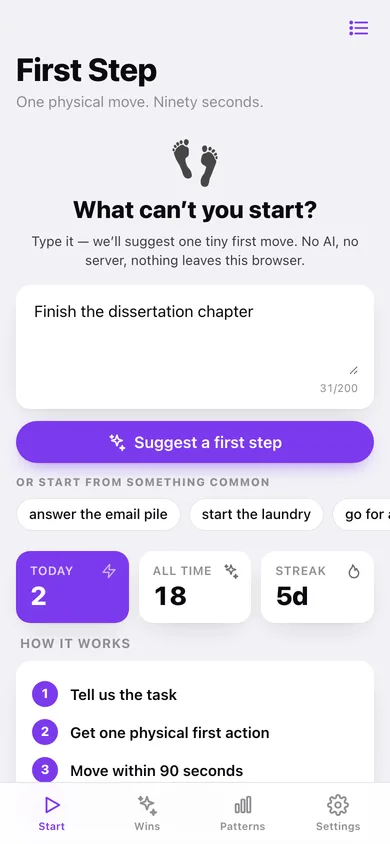
What can't you start? — the task box, common stuck tasks, today's wins and the streak.
-
2
Your first step
What you said, then the one physical move in big type, with other moves in the same bucket.
-
3
90-second timer
The draining ring with the move above it, chime at zero, and Done the moment you have started.
-
4
Win logged
The move that broke the freeze, how long it took, and how often that action has worked.
-
5
Win log
Today's ring, total wins, a 12-week heatmap and every win grouped by day.
-
6
Patterns
Where you get stuck, what worked, the words that show up and your median time to move.
-
7
Action library
All 34 physical-first-action primitives with their trigger words, searchable and filterable.
-
8
Settings
Timer length, chime, CSV export, backup, sample data and erase.
Try it with sample data: Loads eighteen logged wins spread over the last four weeks across work, home, health and social tasks — enough to unlock Patterns and fill the heatmap. You can start fresh at any time.
Ready? It's free.
No account, no install, no subscription. Everything you do stays in this browser.
Your say
What should First Step do? Tell us before we build it.
Tell us what to build next.
Comments need a free Google sign-in, so every one is from a real person.
Sign in with Google to commentNo comments yet — be the first to say what this app should do next.
Questions
Is the web version of First Step free?+
Yes. Every screen is free to use: no subscription, no in-app purchases, no account.
Do I need an account?+
No. Open First Step and start using it right away. Sign in with Google only if you want to upvote an app, save it to your list, or leave a comment.
Where is my data stored?+
Only in this browser's local storage. Nothing you enter is sent to our servers, so we can't see it, back it up, or restore it. Clearing site data, a private window, or another device starts empty. Export a backup from the in-app menu to keep it.
Is there a First Step app for iPhone or Android?+
Not yet. First Step is a community proposal: the browser version is complete, and we build the iPhone and Android app once 100 people upvote it. Upvoters get one email when it ships.